
A broker-side protective stop combined with an automated daily P&L lockout enforced at the execution layer is the only reliable way to keep mirrored Tradovate accounts solvent under real-world futures market stress. For traders running multiple accounts, the recommended control stack includes:
- Broker-side native protective stops on every replicated position, active at the execution layer regardless of client connectivity
- Automated hard daily P&L lockouts configured at the broker or FCM level, not just within the trading platform
- Per-account exposure caps with proportional sizing relative to each subaccount's equity
- Secure OAuth integrations with audit logs, kill-switches, and automated order cancels on disconnect
The immediate steps: set a hard daily loss lockout before placing a single live trade, enable broker-side stops on every Tradovate subaccount, and run a full dry run in simulation mode. SafeFly is the recommended enforcement layer for Tradovate multi-account mirroring, automating all four controls in a single subscription.
Key Takeaways
Broker-side protective stops combined with automated hard daily P&L lockouts enforced at the execution layer are the minimum viable control stack for any serious Tradovate multi-account replication setup.
| Point | Details |
|---|---|
| Broker-side stops are mandatory | Native or broker-server stops must survive client disconnects; client-only stops are a single point of failure. |
| Daily lockout sizing | Set hard daily limits at 2% of account equity; per-trade risk must not exceed half that amount. |
| Staged testing before live capital | Run sandbox dry runs, small live shadowing, and a full failover drill before deploying full scale. |
| Audit logs enable recovery | Timestamped order logs for every event allow accurate reconstruction of position mismatches. |
| SafeFly automates the control stack | SafeFly enforces broker-side stops, P&L lockouts, OAuth integration, and analytics for Tradovate multi-account traders. |
Table of Contents
- What does a copy-trading risk-management system actually enforce?
- How do broker-side protective stops work, and what do exchange rules change?
- How should daily P&L lockouts be designed and enforced?
- How do you size positions when scaling a lead account to multiple Tradovate subaccounts?
- What are the common failure modes in trade replication, and how do you guard against them?
- How do you test and monitor a multi-account copy setup before trusting live capital?
- Step-by-step implementation checklist for Tradovate multi-account copy trading
- What is the recommended minimum configuration for serious multi-account traders?
- What live replication actually teaches you about risk controls
- SafeFly enforces these controls for Tradovate multi-account traders
- Primary sources and further reading
- Sources
What does a copy-trading risk-management system actually enforce?
A safe multi-account copy setup requires controls at multiple layers. No single mechanism is sufficient.
- Broker-side native stops execute at the broker or exchange level, surviving client disconnects. Synthetic stops that run only on a local client are a single point of failure.
- Automated daily P&L lockouts must operate at the execution layer. Broker-side account controls are stronger than platform-only limits because they survive local crashes and apply consistently across all subaccounts.
- Per-account risk caps define the maximum drawdown and per-trade R for each subaccount independently, preventing a single account's breach from cascading.
- Secure OAuth connections with defined scopes, revoke/refresh behavior, and audit logs provide the authentication and accountability layer.
- Operational controls include simulation testing before live deployment, post-trade reconciliation, and real-time monitoring dashboards.
A multi-layer posture combining a platform kill switch, a broker-side hard lock, and third-party monitoring is the most resilient configuration for mirrored multi-account futures trading.
Pro Tip: Never rely on a single enforcement layer. If the platform disconnects, only broker-side controls remain active. Configure both.
How do broker-side protective stops work, and what do exchange rules change?
Broker-side stops fall into two categories. Native exchange-supported stops are stored and triggered at the exchange itself, offering the strongest execution guarantee. Simulated stops are held on the broker's server and submitted as market or limit orders when the trigger price is reached. A third category, client-side stops, runs only on the local application and fails entirely on disconnect.
Interactive Brokers documents that many U.S. futures stop orders are simulated at the broker level and may only trigger during regular trading hours unless specifically configured otherwise. This distinction matters for multi-account replication: a stop that only triggers during RTH leaves positions unprotected during overnight sessions.
U.S. exchange constraints that directly affect stop behavior:
- GLOBEX stop-limit behavior: stop-limit orders may not execute if the market gaps through the limit price, leaving the position open.
- Price banding and Velocity Logic: CME Group exchange protections can park or reject orders and convert market or stop orders into protected limits during fast markets, reducing exit reliability.
- RTH and time-in-force restrictions: CBOT, ICE, and NYMEX each impose TIF windows that affect when stops are active and how long they remain working.
Stop-market orders convert to market orders on trigger and generally provide more reliable execution than stop-limit orders. OCO and bracket logic is typically synthetic and requires server-side handling to avoid single-point failures.
Verification checklist for each Tradovate account:
- Confirm whether stops are accepted outside RTH for each instrument traded
- Verify the stop trigger reference (last price, bid/ask, or mark)
- Confirm whether the stop is stored at the exchange or broker server
- Test stop behavior at simulated disconnect before going live
- Document failover behavior when native stops are unavailable
Pro Tip: When native stops are unavailable for a given instrument or session, require broker-server synthetic stops with documented failover. Never accept client-only stop logic in a multi-account replication setup.
How should daily P&L lockouts be designed and enforced?
A daily P&L lockout operates on two thresholds. A hard lockout cancels all working orders, flattens open positions, and blocks new order submission for the remainder of the session.
A practical daily loss-limit framework starts at approximately 2% of account equity. The hard limit must be at least twice the largest single-trade risk to prevent a single loss from triggering the lockout prematurely.
Example calculation for a $50,000 subaccount:
- Hard daily limit: 2% of $50,000 = $1,000
- Maximum per-trade risk: $500 (half the daily limit)
- Soft alert threshold: $600 (60% of $1,000)
- Prop-firm buffer: if the firm's hard limit is $1,000, set the personal limit at $800 to preserve a buffer against simultaneous losses across accounts
Policy rules after a hard lockout is triggered:
- Mandatory cooldown period before any review of re-entry
- Required journaling of the session's trades and the conditions that led to the breach
- Restricted re-entry: no new positions until the next session at minimum
- Weekly and monthly caps reviewed and adjusted based on trailing drawdown
Pro Tip: Configure the hard lockout at the broker or FCM level, not only within the trading platform. A platform-level limit that does not survive a client disconnect provides no protection when it is needed most.
How do you size positions when scaling a lead account to multiple Tradovate subaccounts?
Three scaling models apply to multi-account replication. Proportional equity scaling adjusts contract quantity based on each subaccount's equity relative to the lead account. Fixed-contract allocation assigns a set number of contracts per subaccount regardless of equity, appropriate when accounts are near-identical in size. Volatility-adjusted sizing scales contracts based on the instrument's current ATR or margin requirement, keeping per-account dollar risk consistent across instruments.
Computing per-account max drawdown and per-trade R:
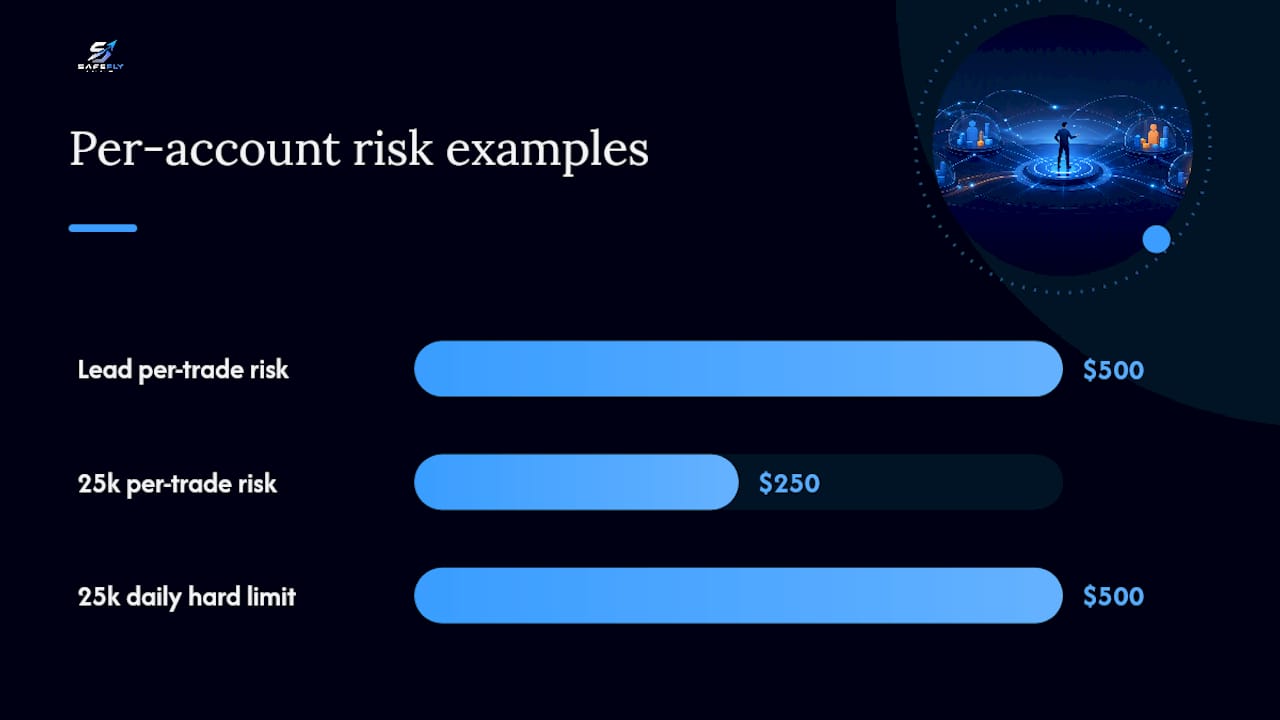
- Define the lead account's per-trade risk in dollars (e.g., $500 on a $50,000 account = 1%)
- Scale each subaccount's per-trade risk proportionally (a $25,000 subaccount uses $250 per trade)
- Set each subaccount's daily hard limit at 2× the per-trade risk ($500 for the $25,000 account)
- Confirm that the aggregate exposure across all accounts does not exceed the operator's total capital risk tolerance
When mirroring multiple instruments simultaneously, correlated exposures compound. Two accounts trading ES and NQ in the same direction carry higher aggregate risk than their individual limits suggest. Cap total notional exposure across all accounts and instruments as a separate control.
Verify Tradovate's order quantity limits and fat-finger rejection thresholds for each account before live deployment. Quantity caps at the broker level provide a secondary guard against replication errors that submit oversized orders.
What are the common failure modes in trade replication, and how do you guard against them?
Replication breaks in predictable ways. Identifying the failure mode early determines whether recovery is automated or requires manual intervention.
- Partial fills: the lead account fills fully; subaccounts receive partial fills, creating position mismatches. Detection: fill-rate divergence alerts comparing lead to sub fill quantities within a defined latency window.
- Exchange rejections: fat-finger limits, quantity caps, or margin deficiencies reject orders on specific subaccounts. Detection: order status monitoring with immediate alert on any rejection.
- Parked orders: price banding and Velocity Logic can park stop or market orders during fast markets, creating a false sense of protection. Traders must verify order status after any significant market event.
- Latency spikes: replication delay causes subaccount entries at materially different prices than the lead. Detection: execution latency monitoring with threshold alerts.
- Connectivity disconnects: client-side stops fail; only broker-side controls remain. Automated flattening on mismatch thresholds is the required guardrail.
Recovery playbook:
- Isolate the affected account and halt new replication to it
- Run fault reconciliation: compare lead account positions to each subaccount
- Flatten any mismatched positions manually or via automated reconciliation
- Resume replication only after manual approval and documented root-cause review
Pro Tip: Synthetic OCO and bracket logic must run on a server-side component to be reliable in a multi-account setup. Local client-only linkage is a single point of failure that will eventually break during a connectivity event.
How do you test and monitor a multi-account copy setup before trusting live capital?
Staged test plan:
- Sandbox dry runs with simulated accounts: verify stop placement, P&L lockout triggers, and order type mapping
- Small live-scale shadowing: replicate one subaccount at minimum size for at least one full trading week
- Stress tests around scheduled events: FOMC, NFP, and expiration days expose latency and rejection behavior
- Full failover drill: simulate a client disconnect mid-session and verify broker-side stops hold positions
Monitoring metrics in production:
- Real-time P&L by account with soft and hard limit indicators
- Replication latency per trade, with alerts on spikes above the defined threshold
- Fill consistency rate: percentage of replicated trades that match the lead account's fill quantity and price within tolerance
- Working order status: confirm stops are native or broker-server, not parked or client-only
- Audit logs: every order submission, modification, and cancellation recorded with timestamps
Alerting and escalation:
- Soft alarms at 50–75% of daily limits trigger operator notification
- Automated hard actions at threshold: cancel working orders, flatten positions, block new submissions
- Human-on-call escalation for any unresolved position mismatch after automated recovery
Post-test reconciliation metrics: trade-level match rate between lead and subaccounts, timing deltas per replication event, and per-account P&L variance against the lead account's P&L.
Step-by-step implementation checklist for Tradovate multi-account copy trading
Connection and authentication:
- Set up secure OAuth for each Tradovate account via the replication platform
- Verify OAuth scopes cover order submission, position query, and account data
- Test revoke and refresh behavior to confirm reconnection is automatic
Stop configuration:
- Confirm broker-side native or broker-server synthetic stops are enabled per account
- Verify stop trigger reference (last vs. bid/ask) for each instrument
- Test stop execution at simulated disconnect before live deployment
- Document failover behavior for each instrument and session type
P&L lockout configuration:
- Set hard daily limits at the broker or FCM level for each subaccount
- Configure soft alerts at 60% of the hard limit within the replication platform
- Run a simulated loss sequence to verify lockout triggers correctly
Order type mapping and TIF:
- Confirm stop-limit offsets are appropriate for each instrument's typical spread
- Verify time-in-force windows per instrument and session
- Map lead account order types to subaccount equivalents and document any differences
Pre-launch test suite:
- Execute sandbox trades covering entry, stop trigger, and P&L lockout
- Simulate partial fills and rejections; verify recovery behavior
- Run a scheduled-event stress test
- Review audit logs for completeness before going live
The SafeFly blog's Tradovate-specific guide provides additional verification steps and mapping notes for Tradovate integrations.
What is the recommended minimum configuration for serious multi-account traders?
The minimum enforcement stack for any live multi-account Tradovate setup:
- Broker-side native stops or documented broker-server synthetic stops on every position
- Automated hard daily P&L lockouts at the broker or FCM level, sized at 2% of account equity with a per-trade risk cap at half that amount
- Per-account exposure caps with proportional sizing verified before each session
- Audit logs covering every order event, accessible for post-session review
Daily operating discipline:
- Pre-session risk checklist: confirm all stops are active, lockout limits are set, and OAuth connections are live
- Soft-limit behavior: treat a soft alert as a mandatory pause for position review, not a suggestion
- Post-limit cooldown: after any hard lockout, no new positions until the next session and a completed trade journal entry
SafeFly implements all of these controls for Tradovate multi-account replication. The SafeFly risk disclosure documents the platform's enforcement mechanics and trader responsibilities in detail.
What live replication actually teaches you about risk controls
The controls that fail first in live multi-account setups are almost never the ones traders spent the most time configuring. Stop placement gets careful attention. Daily loss limits get set. OAuth connections get tested. What gets missed is the failure mode that occurs between those layers: a connectivity drop that happens after a position opens but before the broker-side stop is confirmed active, or a parked order during a fast market that looks like a working stop but is not triggering.
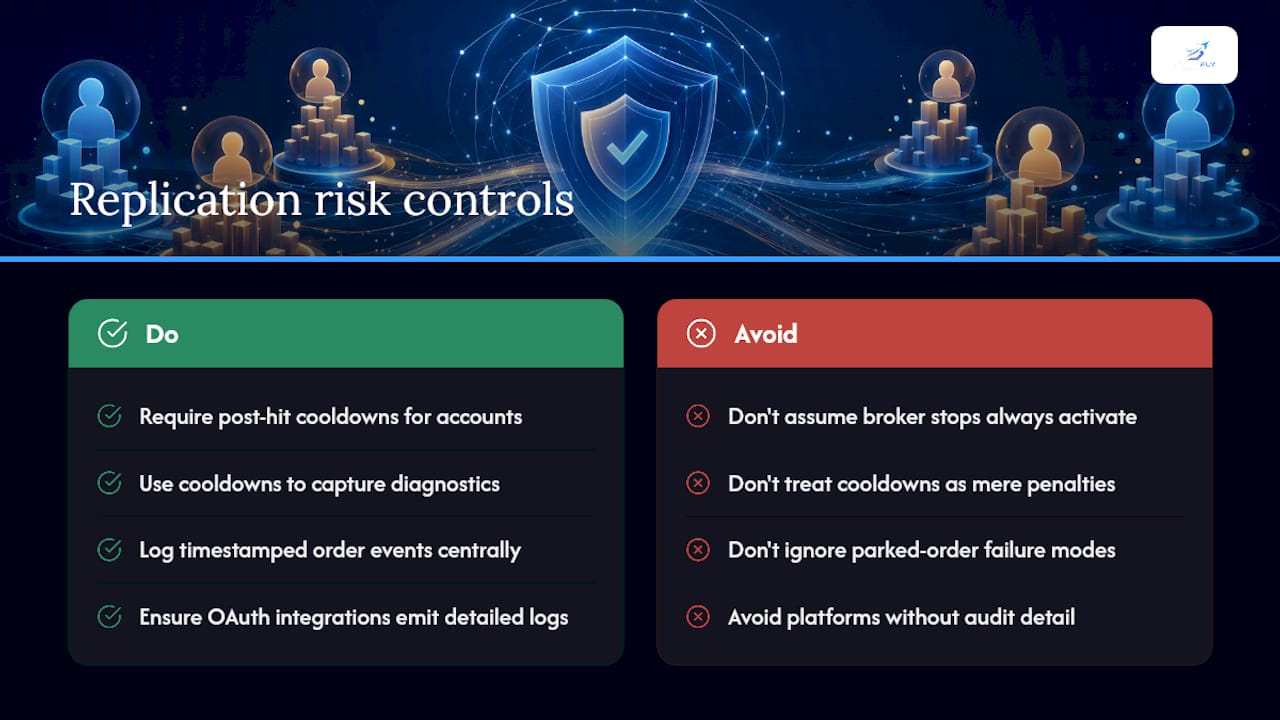
The value of mandatory post-hit cooldowns is underestimated. A hard lockout that triggers mid-session is not just a risk control. It is diagnostic data. The conditions that produced the breach, the sequence of fills, the latency at the moment of replication, and the stop placement relative to the move all contain information that improves the next session's configuration. Treating the cooldown as a penalty misses this entirely.
Auditability matters more than most traders expect before they need it. When a position mismatch occurs across six subaccounts simultaneously, the ability to reconstruct the exact sequence of order events from timestamped logs is what separates a recoverable incident from a compounding loss. OAuth-based integrations that log every token refresh, order submission, and cancellation provide that reconstruction capability. Platforms that do not produce this level of audit detail are not suitable for serious multi-account production use.
SafeFly enforces these controls for Tradovate multi-account traders
Configuring broker-side stops, automated P&L lockouts, OAuth integrations, and audit logs across multiple Tradovate accounts manually is operationally intensive and error-prone. SafeFly automates the entire control stack: broker-side protective stops on every replicated position, account-level hard daily P&L lockouts, secure OAuth integration with Tradovate, and detailed trade analytics with AI coaching.

Every replicated trade carries a protective stop enforced at the broker level, active even if the client disconnects. Hard daily lockouts cancel working orders and block new submissions when the limit is reached, with no manual intervention required. The platform runs on a subscription model with a 3-day trial period, giving traders the opportunity to verify every control in simulation before committing live capital.
Review the full feature set and start a trial at SafeFly's platform documentation, or compare subscription tiers at SafeFly pricing.
Primary sources and further reading
- US futures stop order rules — Interactive Brokers: authoritative documentation on simulated vs. native stop behavior and RTH restrictions for U.S. futures.
- How to Set Daily Loss Limits in Futures Trading — Young Money Investments: practical framework for sizing and enforcing daily loss limits mechanically.
- Exchange order protections and price banding — NexusFi Academy: explanation of Velocity Logic, price banding, and NRR and their effect on stop and market order execution.
- Order types and advanced order management for futures trading — NexusFi Academy: stop-market vs. stop-limit execution reliability and synthetic OCO/bracket failure modes.
- Daily Loss Limits and Account Preservation Protocols — NexusFi Academy: broker-side vs. platform-only enforcement and multi-layer posture for mirrored accounts.
- How it works · SafeFly: product documentation covering broker-side stops, OAuth integration, P&L lockouts, and analytics for Tradovate multi-account replication.
This article is general information, not a substitute for advice from a qualified financial advisor. Consult a qualified financial professional about your own circumstances before acting on anything here.
Sources
- US futures stop order rules — Interactive Brokers
- How to Set Daily Loss Limits in Futures Trading — Young Money Investments
- Exchange order protections and price banding — NexusFi Academy
- Order types and advanced order management for futures trading — NexusFi Academy