

A daily loss limit (DLL) is a hard cap on how much a trading account can lose within a single session. The exact threshold, calculation method, and enforcement structure may vary by trading firm, account type, or program. Most prop firms use a percentage between 3% and 5% of the account balance, but tighter or conditional limits may apply, and calculation bases can differ between evaluation and funded phases.
- Unrealized P&L typically counts. Most prop firms use equity-based calculations, meaning open losing positions typically reduce your available buffer in real time, not just realized losses at close.
- Enforcement is usually automated. Platforms like Tradovate typically cancel working orders, liquidate open positions, and lock the account when the limit is reached, with no manual override available.
- Reset times vary and matter. Some firms reset at 5:00 PM CT (CME close), others use midnight CET or 00:00 UTC as their reset times. Holding a losing position through a reset can shift that loss into the next day's calculation.
According to PropJournal's 2026 guide, most prop firms set daily loss limits at 4–5% of account size, and DLL violations are among the leading causes of funded-trader failure.
Key Takeaways
Setting a personal daily loss limit at 50–70% of the firm's stated threshold, combined with automated enforcement, is the most reliable method for avoiding funded-account termination.
| Point | Details |
|---|---|
| Know your firm's reset time | Confirm the server-time reset (5:00 PM CT, midnight CET, or 00:00 UTC) before each session to avoid accidental cross-day breaches. |
| Use a 50–70% personal buffer | Stop trading at 50–70% of the firm's hard DLL to absorb commissions, slippage, and prevent emotional escalation. |
| Size trades using the one-third rule | Limit each trade to one-third of your personal daily limit; on a $3,500 personal stop, that is approximately $1,167 per trade. |
| Equity-based calculations count unrealized losses | Open floating losses reduce your available buffer in real time; close losing positions before they silently consume the limit. |
| SafeFly enforces limits across multiple accounts | SafeFly's broker-side stops and daily P&L lockouts automate DLL enforcement across all connected Tradovate accounts simultaneously. |
Table of Contents
- What every trader needs to know about daily loss limits
- How daily loss limits are enforced in practice
- How firms calculate the daily loss limit
- How daily loss limits change between evaluation and funded phases
- How daily loss limits and maximum drawdown differ
- Firm rules and real examples across major prop programs
- Reset times and timing traps that catch traders off guard
- What happens when you hit the daily loss limit
- How to choose and apply a sensible personal daily loss limit
- A worked calculation and position-sizing template for Tradovate traders
- The discipline gap that firm rules cannot close
- SafeFly automates daily limit enforcement across Tradovate accounts
- Sources
What every trader needs to know about daily loss limits
The daily loss limit functions as a circuit breaker. Once your account equity drops by the firm's specified amount from the day's starting point, trading stops, either automatically or by rule.
- Definition: The maximum dollar or percentage loss permitted in a single trading session before the account is paused or terminated.
- Common thresholds: 4–5% of account size across most prop programs; tighter programs use 3%.
- Unrealized losses: Equity-based DLLs count open floating losses against the limit in real time.
- Enforcement: Platforms typically auto-liquidate and lock; some programs apply a soft lock (session ends, account survives) while others treat a breach as a hard fail (account terminated).
- Calculation basis: Balance-based rules use the starting or prior-day closing balance; equity-based rules use the live account value including open positions.
Baseline example: A 5% DLL on a $100,000 account means trading stops once the account loses $5,000 in a single session, whether from closed trades, open floating losses, or a combination of both.
Before each session, verify three things: your firm's reset time, whether the calculation is balance-based or equity-based, and whether your account has a fixed-dollar or percentage-based rule. Those three variables determine your actual risk budget for the day.
How daily loss limits are enforced in practice
Enforcement is not passive. When a DLL is reached on a platform like Tradovate, the response is immediate and automated. Tradovate's risk settings documentation describes a session window running from 5:00 PM CT to 3:45 PM CT (Sunday through Friday). When a custom daily loss limit is reached within that window, the platform cancels all working orders, closes open positions, and locks the account until the next session opens at 5:00 PM CT.
Tradovate's daily loss limit page adds an important caution: changing pre-applied risk settings can interfere with existing protections. If a funding program has pre-configured your Tradovate risk parameters, manual edits may create liquidation errors or trigger an unintended account pause.
The practical distinction between enforcement types matters:
- Hard breach: Immediate liquidation of all positions and permanent account termination. The evaluation or funded account cannot be recovered.
- Soft lock: Trading is paused for the remainder of the session. The account survives, and trading resumes at the next reset.
- Auto-liquidation: Positions are closed at market price, which means slippage during fast markets can push the realized loss beyond the limit itself.
Pro Tip: Before trading a new account, open the platform's risk settings and confirm the DLL value matches your firm's published rule. On Tradovate, navigate to Settings > Risk Management to view the configured limit. If the value is pre-applied by your funding program, do not alter it.
How firms calculate the daily loss limit
PropFirmsFinder documents three primary calculation methods used across the industry:
- Starting-balance percentage: The DLL is calculated as a fixed percentage of the account balance at the start of the trading day. The floor does not move during the session.
- Previous-day closing-balance percentage: The DLL resets each day based on the prior day's ending balance, so a profitable day raises the floor slightly.
- Higher-of balance/equity: The DLL is calculated against whichever is greater, the starting balance or the current equity. This is the most restrictive variant because a profitable open position raises the floor, and a subsequent reversal can breach the limit even if the day's net P&L is still positive.
The table below shows how each method produces a different loss floor for a $100,000 account.
| Method | Formula | 3% Floor | 5% Floor |
|---|---|---|---|
| Starting balance | Balance × (1 − DLL%) | $97,000 | $95,000 |
| Previous-day closing balance | Prior close × (1 − DLL%) | Varies daily | Varies daily |
| Higher-of balance/equity | Max(balance, equity) × (1 − DLL%) | Moves up with gains | Moves up with gains |
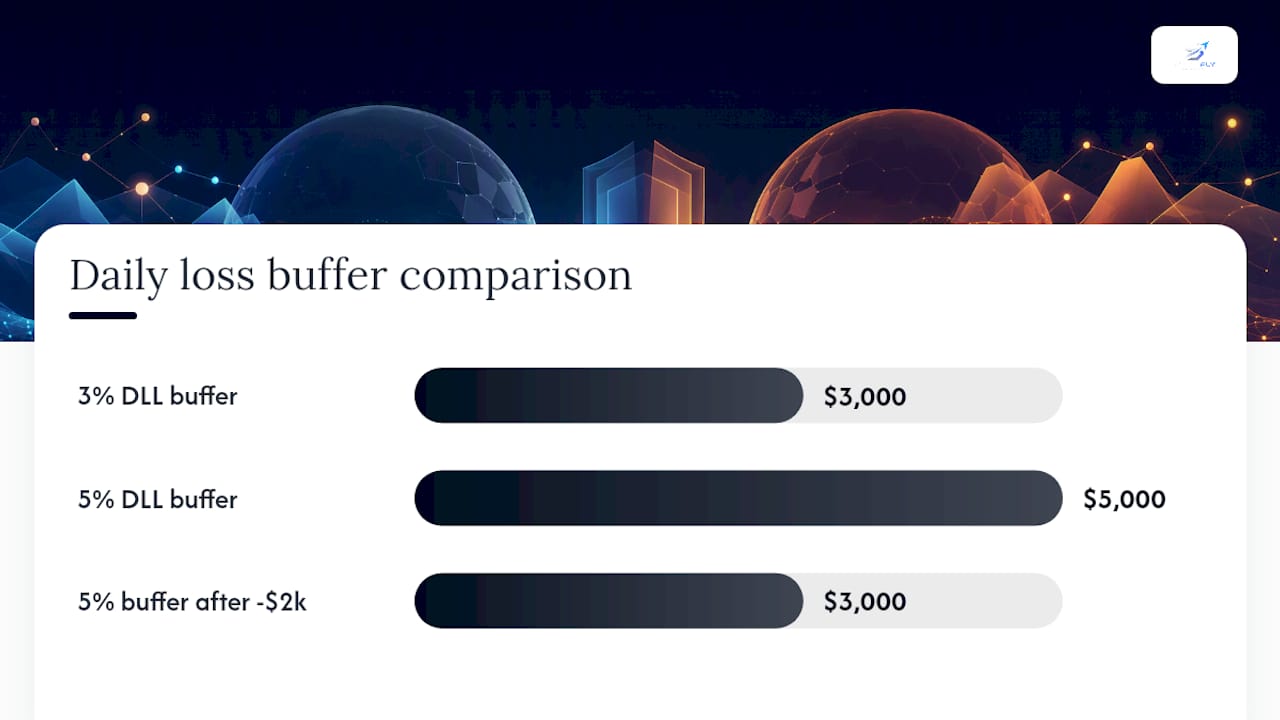
Unrealized losses and equity-based calculations: If a trader holds a position that is currently down $2,000 on a $100,000 account with a 5% DLL, the available buffer shrinks to $3,000 in real time. Closing that position does not reset the buffer; the realized loss is simply locked in.
Fixed-dollar rules, common at firms like Topstep, work differently. Rather than a percentage, the firm assigns a specific dollar amount that does not scale with account growth. Commissions, exchange fees, and slippage are included in the calculation at most firms, so the effective buffer is always slightly smaller than the stated limit.
How daily loss limits change between evaluation and funded phases
Evaluation accounts and funded accounts often operate under different DLL structures, and failing to recalibrate position sizing when transitioning between them is a common and costly mistake.
During evaluation, many programs use a trailing drawdown model. The loss floor rises as the account equity rises, tracking the intraday high-water mark. FuturesHive notes that trailing-drawdown models can cause breaches on days that end profitably if unrealized equity peaks are later erased. Apex Trader Funding applies a trailing drawdown during evaluation that follows intraday equity peaks, making it substantially more restrictive than a static floor.
Once a trader passes evaluation and receives a funded account, the drawdown rule at some programs converts to a static threshold based on the starting funded balance. Apex, for instance, shifts from trailing to a fixed floor after the first payout at certain account levels. FTMO uses a balance-based 5% DLL across both phases but applies it to the starting balance of each calendar day, so a profitable prior day does not raise the floor.
- The5ers Hyper Growth uses a tighter 3% daily loss limit, which on a $100,000 account means a $3,000 maximum session loss.
- FundedNext pre-configures Tradovate risk settings for its funded accounts. FundedNext's help documentation explicitly warns traders not to modify those values.
Pro Tip: When you move from evaluation to a funded account, recalculate your maximum position size from scratch using the new account's DLL and calculation method. A trade that was within risk tolerance during evaluation may exceed the funded account's tighter or differently structured limit.
How daily loss limits and maximum drawdown differ
These two rules operate on different time horizons and serve different purposes. Conflating them is one of the more common misunderstandings among newer funded traders.
- Daily loss limit: Caps losses within a single trading session. Resets each day (or at the firm's defined reset time). Designed to prevent a single bad day from destroying the account.
- Maximum drawdown: Caps the cumulative loss from the account's peak equity to its current value over the entire account lifetime. Does not reset. Designed to prevent gradual capital erosion across multiple sessions.
A trader can breach the DLL without breaching the maximum drawdown (one bad session on an otherwise profitable account), and can approach the maximum drawdown without ever triggering the DLL (a series of moderate daily losses that individually stay within the daily cap).
| Scenario | DLL Breached? | Max Drawdown Breached? |
|---|---|---|
| Single session loss of 6% on a 5% DLL account | Yes | Possibly not |
| Ten sessions each losing 1% on a 5% DLL / 10% max drawdown | No | Yes (10% cumulative) |
| Five sessions each losing 0.8% | No | No |
Managing both simultaneously requires sizing trades so that a full DLL loss on any given day does not push the cumulative drawdown past a point of no recovery. A practical approach: treat the DLL as the daily budget and the maximum drawdown as the total budget. If the maximum drawdown is 10% and the DLL is 5%, a trader who hits the DLL twice in a row has exhausted the entire lifetime allowance.
Firm rules and real examples across major prop programs
The following examples use published or widely cited rules for a $100,000 account. Verify current rules directly with each firm before trading, as thresholds and calculation methods can change.
-
FTMO: 5% daily loss limit, balance-based, calculated from the starting balance of each calendar day. On a $100,000 account, the floor is $95,000. Unrealized losses count toward the limit in real time.
-
Topstep: Fixed-dollar DLL tiers tied to account size. The specific dollar amounts vary by account level. The calculation includes commissions and fees. Topstep's help documentation recommends setting a personal limit inside the firm's hard limit as an additional buffer.
-
Apex Trader Funding: Uses a trailing drawdown during evaluation that tracks intraday equity peaks. The floor rises with profits but never falls. After the first payout on qualifying accounts, the drawdown may convert to a static threshold.
-
The5ers Hyper Growth: 3% daily loss limit on a $100,000 account equals a $3,000 maximum session loss. This tighter threshold demands smaller position sizes and tighter per-trade stops than a standard 5% program.
-
FundedNext: Applies a DLL structure similar to FTMO's balance-based approach and pre-configures Tradovate risk settings for funded accounts. Manual edits to those settings are explicitly discouraged.
-
Tradeify: Applies daily loss limits consistent with industry norms. Traders should confirm the specific dollar or percentage threshold for their chosen account size directly with the firm.
The practical implication is significant: a two-contract ES trade with a 10-point stop carries roughly $1,000 in risk. On a 5% DLL account ($5,000 floor), that trade uses 20% of the daily budget. On a 3% DLL account ($3,000 floor), the same trade uses 33%. The same position size is conservative in one program and aggressive in another.
Reset times and timing traps that catch traders off guard
Reset time is the single most misunderstood variable in daily loss limit management. FuturesHive's guide identifies reset-time confusion as a frequent source of accidental breaches, particularly for U.S. traders working with European-based programs.
Common reset times and their U.S. Eastern equivalents:
- 5:00 PM CT (CME close): 6:00 PM ET. Used by Tradovate's session window and several U.S.-based programs.
- Midnight CET: 6:00 PM ET (standard time) or 5:00 PM ET (daylight saving time). Common for FTMO and other European programs.
- 00:00 UTC: 7:00 PM ET (standard time) or 8:00 PM ET (daylight saving time). PropXP documents that some programs set day-start equity at 00:00 UTC and treat any breach of the resulting floor as a hard fail.
Timing trap: A U.S. trader holding a losing ES position at 5:45 PM ET may believe the new trading day has already started. If the firm resets at midnight CET (6:00 PM ET), that loss still belongs to the prior day's DLL calculation. The same position held just 15 minutes later falls under the new day's budget.
The second common trap is assuming that a profitable close neutralizes a prior intraday loss for DLL purposes. Under equity-based calculations, the DLL is measured against the session's worst equity point, not the closing balance. A trade that recovers fully before close may still have triggered an automated breach at its low point.
Timing checklist before each session:
- Confirm your firm's server-time reset (not local time).
- Identify what happens to open positions at reset: do they carry over, and does the unrealized P&L count against the new day?
- If unsure, test the reset behavior with a minimal position before trading full size.
What happens when you hit the daily loss limit
The consequences depend on whether the breach triggers a soft lock or a hard fail, and on whether enforcement is automated.
- Hard breach (account termination): The account is immediately liquidated, all positions are closed at market, and the funded or evaluation account is permanently closed. No appeal process reverses an automated rule-based breach.
- Soft lock (session pause): Trading is suspended for the remainder of the session. The account remains active and resets at the next session open. This outcome is more common in retail platforms with configurable DLL settings.
- Automated liquidation risk: During fast markets, auto-liquidation at market price can result in a realized loss that exceeds the stated DLL by the amount of slippage. The account still terminates even if the overage was caused by execution conditions rather than deliberate trading.
Tradovate's documentation confirms that reaching the limit triggers automatic liquidation and account lock, and that support staff can explain the breach but cannot reverse it. Topstep similarly notes that automated enforcement is standard and that personal discipline remains the trader's responsibility even when platform enforcement exists.
Pro Tip: Set a personal stop rule at 50–70% of the firm's stated DLL. On a $5,000 firm limit, stop trading at $2,500–$3,500 in losses. This buffer absorbs commissions, slippage, and the psychological pressure to "trade back" a loss, all of which can push a recoverable session into a hard breach.
How to choose and apply a sensible personal daily loss limit
A firm's published DLL is a ceiling, not a target. The personal limit should represent a bad day, not a fatal one.
- Determine the firm's hard threshold. Identify the exact dollar amount or percentage and the calculation method (balance-based, equity-based, or higher-of).
- Apply a 50–70% buffer. Set your personal stop at 50–70% of the firm limit. This is the number you stop trading at, regardless of market conditions.
- Calculate per-trade risk. Limit each trade to no more than one-third of your personal daily limit. On a $3,500 personal limit, that is approximately $1,167 per trade.
- Write the rule down. A pre-written trading plan with explicit stop rules removes the in-session decision of whether to keep trading after a loss.
- Automate enforcement where possible. Platform risk settings, broker-side stops, and tools that enforce daily lockouts remove the human variable from the equation.
Strategy-specific examples:
- Scalping: Per-trade risk of 20–25% of the personal daily limit. Higher trade frequency demands tighter individual stops.
- Intraday directional: Per-trade risk of 25–33% of the personal daily limit. Fewer trades, larger stops, but the daily budget is consumed faster per loss.
- Swing (overnight): The DLL calculation may include overnight floating losses at the next session open, so position sizing must account for gap risk.
Behavioral guardrails:
- 3-strike rule: Stop trading after three consecutive losing trades in a session, regardless of remaining budget.
- Stop-trading trigger: If 50% of the personal daily limit is lost before noon, close the platform and review the session.
- End-of-day review: Log every trade, note whether the DLL buffer was respected, and identify whether any loss was caused by a rule violation rather than a market move.
A worked calculation and position-sizing template for Tradovate traders
The following example uses a $100,000 account. The same method applies to any account size by substituting the relevant figures.
Step 1: Establish the DLL floor.
- 3% DLL: $100,000 × 0.03 = $3,000 maximum session loss; floor at $97,000.
- 5% DLL: $100,000 × 0.05 = $5,000 maximum session loss; floor at $95,000.
Step 2: Set the personal limit (70% buffer).
- 3% DLL: $3,000 × 0.70 = $2,100 personal stop.
- 5% DLL: $5,000 × 0.70 = $3,500 personal stop.
Step 3: Calculate per-trade risk (one-third rule).
- 3% DLL personal limit: $2,100 ÷ 3 = $700 per trade.
- 5% DLL personal limit: $3,500 ÷ 3 = $1,167 per trade.
Step 4: Determine maximum contracts given stop distance.
The table below uses the E-mini S&P 500 (ES) tick value of $12.50 per tick (0.25 points) and a commission assumption of $5 per round turn per contract.
Basis: ES tick value $12.50; 1 point = 4 ticks = $50. Commission per round turn per contract = $5 (illustrative). Stop distance in points × $50 × contracts = gross risk; subtract commission to confirm effective risk stays within per-trade cap.
Platform integration on Tradovate: The Tradovate risk settings panel allows traders to enter a custom daily loss limit in dollar terms. Once configured, the platform enforces the limit automatically within the session window. For traders managing multiple Tradovate accounts, SafeFly's multi-account automation mirrors trades from a lead account and places broker-side protective stops on each mirrored account, enforcing the calculated personal limit across all accounts simultaneously.

Pro Tip: After configuring your DLL in Tradovate, place one small test trade and manually close it at a loss to confirm the platform registers the loss correctly against your configured limit. This takes two minutes and confirms the setting is active before you trade full size.
The discipline gap that firm rules cannot close
The technical mechanics of daily loss limits are well-documented. What is less discussed is the gap between knowing the rule and following it under pressure.
The most common mistakes are not calculation errors. They are behavioral: holding a losing position through a reset because the trader expects a reversal, adding to a losing position to "average down" after two consecutive losses, and failing to account for commissions and slippage when estimating proximity to the limit. Each of these behaviors has a straightforward corrective action. Write the stop rule before the session starts. Treat the personal daily limit as a hard stop, not a suggestion. Log every session and review whether the limit was respected, not just whether the day was profitable.
The 3-strike rule deserves particular attention. Three consecutive losing trades in a session is a statistically meaningful signal that market conditions have shifted or the trading plan is not working that day. Stopping at that point, regardless of remaining budget, preserves capital for sessions where conditions are favorable. PropJournal's data identifies DLL violations as a leading failure mode for funded traders, and the pattern is almost always the same: a trader who was within the limit after two losses continued trading and breached it on the third or fourth.
A short pre-session checklist:
- Confirm today's DLL floor and personal stop level in dollar terms.
- Note the firm's reset time in your local time zone.
- Set a hard stop-trading alarm at 50% of the personal daily limit.
- Review yesterday's session for any limit-proximity events before placing the first trade.
SafeFly automates daily limit enforcement across Tradovate accounts
Manually tracking a daily loss limit across three or four Tradovate accounts in real time is operationally unreliable. A single missed stop or a delayed position close can push one account past its limit while the others remain within range.

SafeFly addresses this directly. The platform mirrors trades from a lead Tradovate account to multiple follower accounts automatically, placing a broker-side protective stop on every mirrored position. If a connection drops, the stop remains active at the broker level. Daily P&L lockouts enforce the personal limit across all accounts simultaneously, removing the manual tracking requirement entirely. Secure OAuth integration means no credentials are stored or transmitted outside the platform's authentication layer.
For funded traders managing accounts across multiple prop programs, SafeFly's trade analytics and AI coaching provide session-level performance data that makes post-session limit reviews faster and more precise. The SafeFly risk disclosure page details how automated lockouts work and what traders are responsible for configuring.
Start a 3-day trial and see how SafeFly enforces your daily limits across every account. Visit SafeFly's pricing page to review subscription options, or go to How it works for a full walkthrough of the platform's protective-stop and lockout features.
Sources
The following sources were used in this guide. Verify each firm's current rules directly on their official pages before trading, as thresholds and calculation methods are updated periodically.
- Risk Settings — Tradovate Support
- Daily loss limit — Tradovate
- Daily loss limit in the Trading Combine and Express Funded Account — Topstep Help
- Daily Loss Limit Rules: 5% That Kills 80% of Funded Traders (2026) — PropJournal
- Daily Loss Limit Explained: How Prop Firms Calculate It — PropFirmsFinder
- Daily loss limit prop firm guide 2026 — FuturesHive
- What is Max Daily Loss (daily drawdown) and how is it calculated? — PropXP
- How to find the Risk Settings in Tradovate? | FundedNext Futures Help Center
This article is general information, not a substitute for advice from a qualified financial advisor. Consult a qualified financial professional about your own circumstances before acting on anything here.