

Disconnection trade protection means one thing in practice: a resting stop order that survives your internet connection dying. If your bracket or stop-loss lives only on your trading platform's client software, it disappears the moment your session drops. Real protection requires either exchange-level Cancel-on-Disconnect (COD), broker-held protective stops, or both, combined with bracket and OCO logic that lives on a server, not your laptop.
Before you trust any broker or copier with a multi-account book, demand three things:
- Server-side order persistence or exchange COD confirmed in writing, not assumed.
- Per-follower bracket/OCO reimplementation on every mirrored account, not a client-side link that breaks when the lead account disconnects.
- Reconnection audit logs with timestamps showing exactly what canceled, what filled, and what stayed live.
Pro Tip: Ask your broker to show you an actual disconnect event log from another client account, not a policy summary. Policy documents describe intent; logs describe behavior.
SafeFly builds this protection into its how-it-works infrastructure by re-implementing bracket logic per follower account and pairing it with broker-side stops.
Key Takeaways
Disconnection trade protection works only when exchange or broker-side stops persist independently of your connection and every mirrored account carries its own reimplemented bracket logic.
| Point | Details |
|---|---|
| Confirm COD trigger type | Ask whether cancellation fires on network loss or heartbeat timeout, and get it in writing. |
| Verify server-side brackets | Client-side OCO and trailing stops stop working the instant you disconnect. |
| Test before scaling | Run a live disconnect test with a small position before trusting a copier across multiple accounts. |
| Reimplement per follower | Mirrored accounts each need their own protective stop, not a link back to the lead account. |
| Use SafeFly for mirrored protection | SafeFly places independent broker-side stops and daily P/L lockouts on each Tradovate follower account via OAuth. |
Table of Contents
- How Does Exchange-Level Cancel-on-Disconnect Work?
- Which Order Types Survive a Trader Disconnect?
- What Should You Ask Your Broker Before You Trust Their Protections?
- How Should Automated Mirroring Preserve Your Protective Stops?
- What Risk Limits and Monitoring Catch a Failed Mirror?
- What Should You Do the Moment You Detect a Disconnect?
- What Most Traders Get Wrong About Disconnection Risk
- Protect Every Account You Mirror With SafeFly
- Sources
How Does Exchange-Level Cancel-on-Disconnect Work?
Cancel-on-Disconnect (COD) is a mechanism exchanges offer to cancel resting orders tied to a session that has lost its connection. It's a safety valve, not a guarantee. The FIA's guidance on automated trading risk controls frames COD as optional at most exchanges, meaning your firm or your broker has to actively request and configure it. In a major system failure, exchange-level COD may be the only mechanical way to pull your orders, since your broker's own systems could be compromised at the same time.
The trigger matters as much as the feature itself. Some venues cancel orders on a network-level disconnect; others wait for an application heartbeat to time out, which can take longer than you'd expect. MIAX's Onyx documentation describes session-level COD where members can configure actions like canceling all non-GTC/GTD open orders the moment a session drops.
Brokers layer their own protections on top of this, and they decide how much granularity you get. Three things vary by broker:
- Whether COD cancels apply per session or across your entire account.
- How fast the pass-through cancel actually reaches the exchange.
- Whether working orders on other, still-connected sessions get swept along with the disconnected one.
If you run multiple sessions across several accounts, session-level granularity isn't optional. Account-wide cancellation on a single dropped session can wipe out perfectly healthy positions elsewhere.
Which Order Types Survive a Trader Disconnect?
Native exchange orders, meaning orders already accepted and resting in the exchange's book, persist independently of your connection status. A limit order sitting at the exchange doesn't care if your laptop loses Wi-Fi. That's the good news.

The bad news is that most bracket and OCO setups are not native exchange objects. CME Globex, for example, has no built-in OCO order type. According to a practitioner explainer on futures order types, bracket and OCO logic typically lives on the platform or the broker's servers. If that logic is managed locally on your machine rather than server-side, it stops functioning the instant you disconnect, leaving a naked position with no exit attached.
Trailing stops split the same way. A trailing stop calculated on your local client stops trailing at disconnect and just sits frozen at its last price. A server-side or broker-held trailing stop keeps adjusting.
Even server-held stops face physical limits. Nasdaq's order risk management documentation explains that trading collars and protection bands can cancel portions of a triggered stop-market order if the market has moved past a defined boundary. A stop can be "safe" from disconnection and still get partially canceled by the exchange's own volatility guardrails.
What Should You Ask Your Broker Before You Trust Their Protections?
Verifying disconnection trade protection isn't a one-time question, it's a short testing program. Run it before you scale up to multiple accounts, not after a bad week reveals the gap.
- Ask if COD is offered and who controls the trigger. Get a straight answer on whether it's network-level or heartbeat-based, and whether it's on by default or something you must request.
- Ask what your disconnect actually triggers. Does your platform disconnecting cause a broker-side pass-through cancel, or does the order just sit there until someone notices?
- Confirm whether your bracket and OCO exits are server-side. This is the single most consequential question for copier setups, since a client-side bracket is functionally decorative during an outage.
- Run a small live test. Place a modest position with a server-side bracket, then force a disconnect (turn off Wi-Fi, kill the app) and watch what happens to the follower orders.
- Pull the execution and cancel reports afterward. Compare timestamps against when you actually disconnected.
- Call the trade desk during the test window. A broker that can't produce a human on short notice during a controlled test won't be faster during a real outage.
Pro Tip: Keep every execution report from your disconnect test in one folder. If you ever need to dispute a fill or a missed cancel, timestamped logs settle the argument faster than a phone call.
How Should Automated Mirroring Preserve Your Protective Stops?
Trade mirroring across multiple Tradovate accounts introduces a problem exchange COD alone can't solve: your bracket and OCO logic has to exist separately on every single follower account, not just the lead account you're trading from.
If a copier only mirrors the entry and links the stop back to the lead account's local session, a disconnect on the lead account leaves every follower position unprotected simultaneously, multiplying a single-account risk across your entire book. The Thor Trade Copier explainer on bracket and OCO logic makes this point directly: since brackets and OCO aren't native exchange objects, a copier has to rebuild that logic independently for every account it touches.
A reliable server-side copier must place a genuine, standalone protective stop on each follower account at the moment of mirroring, not a reference back to the lead position. Anything less turns one disconnect into an account-wide event.
What this requires operationally:
- Secure OAuth connections into each broker, so the copier can act on your behalf without you handing over credentials.
- Server-based execution for each follower, so entries and exits fire with low latency independent of your own connection.
- Audit logging on every mirrored trade, so you can reconstruct exactly what happened if something goes wrong.
SafeFly's Tradovate integration is built around this exact model, connecting each follower account through OAuth and placing an independent broker-side stop on every mirrored trade.
What Risk Limits and Monitoring Catch a Failed Mirror?
Bracket logic alone doesn't catch everything. You also need hard limits that stop a bad day from becoming a ruinous one, and monitoring that tells you the moment something breaks.
Daily profit and loss lockouts are the simplest and most effective backstop. Set a maximum daily loss per account, and have the system halt trading automatically once it's hit, before a copier glitch or a runaway market compounds the damage. Per-account exposure caps do the same job for position size.
Heartbeat monitoring and alerting close the visibility gap. A copier that mirrors trades but doesn't confirm the fill on the follower account can silently desync from the lead account for minutes before anyone notices.
- Set daily P/L lockouts on every account, not just the lead.
- Enforce per-account exposure caps independent of what the lead account is doing.
- Run continuous heartbeat checks between lead and follower connections.
- Alert immediately on any reconciliation mismatch between expected and actual fills.
Detailed trade analytics also matter here in a less obvious way. Reviewing patterns in copier slippage over weeks, rather than reacting to single incidents, tends to expose the specific broker pairings or times of day where mirroring reliability degrades.
What Should You Do the Moment You Detect a Disconnect?
Speed matters, but so does sequence. Acting out of order can turn a clean recovery into a reconciliation mess.
- Pull the exchange and broker execution/cancel reports immediately. Confirm precisely what canceled automatically and what remained live.
- Call the trade desk if anything is still exposed. Request a manual cancel and log the exact time you made the call.
- Pause mirroring across all follower accounts until you know the lead account's true position.
- Reconcile every fill against your intended position before resuming any automated activity.
- Adjust exposure caps or lockout thresholds if the disconnect revealed a gap in your current settings.
Treat every disconnect, even a brief one, as a data point for the next round of testing rather than a one-off inconvenience.
What Most Traders Get Wrong About Disconnection Risk
The conventional advice on this topic stops at "ask your broker if they offer Cancel-on-Disconnect," as if a yes or no answer settles the matter. It doesn't. COD is configurable, optional at most venues, and defined differently by every exchange and broker. A trader who confirms COD exists but never asks about session granularity or trigger type has confirmed almost nothing.
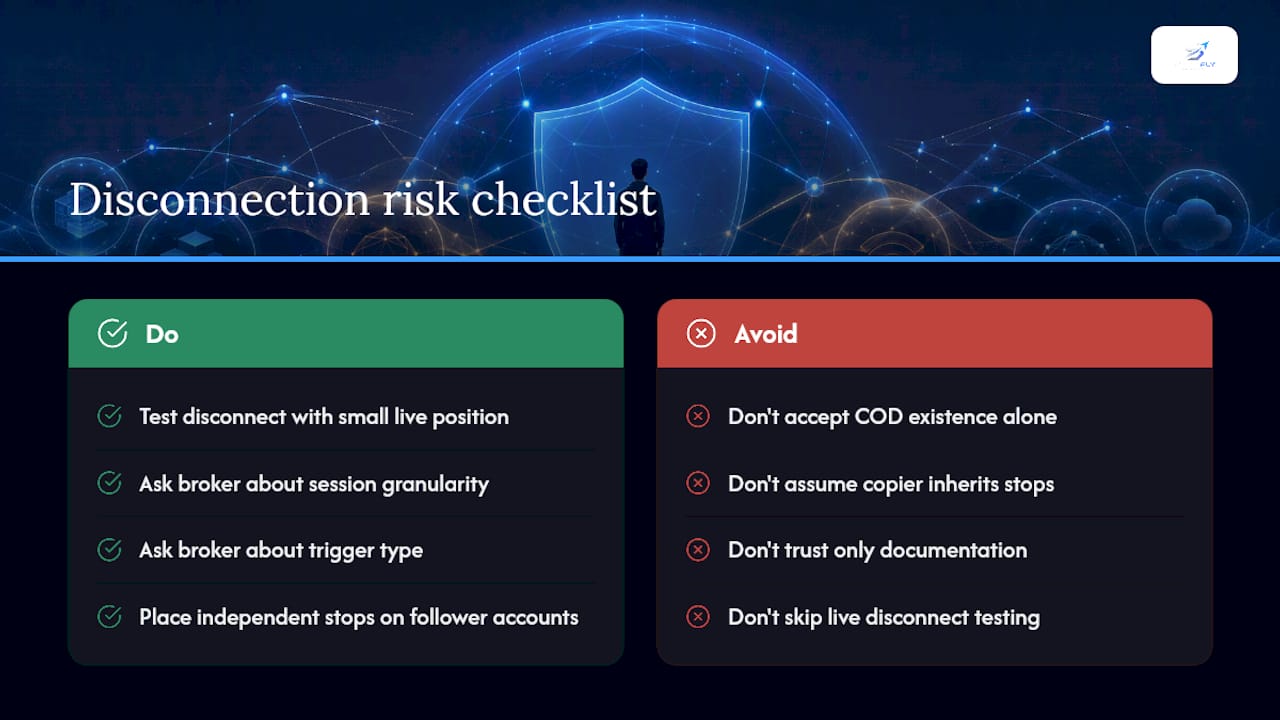
The bigger blind spot sits with copier setups. Traders assume that mirroring software inherits whatever protection the lead account has. It doesn't, because bracket and OCO logic generally isn't a native exchange object. Every follower account needs its own independently placed stop, and a lot of copier tools quietly skip that step to keep latency low.
What should come first isn't a feature checklist, it's a disconnect test with real money on a small position. Documentation tells you what a system is supposed to do. A forced disconnect tells you what it actually does. Traders running four or five accounts rarely have time for that test, which is exactly why the providers handling the reimplementation for them, account by account, earn their keep.
— Arturo
Protect Every Account You Mirror With SafeFly
SafeFly exists specifically for traders who've outgrown manual copying across Tradovate accounts and can't afford the exposure gap a basic mirror leaves behind. Instead of linking follower orders back to a lead account's local session, SafeFly places an independent, broker-side protective stop on every mirrored trade the moment it fires.

Each account connects through secure OAuth, so you're not sharing credentials across a chain of platforms just to keep positions in sync. Daily profit and loss lockouts run per account, and detailed trade analytics plus AI coaching flag where copier slippage or execution patterns need attention. If you're managing several Tradovate accounts and want your stops to survive a dropped connection rather than just hoping they do, review how SafeFly's system works and check the risk disclosure before starting your trial.
This article is general information, not a substitute for advice from a qualified financial advisor. Consult a qualified financial professional about your own circumstances before acting on anything here.
Sources
- FIA — Best practices for automated trading risk controls and system safeguards
- MIAX Onyx FIX order interface (Onyx) documentation
- Nasdaq order risk management documentation