
A futures day-trading lockout is a rule, manual or automated, that stops a trader from placing new orders for a set period after the loss threshold is hit. The recommended approach combines two layers: broker-enforced daily-loss limits as a backstop and trader-controlled lockouts for discipline on individual strategies. Rely on automated lockouts when trading multiple accounts or when emotion tends to override your plan; use manual lockouts when you need flexibility around specific setups.
- Broker-enforced limits protect the firm's capital and often trigger forced liquidation.
- Trader-controlled lockouts protect your own discipline and can be tuned to your strategy.
- Regulatory position limits from the CFTC govern market-wide exposure, not individual account behavior.
Quick fact: AMP Futures enforces an 80% net liquidity daily-loss floor and charges $25 per contract if its risk desk has to step in and liquidate.
Key Takeaways
Futures day-trading lockouts work best when broker-enforced daily-loss limits and trader-controlled lockouts operate together, matched to account size and realistic worst-case drawdown.
| Point | Details |
|---|---|
| Know the distinction | Lockouts manage personal account risk; CFTC position limits manage market-wide exposure. |
| Match scope to setup | Choose account-level lockouts for single accounts, global lockouts for multi-account trading. |
| Set thresholds from data | Base dollar or percent limits on your worst 20 to 30 trading sessions, not a guess. |
| Confirm broker fees first | Check whether forced liquidation carries a per-contract fee, as with AMP Futures. |
| Automate across accounts | SafeFly enforces identical lockouts and broker-side stops across every linked Tradovate account. |
Table of Contents
- What Is a Futures Day Trading Lockout?
- Common Types of Lockouts in Futures Trading
- What Happens When a Lockout Triggers?
- How to Choose and Configure Lockout Thresholds
- Broker and Platform Lockout Examples Worth Knowing
- Best Practices and Common Pitfalls With Lockouts
- How SafeFly Handles Multi-Account Lockouts
- Where SafeFly Fits Into Your Lockout Strategy
- Frequently Asked Questions
- Sources
What Is a Futures Day Trading Lockout?
A daily-loss limit is a dollar or percentage threshold that, once breached, halts new trading for the rest of the session or a fixed cooldown window. A trader lockout is the mechanism that enforces that limit, whether you flip the switch yourself or software does it for you. A regulatory position limit is different entirely. It caps how many contracts any single trader can hold in a given market, set by the exchange or the CFTC to prevent one player from cornering supply.
Lockouts manage your personal risk exposure. Position limits manage the market's exposure to any one participant. Confusing the two leads traders to assume a broker's daily-loss setting somehow protects them from regulatory action, when it doesn't.
- Trader (manual) lockout: you set it, you can typically remove it (unless a risk-settings lock prevents that).
- Broker-enforced lockout: the firm sets it, often tied to net liquidity, and it can trigger fees.
- Prop-firm lockout: built into evaluation rules, usually non-negotiable and non-cancellable.
- Regulatory position limit: enforced by the exchange or CFTC, unrelated to your daily P&L.
Common Types of Lockouts in Futures Trading
Lockout designs vary more than most traders expect, and the differences matter once you're configuring one on a live account.
- Dollar-based limits: a flat threshold, say $500 or $1,500, that locks the account once daily losses hit that number.
- Per-contract liquidation rules: brokers may charge a flat fee, such as $25 per contract, when their desk has to close positions for you.
- Time-based lockouts: fixed windows, commonly 15 minutes, 30 minutes, an hour, or the rest of the session, up to 24 hours on platforms like NinjaTrader.
- Scope variations: some lockouts hit a single account, others cascade across every linked account under one login.
Pro Tip: Set your time-based lockout duration longer than you think you need. A 15-minute cooldown rarely breaks a revenge-trading impulse. An hour usually does.
What Happens When a Lockout Triggers?
Once a lockout fires, the platform typically does three things at once: flattens open positions, cancels working orders, and rejects any new order attempts. NinjaTrader's Trader Lockout feature does exactly this and cannot be canceled early once activated, regardless of how the market moves afterward.
- Open positions get closed at market.
- Pending orders are wiped from the book.
- New order tickets get rejected until the timer expires.
- Some lockouts apply only to the triggering account; others apply across every linked account simultaneously.
A forced liquidation from a broker's risk desk often comes with a fee attached. A trader-initiated manual lockout flattens the same way but costs nothing beyond the trade you were already in.
How to Choose and Configure Lockout Thresholds
Picking a threshold isn't guesswork if you anchor it to real numbers from your own trading. Start with these four inputs before you touch a settings menu:
- Account size. A $10,000 account and a $100,000 account should never share the same dollar limit.
- Average daily volatility of your instrument. Micro E-mini contracts swing differently than full-size crude oil futures.
- Per-trade risk. If you risk $150 per trade, a $300 daily lockout gives you exactly two shots before you're done.
- Worst-case intraday drawdown. Look at your last 20 to 30 sessions and find your ugliest day. Set the limit near that number, not above it.
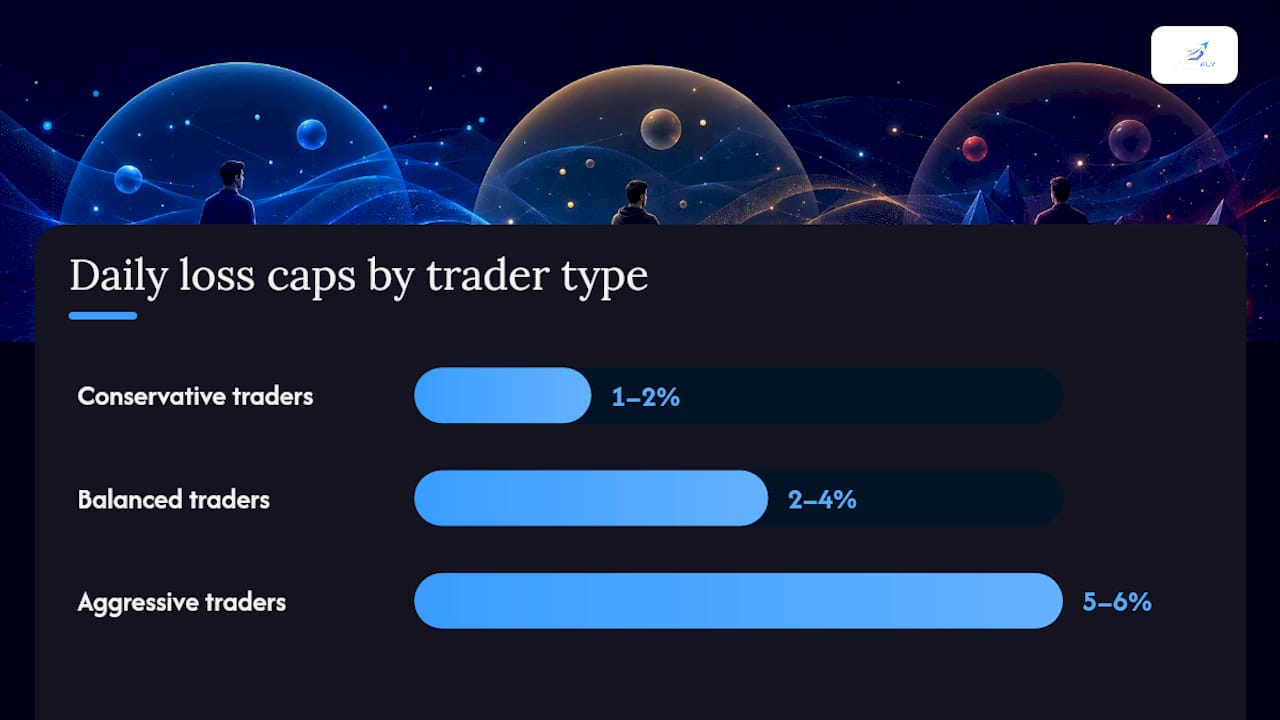
As a rough guide, conservative traders often cap daily losses around 1% to 2% of account equity, balanced traders around 2% to 4%, and aggressive traders up to 5% or 6%, though these ranges depend heavily on strategy and instrument. Combine the lockout with hard stops on every position and fixed position sizing, since a lockout alone won't save you from a single oversized trade that blows through the daily limit in one shot.
Pro Tip: Test any new lockout threshold on a simulated account first, or start with a short cooldown window before committing to a full-session lock. This surfaces conflicts with your order routing before real money is on the line.
Broker and Platform Lockout Examples Worth Knowing
Seeing how real platforms implement lockouts makes the abstract rules concrete. NinjaTrader offers a manual Trader Lockout for simulation and prop accounts, flattening positions and blocking new orders across supported platforms for a set duration you choose in advance. NinjaTrader Prop has also added account-level lockout and a Risk Settings Lock, so one account can pause independently while the risk parameters that triggered the lock stay untouchable until the timer runs out.
AMP Futures takes a firm-enforced approach: an 80% net liquidity daily-loss policy with a $25 per-contract fee if the risk desk has to liquidate for you. Prop-firm evaluation accounts often layer on their own version, frequently non-cancellable and simulation-only in behavior.
Before trading live, confirm exactly which liquidation fee policy your broker applies and whether a lockout can be adjusted mid-session or only reset at the next trading day.
Best Practices and Common Pitfalls With Lockouts
Lockouts work best as a final backstop, not your primary risk tool. Pair them with pre-planned position sizing and hard stops set before you enter a trade, and use a risk-settings lock so you can't quietly disable the rule the moment you're tempted to revenge trade.
- Do: test lockout rules in simulation before going live.
- Do: use risk-setting locks so limits can't be changed mid-drawdown.
- Don't: treat a lockout as your only line of defense against a bad trade.
- Don't: remove stops or widen limits in the middle of a losing session.
Watch for cross-account cascades, where a lockout on one account triggers linked accounts to freeze too, and for interactions with intraday margin rules. FINRA's 2026 intraday margin amendments introduce a 90-day freeze for accounts that fail to satisfy intraday margin deficits promptly, a very different mechanism from a daily-loss lockout but one that can compound the same bad day. Futures rules also differ meaningfully from equities: the SEC's pattern day trader framework, including its historical $25,000 equity minimum, applies to stock accounts and does not govern futures trading.
Pro Tip: If you trade more than one account, check whether your platform's lockout is account-scoped or global before you need it in a crisis, not after.
How SafeFly Handles Multi-Account Lockouts
Managing lockout rules across several Tradovate accounts by hand is where most traders lose consistency. SafeFly automates that layer directly. Trades from a lead account mirror to every linked account with a broker-side protective stop attached automatically, and daily profit-and-loss lockouts apply identically across the group rather than account by account.
- Every mirrored trade carries its own stop, so a disconnection doesn't leave a position unprotected.
- Daily lockouts fire uniformly, closing the gap where one account keeps trading after another has already hit its limit.
- Secure OAuth connections handle the integration, so no credentials get shared manually.
The point of a broker-side stop is that it lives with the broker, not your local terminal, so it still executes even if your connection drops mid-session.
Activation logs and detailed trade analytics let you review exactly when a lockout fired and why, which matters more than most traders expect when reconstructing a rough trading day. Full mechanics are outlined on the SafeFly product page, and the risk framework behind the feature is documented separately.
A Trader's View on When Lockouts Actually Earn Their Keep
The lockout that has saved me the most capital wasn't the one tied to my worst day. It was the one that fired on an average Tuesday, after two quick losses that would have turned into five without it. On single accounts, a manual lockout is fine. Once you're running several accounts in parallel, only a platform-wide lockout catches every account before the damage compounds. That's the same logic behind the threshold checklist earlier: match the lockout's scope to how you actually trade, not to how you trade on your best day.
Where SafeFly Fits Into Your Lockout Strategy
If you're managing multiple Tradovate accounts by hand right now, you already know the gap between deciding to stop trading and actually stopping across every account at once. SafeFly closes that gap by enforcing the same daily P&L lockout and broker-side stop across all linked accounts simultaneously, so a limit hit on your lead account can't get missed on the others.

The platform connects through secure OAuth, logs every lockout event with detailed trade analytics, and includes AI-driven coaching to help you spot patterns in why lockouts fire in the first place. Read the risk disclosure before configuring live thresholds, and start with a short cooldown window in simulation rather than a full-session lock on day one. SafeFly offers a 3-day trial. Check pricing and plan details and see how the full feature set works before connecting a live account.
Frequently Asked Questions
Can I remove a lockout once it triggers? Usually not before the timer expires. NinjaTrader's Trader Lockout explicitly cannot be canceled early, and risk-settings locks are designed to prevent exactly that kind of override.
Do futures lockouts follow the same rules as the equity pattern day trader rule? No. The SEC's pattern day trader framework, including the $25,000 equity minimum, applies to equities margin accounts, not futures.
What's the difference between a lockout and a position limit? A lockout controls your account after a loss threshold; a CFTC position limit caps how many contracts anyone can hold in a market regardless of P&L.
Will a broker charge me for a forced liquidation? Some do. AMP Futures charges $25 per contract when its risk desk liquidates positions after a net liquidity breach.
Can lockouts apply across multiple accounts at once? Yes, on platforms built for it. SafeFly enforces the same daily lockout across all linked Tradovate accounts through its multi-account automation.
Sources
Quick fact: NinjaTrader's lockout duration options run up to 24 hours, giving traders a meaningful range between a quick cooldown and a full day off.