

Tradovate supports copy trading through its built-in Group Trade feature, but the native tool only mirrors market-based entries and does not replicate bracket orders, stop-losses, or take-profit exits on follower accounts. For traders managing simple, market-order-only strategies across a small number of same-broker accounts, Group Trade is functional and free. For anyone who needs broker-side protective stops, automated exits, or daily PnL lockouts, a dedicated copier is the practical next step.
At a glance:
- Native support exists: Tradovate Group Trade replicates market orders from a leader account to follower accounts within the same brokerage.
- Key gap: Bracket orders, ATM orders, OCO orders, and pending limit/stop orders do not transfer as-is to followers.
- Risk implication: Follower accounts have no automatic protective stops unless you place them manually or use a dedicated copier.
- Recommended path: Test Group Trade in simulation first; if your strategy requires automated exits or broker-side stops, evaluate a dedicated solution such as Safefly.
Table of Contents
- What does Tradovate Group Trade actually do?
- How to set up Group Trade on Tradovate step by step
- How Group Trade executes replicated trades in practice
- What are the most important limitations of Group Trade?
- Using Group Trade with funded accounts and prop-firm evaluations
- When is the native copier not enough?
- How do you decide between Group Trade and a dedicated copier?
- Recommended next steps and implementation timeline
- Key Takeaways
- The gap between what Group Trade promises and what multi-account traders actually need
- Safefly: built for the gaps Group Trade leaves open
- Where to verify details and follow-up reading
What does Tradovate Group Trade actually do?
Group Trade is Tradovate's native multi-account replication feature. It operates on a leader-to-follower model: one account is designated as the leader, and one or more accounts in the same group receive mirrored orders whenever the leader executes a trade.
The core feature set covers:
- Market-order mirroring: When the leader submits a market order, follower accounts receive corresponding market orders automatically.
- Per-account contract multipliers: Each follower account can be assigned a fixed contract count or a multiplier relative to the leader's position size.
- Single-position netting per instrument: Tradovate nets positions per instrument within each account, so followers hold one net position per contract rather than stacking separate legs.
- Group-based account mapping: Accounts are organized into named groups, and the leader's trades propagate to every account assigned to that group.
Group Trade is available as an add-on within the Tradovate brokerage platform. Traders using Apex Trader Funding accounts on Tradovate can access Group Trade through the Apex help center documentation, though compatibility with funded or evaluation accounts requires separate verification with the funder.
How to set up Group Trade on Tradovate step by step
Prerequisites
Before starting, confirm that all accounts are held under the same Tradovate brokerage login, that the Group Trade add-on is enabled on your subscription, and that you have access to the desktop platform or web trader. Mobile has limited Group Trade functionality.
Setup sequence
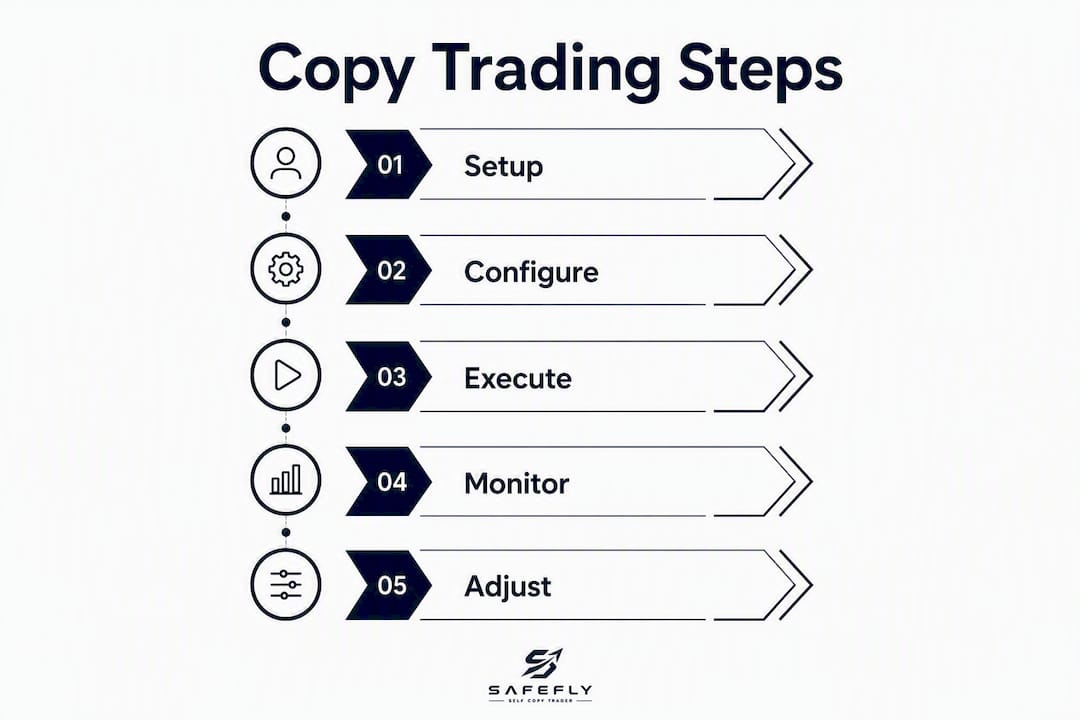
- Enable the Group Trade add-on. Log in to your Tradovate account, navigate to the subscription or add-ons section, and activate Group Trade. After activation, log out and log back in to ensure the feature loads correctly.
- Open the Group Trade panel. On the desktop platform, locate the Group Trade widget in the platform menu. This panel is where all group configuration takes place.
- Create a new group. Click "Add Group" or the equivalent control, assign the group a descriptive name (for example, "ES Multi-Account"), and save.
- Designate the leader account. Select the account that will serve as the source of all replicated trades. Only one leader is permitted per group.
- Add follower accounts. Select each follower account from the available account list and assign it to the group. Confirm that each follower account appears in the group roster.
- Set per-account contract quantities. For each follower, enter either a fixed contract count or a multiplier. Verify that the quantities are mathematically divisible by the group configuration to avoid order errors at execution time.
- Save and activate the group. Confirm all settings, save the group, and verify that the group status shows as active.
- Test in simulation. Before running Group Trade on live accounts, replicate the full setup in Tradovate's simulation environment and confirm that follower orders execute as expected.
Pro Tip: Record every group configuration setting, including account IDs, contract quantities, and multipliers, in a separate log file before going live. If a platform update resets your group settings, you can restore them in minutes rather than reconstructing them from memory.
How Group Trade executes replicated trades in practice
When the leader account submits a market order, Tradovate's Group Trade engine submits corresponding market orders to each follower account in the group. The follower orders are not contingent on the leader's fill price; they are submitted as independent market orders once the leader's order is placed.

Quantity mapping follows the per-account configuration set during setup. If the leader trades 2 contracts and a follower has a multiplier of 1.5, the follower receives a 3-contract order. If the resulting quantity is not a whole number, Tradovate will raise an error, so contract math must be verified before activation.
Position netting means that if the leader is already long 2 contracts and adds 1 more, the follower's account adjusts its net position accordingly rather than opening a separate order. This keeps follower account positions aligned with the leader's net exposure per instrument.
Execution timing introduces a practical consideration. Small delays between master and follower order submission are common, particularly during high-volatility periods. Those delays can produce slippage, meaning follower fills may differ from the leader's fill price by one or more ticks.
Pro Tip: Set a maximum acceptable slippage threshold before going live, for example, two ticks on ES or NQ. If follower fills consistently exceed that threshold during simulation testing, investigate network latency and platform load before scaling to additional accounts.
What are the most important limitations of Group Trade?
Group Trade covers market-order replication reliably, but several gaps affect trade fidelity and risk control in ways that matter significantly for serious multi-account operations.

Order type and exit limitations
| Feature | Group Trade (native) | Dedicated copier |
|---|---|---|
| Market order replication | Yes | Yes |
| Bracket / ATM / OCO replication | No | Yes (varies by provider) |
| Pending limit/stop order transfer | No (converts to market on fill) | Yes (varies by provider) |
| Broker-side protective stops | No | Yes |
| Per-account fixed sizing and rounding | Limited | Yes |
| Daily PnL lockouts | No | Yes |
| Audit trail / analytics | Minimal | Yes |
Bracket and ATM orders placed on the leader account are not mirrored as bracket exits on followers. A leader account with a stop-loss at 10 ticks and a take-profit at 20 ticks will not automatically place those same exits on follower accounts. Each follower holds an unprotected position until the trader manually intervenes or the leader's flat order propagates.
Pending orders — limit entries or stop entries — placed on the leader do not transfer as pending orders to followers. When the leader's pending order fills, followers receive market orders at that moment, which can produce meaningful slippage if the market has moved since the leader's fill.
Additional operational gotchas
- Same-broker requirement: — Group Trade only works across accounts held within the same Tradovate brokerage login. Cross-broker or cross-platform copying is not supported natively.
Pro Tip: Run a daily reconciliation of leader and follower fills at the end of each session. Even a single missed or mismatched order can compound into a significant position discrepancy over a week of trading.
Using Group Trade with funded accounts and prop-firm evaluations
Group Trade is commonly used by traders managing multiple prop-firm accounts simultaneously, but community experience across platforms such as Tradovate's community forum shows that outcomes vary and that verification steps are non-negotiable before going live.
Key considerations for prop-firm use:
- Funder ownership rules: — Some prop firms prohibit linking accounts across different funded traders or sharing trade signals between accounts. Confirm your funder's terms explicitly before using Group Trade.
- Evaluation rule replication: — Group Trade replicates entries, but it does not enforce evaluation-specific rules such as daily drawdown limits or maximum position sizes on follower accounts. Each follower account must be monitored independently against its own evaluation parameters.
The safest approach is to obtain written confirmation from each funder regarding their account-sharing and trade-duplication policy, then test the configuration in simulation for at least five trading sessions before applying it to live evaluation accounts.
When is the native copier not enough?
Tradovate's native copier works well for straightforward, market-order-only strategies, but it lacks the advanced risk controls and automated exit management that high-volume multi-account traders require. The feature gaps that most commonly drive traders toward a dedicated copier are:
- No OCO or ATM bracket support: — Complex order structures used in futures trading do not transfer to followers.
Traders who need SL/TP replication, OCO support, or automated protective exits typically adopt a dedicated copier or a broker-side stop provider. The decision is not about platform preference; it is about whether the risk-control gaps in Group Trade are acceptable given the strategy and account scale.
Security is a separate but related consideration. Dedicated copiers that use OAuth broker connections avoid requiring traders to share account credentials directly. OAuth integration means the copier authenticates through the broker's own authorization layer, reducing the risk of credential exposure.
Safefly addresses each of these gaps directly. It automates trade replication across multiple Tradovate accounts and adds broker-side protective stops, daily PnL lockouts, and detailed trade analytics via secure OAuth integration. Each mirrored trade carries an automatic protective stop, so follower accounts are not left exposed if a connection drops or a manual exit is missed. AI-driven performance coaching and a full analytics dashboard give traders the audit trail that Group Trade does not provide.
How do you decide between Group Trade and a dedicated copier?
The decision comes down to four questions about your strategy and operational requirements.
- Do you need broker-side protective stops? If yes, Group Trade is insufficient. A dedicated copier with broker-side stop placement is required.
- Do your strategies use bracket orders, ATM orders, or OCO exits? If yes, Group Trade will not replicate those exits on follower accounts.
- How many accounts and contracts are you managing? Group Trade scales adequately for a small number of same-broker accounts. Larger operations with complex sizing requirements benefit from per-account fixed sizing and rounding controls.
- What is your slippage tolerance? If your strategy is sensitive to tick-level execution differences between leader and follower, measure actual slippage in simulation before committing to Group Trade at scale.
Red flags that indicate a dedicated copier is warranted:
- Your strategy relies on bracket or ATM exits for risk management.
- You are trading funded accounts with strict daily drawdown rules that require automated enforcement.
- You manage more than three or four accounts and need a reliable audit trail for reconciliation.
- You cannot monitor all accounts manually during the trading session.
Suggested test plan:
- Configure Group Trade in simulation and run it for at least five sessions.
- Record leader and follower fills side by side and calculate average slippage per instrument.
- Attempt to replicate a bracket order on the leader and confirm whether follower exits are placed.
- Verify that contract sizing math produces no errors across all follower accounts.
- Run a one-to-two-week live pilot at minimum position size before scaling.
Recommended next steps and implementation timeline
The following checklist applies regardless of whether you stay with Group Trade or move to a dedicated copier.
- Day 7: — Confirm funder rules in writing if you are using prop-firm accounts.
Key Takeaways
Tradovate Group Trade handles market-order replication reliably, but the absence of bracket replication and broker-side stops makes it insufficient for risk-controlled multi-account futures trading at scale.
| Point | Details |
|---|---|
| Native copy trading exists | Group Trade mirrors market orders across same-broker Tradovate accounts with per-account contract multipliers. |
| No bracket or pending order replication | Stop-loss, take-profit, and pending limit/stop orders do not transfer to followers; followers receive market orders on leader fills. |
| Slippage is a real factor | Small delays between leader and follower order submission can produce tick-level slippage, especially during volatile sessions. |
| Prop-firm use requires verification | Funder policies on account linking and trade duplication vary; always confirm in writing before using Group Trade in live evaluations. |
| Safefly fills the critical gaps | Safefly adds broker-side protective stops, daily PnL lockouts, OAuth security, and trade analytics for traders who need more than Group Trade provides. |
The gap between what Group Trade promises and what multi-account traders actually need
There is a tendency among traders new to multi-account management to treat Group Trade as a complete copy trading solution because it ships with the platform and costs nothing extra. That framing understates the operational risk. A copy trading tool that replicates entries but not exits is, in practical terms, a position-opening machine with no automatic off switch on follower accounts.
The most common failure mode is not a technology problem. It is a process problem: a trader places a bracket order on the leader, assumes followers are protected, and then steps away from the screen. The leader's stop fires and closes the position. The follower accounts, holding unprotected market positions, continue to run against the trader until manual intervention. At scale, across four or five accounts, that gap compounds quickly.
The second underappreciated issue is the audit trail. Reconciling fills across multiple accounts without structured logging is time-consuming and error-prone. A missed fill or a sizing error that goes undetected for a week can distort performance attribution and make it difficult to assess whether a strategy is actually working as intended.
Group Trade is a legitimate starting point for simple, market-order-only replication. The decision to upgrade should be driven by strategy complexity and account scale, not by platform loyalty or the appeal of a free feature.
Safefly: built for the gaps Group Trade leaves open
Traders who have tested Group Trade and found its exit automation insufficient have a direct upgrade path. Safefly is purpose-built for serious futures traders managing multiple Tradovate accounts who need more than market-order mirroring.

Every trade mirrored through Safefly carries an automatic broker-side protective stop, so follower accounts are protected even if a connection drops mid-session. Daily PnL lockouts enforce risk limits automatically, removing the need for manual monitoring across every account. OAuth integration means account credentials are never shared directly with the platform. The analytics dashboard and AI coaching layer give traders a structured audit trail and performance feedback that Group Trade does not provide.
The 3-day trial is the recommended starting point: configure a small-size pilot alongside your existing Group Trade setup, compare execution quality and stop placement, and assess whether the added risk controls justify the subscription. For traders running funded accounts or managing more than two or three accounts simultaneously, the broker-side stop feature alone addresses the most critical gap in the native tool.
Where to verify details and follow-up reading
Before going live with any multi-account configuration, consult these sources to confirm current platform behavior and funder policies:
- Tradovate Group Trade support article: — The official documentation for Group Trade setup, configuration options, and current feature scope. Check here first for any platform updates that may affect group behavior or add-on availability.
- Tradovate community forum — copy trading thread: — Real-world reports from traders using Group Trade across multiple prop-firm accounts. Useful for understanding latency experiences, fill discrepancies, and funder-specific compatibility issues.
- Apex Trader Funding Group Trade documentation: — Specific guidance for traders using Apex-funded accounts with Tradovate's Group Trade feature. Verify current account-linking rules before use.
- Tradovate community — native trade copier thread: — Additional community discussion on native copy trading behavior, including edge cases and operational workarounds reported by active users.
- Your funder's terms of service: — No documentation replaces a direct confirmation from your prop firm or funder regarding account-sharing and trade-duplication policies. Recheck these rules before each new evaluation cycle, as funders update their terms periodically.