
SafeFly supports Tradovate OAuth connections for trade mirroring and broker-side risk controls. Connect your Tradovate account and SafeFly can mirror trades across multiple accounts, place protective stops at the broker level, and enforce daily P&L lockouts — all without your Tradovate credentials ever leaving Tradovate's systems. The connection uses a limited-scope token, not your username or password, and you can revoke access at any time from Tradovate's connected-apps settings. To begin, sign into your SafeFly account and click Connect to start the Tradovate authorization flow.
Key Takeaways
SafeFly connects to Tradovate via OAuth 2.0, giving traders automated multi-account mirroring with broker-side protective stops and daily P&L lockouts — all without sharing Tradovate credentials with any third party.
| Point | Details |
|---|---|
| OAuth connection is supported | SafeFly authorizes via Tradovate's consent screen; no password sharing required. |
| Tokens are revocable immediately | Revoke SafeFly's access from Tradovate's connected-apps settings at any time. |
| Broker-side stops persist offline | Protective stops live at Tradovate and remain active even if SafeFly disconnects. |
| Test on demo accounts first | Complete at least one full mirroring cycle on a demo account before connecting live. |
| SafeFly manages multi-account risk | Daily P&L lockouts and broker-side stops enforce risk limits across all follower accounts automatically. |
Table of Contents
- How does the Tradovate OAuth integration with SafeFly work?
- Step-by-step: connecting one or more Tradovate accounts
- What permissions does SafeFly request on the Tradovate consent screen?
- How do you revoke SafeFly's access to your Tradovate account?
- How multi-account mirroring and broker-side risk controls work
- Troubleshooting common connection and mirroring errors
- Pre-connect checklist before you authorize SafeFly
- Why OAuth is the right foundation for automated futures trading
- SafeFly for multi-account Tradovate traders
- Sources
How does the Tradovate OAuth integration with SafeFly work?
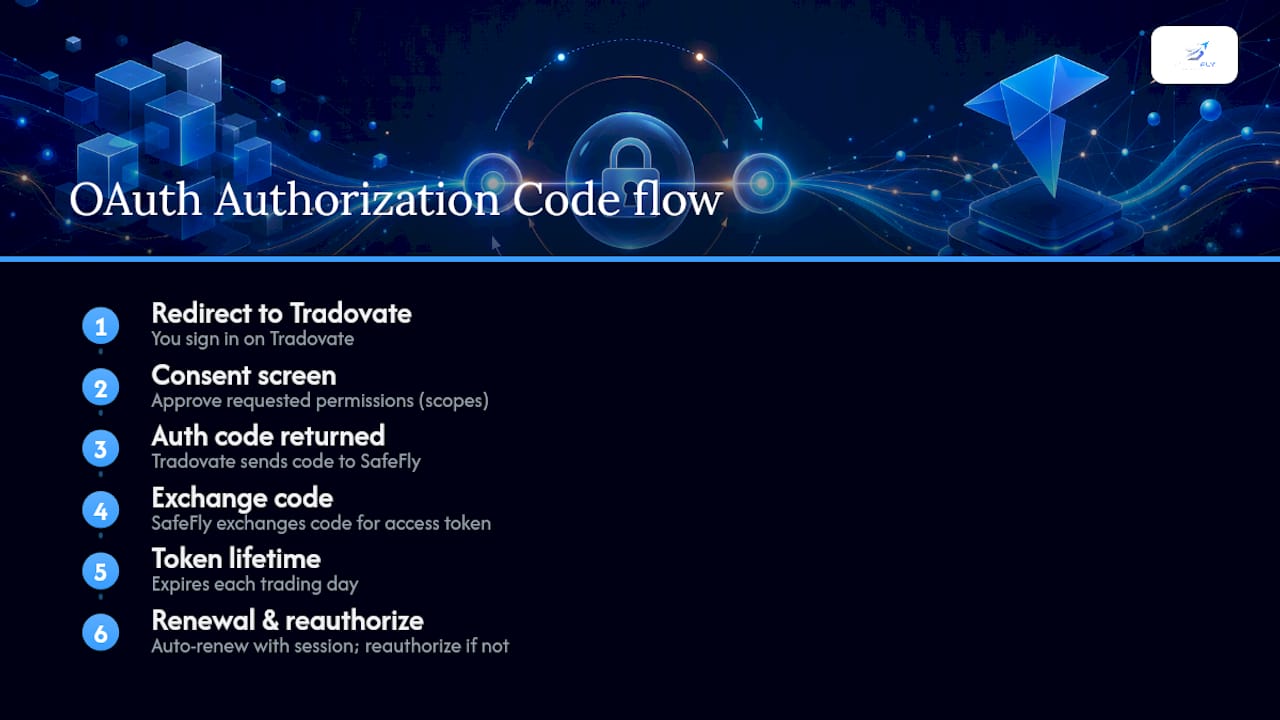
SafeFly uses the OAuth 2.0 Authorization Code flow — the same consent-driven pattern behind every "Connect your account" button in fintech — to request access to your Tradovate account without handling your password.
From your perspective, the flow completes quickly. SafeFly redirects you to Tradovate's login page, where you sign in directly. Tradovate then presents a consent screen listing the specific permissions SafeFly is requesting. You approve, Tradovate returns an authorization code to SafeFly, and SafeFly exchanges that code for an access token. That token is what SafeFly uses to place orders, read balances, and manage stops on your behalf.
The critical distinction is what SafeFly receives: a scoped token, not your credentials. Security analysts describe OAuth as the single most significant upgrade for account-aggregation security because it separates password handling from third-party apps entirely, reducing credential-exposure risk at the source. Your Tradovate username and password never leave Tradovate's systems.
Token lifetimes matter for day traders. Tradovate OAuth tokens expire after each trading day, and SafeFly handles automatic renewal while a mirroring session is active. If no session is running when a token expires, you will need to reauthorize. Some OAuth providers document 24-hour access token lifetimes with refresh tokens used to obtain new access tokens — Tradovate follows a comparable daily-expiry pattern.
Pro Tip: If you trade across multiple time zones or leave sessions running overnight, confirm that your SafeFly mirroring session is active before market open so automatic token renewal fires correctly.
Step-by-step: connecting one or more Tradovate accounts
The connect flow is linear and takes under two minutes per account. Have your Tradovate login credentials and any MFA device ready before you start.
- Sign into your SafeFly account at safefly.live.
- Navigate to Accounts (or Brokers / Connect, depending on your dashboard version).
- Select Tradovate from the broker list.
- SafeFly redirects you to Tradovate's authorization page. Sign in with your Tradovate credentials directly on Tradovate's site.
- On the Tradovate consent screen, review the requested permissions and click Authorize.
- Tradovate redirects you back to SafeFly. SafeFly completes the token exchange automatically.
- Select which Tradovate account(s) to attach to your SafeFly lead or follower configuration. Tradovate lists all available accounts during initialization, and you can specify each account by its
tradovate-account-nameparameter.
For demo/paper accounts, the flow is identical. Tradovate separates live and demo environments, so select the correct environment on the Tradovate authorization page. SafeFly's Tradovate copy trading guide recommends completing at least one full mirroring cycle on a demo account before switching to live.
Before you connect, have these ready:
- Tradovate username and password
- MFA device or authenticator app
- The exact account names as they appear in your Tradovate dashboard (case-sensitive)
- Confirmation of whether you are connecting a live or demo environment
Pro Tip: For multi-account setups, connect and test the lead account on demo first. Once mirroring behavior looks correct, add follower accounts one at a time so you can isolate any account-specific permission issues.
What permissions does SafeFly request on the Tradovate consent screen?
SafeFly requests the minimum scopes necessary to mirror trades and enforce risk controls. No scope grants SafeFly the ability to withdraw funds or change account credentials.
- Account information: Reads account names, IDs, and environment type (live vs. demo) so SafeFly can route orders to the correct account.
- Balances and positions: Monitors open positions and available margin to calculate stop placement and P&L lockout thresholds.
- Order create: Places mirrored orders and broker-side protective stops on follower accounts when the lead account executes a trade.
- Order cancel: Cancels or modifies open orders when a stop is triggered or a daily P&L lockout is reached.
- Market data (read): Reads current prices to size and place stops accurately relative to current market conditions.
Scope approval is not permanent. You can revoke any or all of these permissions at any time from Tradovate's connected-apps settings, and revocation takes effect immediately. SafeFly requests only what is operationally required — the platform does not request withdrawal permissions, account-settings write access, or any scope unrelated to trade execution and risk management.
Security note: OAuth's scope model means SafeFly's access is bounded by what you approved on the consent screen. If SafeFly ever requests a scope you do not recognize, do not approve the connection and contact SafeFly support before proceeding.
How do you revoke SafeFly's access to your Tradovate account?
Revoking SafeFly's OAuth token is an immediate kill-switch. The moment you revoke, SafeFly loses all API access to that Tradovate account — no orders can be placed, no positions read, no stops modified. You do not need to change your Tradovate password.
- Log into your Tradovate account.
- Navigate to Settings and then Connected Apps (or API Access, depending on your Tradovate interface version).
- Locate SafeFly in the list of authorized applications.
- Click Revoke or Remove Access.
- Confirm the revocation when prompted.
Tradovate invalidates the token server-side. SafeFly receives an authentication error on its next API call and stops all mirroring activity for that account. Any open positions placed before revocation remain open — revocation stops new activity, it does not close existing trades.
Pro Tip: After revoking, log into SafeFly and confirm the account shows as disconnected. If SafeFly still shows the account as active, refresh the dashboard or contact support — a cached connection state does not mean the token is still valid, but it is worth confirming.
Revocation is meaningfully different from changing your Tradovate password. A password change does not automatically invalidate existing OAuth tokens; revoking the token directly from connected-apps settings is the correct action when you want to terminate SafeFly's access.
How multi-account mirroring and broker-side risk controls work
SafeFly's multi-account mirroring model operates on a lead-follower architecture. The lead account executes a trade, SafeFly detects the order event via its OAuth connection to that account, and then routes a proportional order to each follower account using the OAuth token for that specific account. Each token is independent, so a connection issue on one follower does not affect the others.
Broker-side protective stops are placed at Tradovate — not just tracked in SafeFly's software. When SafeFly mirrors a trade to a follower account, it simultaneously submits a stop order to Tradovate using the order-create scope. That stop lives at the broker level, which means it remains active even if SafeFly disconnects, your internet drops, or the mirroring session is interrupted.
Daily P&L lockouts work similarly. SafeFly monitors the balance and positions scopes on each follower account throughout the trading day. When a configured daily loss threshold is reached, SafeFly uses the order-cancel and order-create scopes to flatten positions and block new orders for that account for the remainder of the session.
- Lead account executes a trade → SafeFly routes a mirrored order to each follower via its OAuth token.
- SafeFly simultaneously submits a broker-side protective stop to Tradovate for each follower position.
- Balances are monitored continuously; daily P&L lockout fires when the threshold is hit.
- Stops persist at Tradovate even during a SafeFly disconnection.
Pro Tip: Set your daily P&L lockout threshold conservatively on follower accounts during the first week of live mirroring. A tighter threshold gives you a clear signal if mirroring behavior deviates from expectations before larger losses accumulate.
Troubleshooting common connection and mirroring errors
| Problem | Likely cause | Quick fix |
|---|---|---|
| Account not listed after authorization | Account name mismatch or wrong environment selected | Verify the exact account name in Tradovate dashboard; confirm live vs. demo environment |
| Pop-up blocked during redirect | Browser blocking the Tradovate authorization window | Allow pop-ups for safefly.live in browser settings, then retry |
| Token expired, mirroring stopped | Daily token expiry with no active session | Reauthorize from SafeFly's Accounts page; keep a session active during trading hours |
| Stream or connection limit error | Too many concurrent API connections on one Tradovate account | Disconnect unused integrations in Tradovate's connected-apps settings |
| Orders not mirroring to follower | Follower account token revoked or expired | Reconnect the follower account; check Tradovate's connected-apps list |
Quick fixes to try first:
- Clear browser cache and cookies, then retry the authorization flow.
- Disable browser extensions that block redirects or pop-ups.
- Test the connection on a demo account before troubleshooting a live account.
- Check Tradovate's connected-apps settings to confirm SafeFly still appears as authorized.
Contact SafeFly support when the issue persists after reauthorization or when mirroring behavior is inconsistent across accounts. Check Tradovate's own settings first for token-expiry and account-permission errors — those are broker-side and SafeFly support cannot resolve them directly.
Pre-connect checklist before you authorize SafeFly
Complete these steps before starting the OAuth flow to avoid the most common setup errors.
Account and environment prep:
- Enable MFA on your Tradovate account before connecting.
- Note the exact, case-sensitive account names as they appear in Tradovate.
- Confirm whether each account is live or demo and which environment you intend to connect.
- If you trade through a prop firm, verify that the firm permits third-party OAuth connections before proceeding.
Testing protocol:
- Complete at least one full mirroring cycle on a demo account before connecting live accounts.
- Verify that broker-side stops appear in your Tradovate order book after a demo trade mirrors.
- Confirm daily P&L lockout fires at the configured threshold during demo testing.
Questions to ask SafeFly support before going live:
- How does SafeFly handle token renewal if a session drops mid-day?
- What happens to open follower positions if the daily P&L lockout fires?
- Does SafeFly place protective stops on the lead account, follower accounts, or both?
- Are there any restrictions for prop firm accounts regarding order-create scope usage?
Why OAuth is the right foundation for automated futures trading
OAuth is not just a convenience feature — it is the correct security architecture for any automation that touches live trading accounts. Giving a third-party platform your Tradovate password creates a static, unrevocable credential that persists until you change it. An OAuth token is scoped, time-limited, and revocable in seconds. For multi-account mirroring, where SafeFly holds tokens for several accounts simultaneously, that revocability is operationally significant. If anything looks wrong — an unexpected order, an unfamiliar position — you can cut SafeFly's access to one or all accounts from Tradovate's settings in under a minute, without disrupting your login or affecting other connected services.
The broker-side stop architecture reinforces this. SafeFly does not rely solely on software-level controls that disappear if the platform goes offline. Stops submitted to Tradovate via the order-create scope persist at the broker regardless of SafeFly's connection state. That separation of concerns — authorization at the broker, execution at the broker, risk controls at the broker — is what makes automated multi-account trading operationally defensible rather than just convenient.
SafeFly for multi-account Tradovate traders
Serious futures traders managing multiple Tradovate accounts need more than a mirroring tool. They need one that places risk controls at the broker level, not just in software that can go offline.

SafeFly connects to each Tradovate account via a secure OAuth token, mirrors trades from a lead account to followers automatically, and places broker-side protective stops on every mirrored position. Daily P&L lockouts enforce session-level risk limits without manual intervention. The platform includes detailed trade analytics and AI coaching to help you refine performance over time. Start with a 3-day trial, test on demo accounts first, and review the SafeFly risk disclosure before going live. When you are ready, visit SafeFly's pricing page to choose a plan and start your trial.
Sources
- Is It Safe to Link Your Brokerage Account to a Fintech App?
- What is OAuth 2.0? — WorkOS
- Tradovate brokerage supports OAuth Token Authentication (example config)
This article is general information, not a substitute for advice from a qualified financial advisor. Consult a qualified financial professional about your own circumstances before acting on anything here.