

Enforce server-side automated risk rules first: broker-side protective stops, account-level daily P&L lockouts, and max-order-size limits. That is the primary safety layer for anyone running multiple Tradovate accounts. In this context, automated risk rules mean the programmatic trade-safety policies that sit between your strategy and the exchange: protective stops attached at the broker, trade-mirroring safeguards, daily loss lockouts, and similar controls that fire without waiting for a human to react.
Mandatory controls to enable immediately on any Tradovate multi-account setup:
- Broker-side protective stops on every open position, not client-side only.
- A daily loss limit (DLL) with both a soft warning and a hard kill-switch.
- Max order-size limits per account and aggregated across mirrored accounts.
- Sane time-in-force defaults that avoid unintended market orders.
Statistic to know: Many proprietary trading firms cap daily losses at a small percentage of account equity, and that range is a reasonable starting benchmark even for traders who aren't operating under a funded-account agreement. SafeFly builds its lockout and mirroring logic around exactly this kind of server-side enforcement.
Key Takeaways
Automated risk rules work best when broker-side stops, daily P&L lockouts, and mirroring safeguards are enforced server-side rather than left to client-side discipline.
| Point | Details |
|---|---|
| Enforce broker-side first | Server-side stops survive disconnects; client-side controls fail exactly when you need them most. |
| Set a soft DLL threshold | Warn at 50% to 80% of your hard daily loss limit before the kill-switch fires. |
| Mirror with per-account overrides | Give every follower account its own stop scaling and max size to contain a single bad trade. |
| Roll out in stages | Simulate, pilot with three accounts, scale to twenty, then go full rollout. |
| Use SafeFly for mirrored stop insertion | SafeFly inserts broker-side protective stops on every mirrored Tradovate trade and enforces daily P&L lockouts automatically. |
Table of Contents
- Where Should Automated Risk Rules Live in Your Order Flow?
- What Automated Controls Should Every Multi-Account Setup Enforce?
- How Should Account Mirroring Be Designed for Safety?
- How Do You Test and Roll Out Automated Risk Rules Safely?
- What Metrics Should You Monitor in Real Time?
- What Should You Do This Week to Reduce Risk?
- Why Broker-Side Enforcement Is the Real Safeguard
- How SafeFly Automates These Risk Rules on Tradovate
- Frequently Asked Questions
- Sources
Where Should Automated Risk Rules Live in Your Order Flow?
Risk controls work in three places: on your trading terminal (client-side), inside your broker's order-routing layer (server-side), and at the exchange itself. Each catches a different failure, and none of them alone is sufficient.
Pre-trade controls should be the primary defense against inadvertent market activity, applied before an order ever reaches the exchange, rather than relying on post-trade credit checks to catch damage after it happens. The three layers break down like this:
- Client-side (trader terminal): Catches fat-finger errors and lets you set personal limits, but it dies the instant your platform disconnects or your automation script crashes.
- Broker-side (server-side): Enforces your rules from the broker's infrastructure, so it keeps working even if your laptop loses its connection or your bot throws an exception.
- Exchange-level: Price bands, daily price limits, and trading pauses that protect the whole market, not just your account.
For multi-account enforcement, broker-side is the layer that matters most. It survives disconnects, and it enforces limits even when your own automation misbehaves. Server-side controls like daily loss limits and auto-flatten logic exist specifically because client-side protections fail during outages.
Pro Tip: Check that your broker's price-band and circuit-breaker handling actually mirrors the exchange's published limits. If your stop containment logic assumes a wider band than CME actually allows, your stop can get skipped entirely during a fast market.
What Automated Controls Should Every Multi-Account Setup Enforce?
A functioning risk framework for mirrored Tradovate accounts rests on five categories of rules, each doing a specific job.
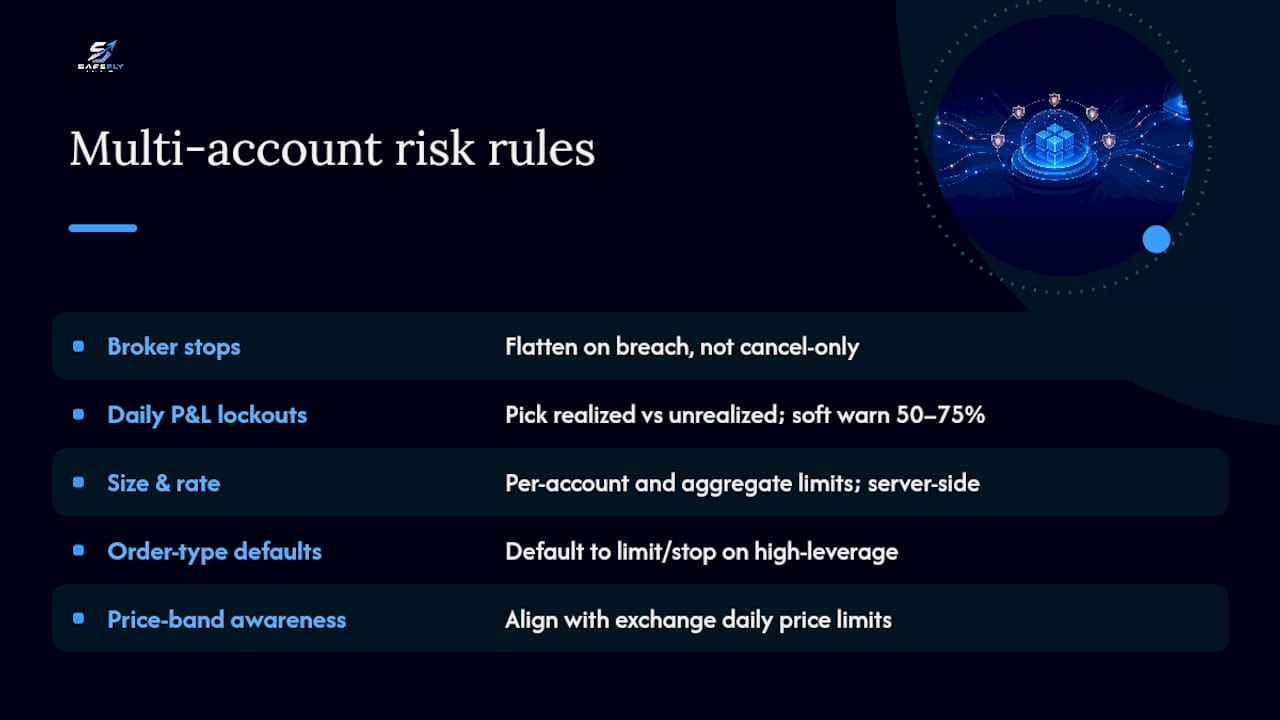
Protective broker-side stops. Every position gets an automatic stop the moment it's opened, configured to flatten on breach rather than sit as a cancel-only order. A cancel-only stop just removes the order. A flatten-on-breach stop actually closes the position, which is what you want when a disconnect leaves nobody watching the screen.
Daily P&L lockouts (DLL). Decide upfront whether your limit counts realized P&L only or includes unrealized exposure, because these two calculation methods produce very different trigger points and traders frequently misjudge which one their setup uses. Reset timing matters too: the exchange settlement convention around 5:00 PM CT is the common anchor point, and mismatched reset times between your DLL and your broker's session boundary is a frequent source of confusion. Set a soft threshold at 50% to 75% of your hard limit so you get a behavioral warning before the kill-switch fires, an approach several prop firms build this approach directly into their daily loss limit design.
Max order-size and order-rate limits. Set these per account and again on the aggregated total across every mirrored account, enforced server-side so a bug in your mirroring logic can't silently multiply size across five accounts at once.
Order-type and time-in-force defaults. Market orders execute fast but are exposed to slippage, while limit and stop orders trade execution certainty for price control. Default to limit or stop containment on high-leverage instruments rather than letting automation default to market orders during volatile stretches.
Price-band awareness. Align your internal rules with the exchange's own daily price limits and pause durations, since these exchange-level protections are meant to be transparent baseline safeguards that participants can plan around.
How Should Account Mirroring Be Designed for Safety?
Mirroring multiple Tradovate accounts off one lead account only works safely if the architecture treats the lead as the single source of truth and every follower as a semi-independent risk unit, not a blind copy target.
Use a lead/follower model where execution happens once in the lead account, and follower accounts receive an idempotent replay of that order rather than a raw re-broadcast. Idempotent replay means a duplicated message can't accidentally double your position.
Build in per-account overrides: each follower keeps its own stop scaling, its own max order size, and its own local DLL cap. Otherwise a single misconfigured lead trade can breach five accounts simultaneously instead of one.
Handle latency and partial fills deliberately. Fill-confirmation thresholds, where a follower only mirrors once the lead order is filled past a set percentage, prevent overexposure when a lead order fills slowly or in pieces. Sequence orders so a partial fill in the lead account doesn't trigger an oversized hedge in a follower.
- Confirm lead-order fill before replicating.
- Pause the follower queue on replication failure.
- Auto-flatten affected follower positions if replication can't be verified.
Pro Tip: When mapping fields to Tradovate's API order objects, insert the broker-side protective stop before the entry order is submitted, not after. If your script crashes between the two calls, you want the stop already in place.
How Do You Test and Roll Out Automated Risk Rules Safely?
Deploy in stages, never all at once. A staged rollout paired with a working kill-switch runbook is the standard approach for automated trading risk controls:
- Simulate first. Run the full rule set against historical or paper-trading conditions before touching real capital.
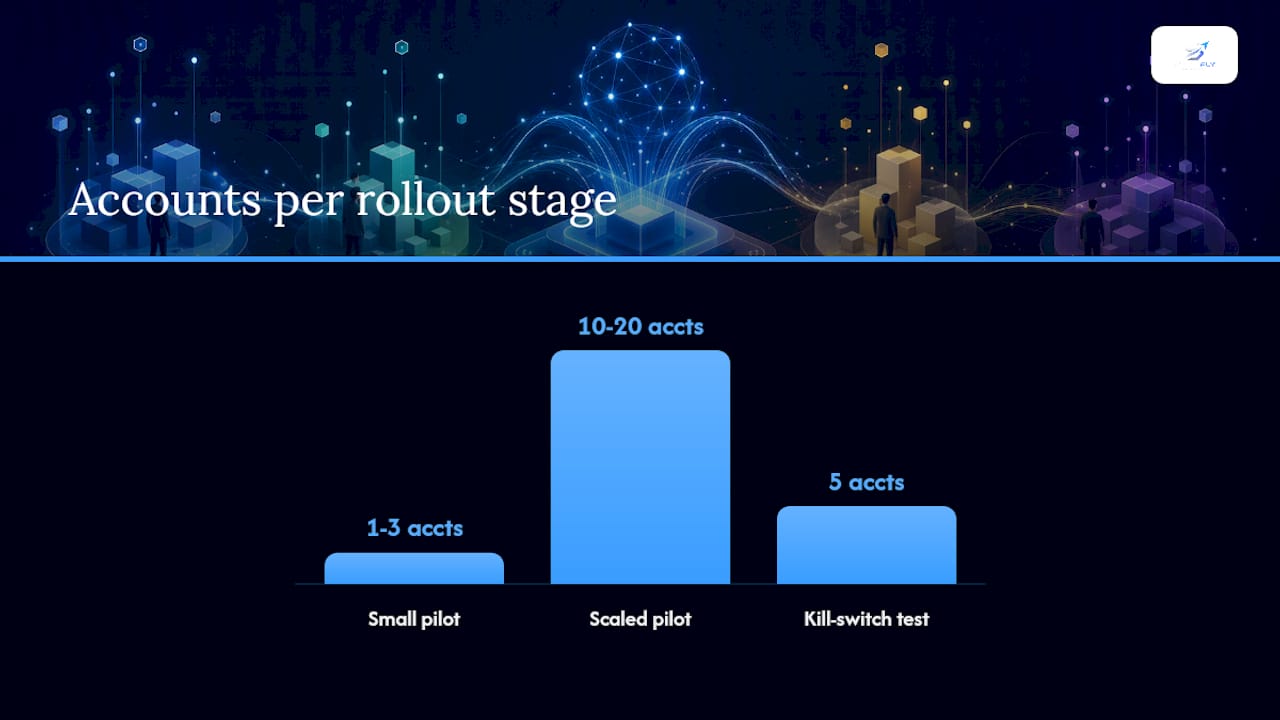
- Small pilot cohort. Move to one to three live accounts with tight max-size limits.
- Scaled pilot. Expand to ten to twenty accounts once the small cohort runs clean for a defined period.
- Full rollout. Only after the scaled pilot shows stable replication and stop-placement rates.
Test cases that matter most: forced disconnects mid-trade, partial fills across multiple instruments, API latency spikes, simultaneous slippage across correlated contracts, and exchange-triggered circuit breakers.
Your failure-mode playbook needs to be written down before you need it, not improvised during an incident. It should specify: immediate actions (flatten positions, cancel resting orders, disable new replication), an alerting chain with named owners, a communication template for affected accounts, and a post-mortem checklist.
Pro Tip: Run your kill-switch test on a Friday afternoon in a simulated environment before you ever rely on it live. You want to know exactly how long it takes to flatten five accounts, not guess.
What Metrics Should You Monitor in Real Time?
Five metrics tell you whether your rule set is actually working: replication latency in milliseconds, order-rejection rate, stop-placement success rate, P&L-trigger events split by soft and hard threshold, and the discrepancy count between lead and follower positions.
- Alert if replication latency exceeds 500 ms consistently.
- Alert if stop-placement failure rate exceeds 1% of attempts.
- Trigger auto-flatten and an incident alert immediately on any hard DLL breach.
Pair real-time paging alerts for hard breaches with a daily aggregated report for trend review. A stop-placement success rate that's fine at three accounts can degrade at fifteen, so revisit your thresholds as account count and order volume grow rather than assuming settings that worked at a small scale still hold.
What Should You Do This Week to Reduce Risk?
- Enable broker-side protective stops at a conservative level across every account.
- Set your personal DLL at roughly 50% to 80% of whatever limit your prop firm or broker imposes.
- Configure max-order-size limits per account and on the aggregated total.
- Run a three-account pilot with SafeFly mirroring and confirm stop-placement on every trade.
- Turn on real-time alerts for stop-placement failures before you scale past the pilot.
On the Tradovate side specifically: verify your API keys are current, confirm OAuth is properly enabled, and check your end-of-day reset time so your DLL calculations align with the exchange session boundary. Before going live, simulate a breach and confirm the kill-switch actually cancels orders, flattens positions, and blocks new entries.
Why Broker-Side Enforcement Is the Real Safeguard
Running mirrored accounts across a fleet of Tradovate logins exposes a hard truth fast: the failure that ends a trading day is rarely a bad entry. It's a disconnect, a stuck script, or a stop that never made it to the broker. Server-side enforcement, not client-side discipline, is what actually survives those moments. SafeFly was built around that premise, with broker-side stop insertion and a tested kill-switch as the core safeguard, not an add-on feature.
How SafeFly Automates These Risk Rules on Tradovate
SafeFly connects to your Tradovate accounts through secure OAuth and mirrors trades from a single lead account to every follower account you manage, inserting a broker-side protective stop on each replicated position automatically. That single design choice, stop insertion before the trade ever finalizes, is the difference between a mirroring tool and a trade-safety system.

SafeFly maps directly onto the controls covered above:
- Broker-side stops inserted on every mirrored order, not just the lead.
- Per-account daily P&L lockouts with soft and hard thresholds you set yourself.
- Replication safety checks, including fill-confirmation logic before a follower account copies a trade.
- Real-time alerting when stop-placement fails or a follower account falls out of sync.
If you're managing more than one Tradovate account today and doing the stop-placement manually, that's the exact gap SafeFly closes. Review the platform architecture and OAuth integration details to see how the mirroring and stop-insertion sequence works, or go straight to current subscription plans to start a trial and run your own three-account pilot this week.
Frequently Asked Questions
What are automated risk rules in futures trading? They're programmatic trade-safety controls, broker-side protective stops, daily P&L lockouts, max-order-size limits, and mirroring safeguards, enforced automatically without waiting on manual intervention.
Should stops be placed client-side or broker-side? Broker-side. Client-side controls fail during disconnects, while server-side enforcement keeps running regardless of what happens to your terminal.
What's a reasonable daily loss limit for multiple Tradovate accounts? A range of 1% to 5% of account equity is common among proprietary trading firms, and it's a sensible starting point even outside a funded-account structure.
How does account mirroring stay safe across multiple accounts? Through a lead/follower model with fill-confirmation thresholds, per-account stop scaling, and automatic pausing of the follower queue if replication can't be verified.
What should trigger an automatic kill-switch?
Sources
- FIA — Automated trading risk controls (2024)
- Risk controls and safety features in futures trading platforms — NexusFi Academy
- Daily loss limit rules at prop firms — FuturesHive (2026 guide)
- Daily loss limit explained — TradingFunder
- Futures order types — Robinhood Learn
- How to set daily loss limits in futures trading — YMI Blog