

Yes, you can automate a breakeven stop reliably. The most direct path is to use a platform's native Auto-Breakeven feature where it exists, then layer in broker-side protective stops for execution safety. Break even stop automation moves the stop-loss to the average entry price, plus an optional offset, once a defined profit threshold is reached. The result: a position that cannot lose more than the offset amount after the trigger fires.
Three approaches cover most use cases:
- Native platform settings (NinjaTrader ATM, Tradovate ATM): The fastest path for single-account GUI traders. Configure Profit Trigger, Plus/Offset, and Auto Trail directly in the platform's ATM template. No code required.
- Broker-side or OMS protective stops: Appropriate when platform-side automation may disconnect. Broker-side enforcement ensures the stop survives session interruptions.
- Custom EA or trade manager (MQL5, EasyLanguage, Python + broker API): Necessary for multi-account mirroring, conditional logic beyond what the GUI exposes, or cross-platform deployments.
Pro Tip: Choose native ATM settings for simplicity and speed. Move to a custom implementation only when you need logic the GUI cannot express, such as incremental trailing steps or multi-account replication.
Key Takeaways
Reliable breakeven stop automation requires matching the Profit Trigger to instrument volatility, validating short and long behavior separately, and combining platform-side automation with broker-side protective stops.
| Point | Details |
|---|---|
| Use native ATM first | NinjaTrader and Tradovate ATM settings cover most single-account breakeven needs without custom code. |
| Match trigger to ATR | Set Profit Trigger at 0.5–2.0 × 5-min ATR depending on instrument volatility; static tick counts drift out of calibration. |
| Validate short/long separately | Offset direction can invert for short positions on some platforms; test both sides before live deployment. |
| Backtest stop logic explicitly | Including stop movement in the backtest, not just entry/exit signals, produces materially different P&L and drawdown results. |
| SafeFly for multi-account reliability | SafeFly enforces broker-side protective stops and daily P&L lockouts across all mirrored Tradovate accounts, independent of platform session state. |
Table of Contents
- How does break even stop automation actually work?
- How to configure Auto-Breakeven on NinjaTrader, Tradovate, and Quantower
- How do you implement breakeven automation in code?
- What are practical trigger and offset values by instrument?
- What edge cases and failure modes should you plan for?
- How should you test breakeven automation before going live?
- How SafeFly handles automated protective stops across multiple accounts
- A note on automation discipline and its limits
- SafeFly brings broker-side protection to multi-account breakeven workflows
- Sources
How does break even stop automation actually work?
The mechanism is straightforward. When a trade's unrealized profit reaches the Profit Trigger (expressed in ticks, points, or currency depending on the platform), the automation modifies the stop-loss order to the entry price plus a Plus/Offset value. That offset compensates for spread or slippage so the stop sits slightly above breakeven rather than exactly at it.
Core parameters to understand before configuring any platform:
- Profit Trigger: The profit level, in ticks, points, or dollar value, at which the stop moves. Setting this too tight relative to instrument volatility causes premature triggers on normal noise.
- Plus/Offset: The distance above entry (for longs) the stop is placed after the trigger fires. A zero offset means the stop lands exactly at entry; a positive offset locks in a small profit.
- Frequency (once vs. repeated): Some platforms allow the breakeven move to fire once or to repeat on each new profit level. "Once" is standard for a pure breakeven move; "repeated" begins to behave like a trailing stop.
- Auto Trail interaction: When both Auto Breakeven and Auto Trail are enabled, the trailing behavior typically starts after the breakeven move completes. The MQL5 Trade Manager article recommends setting
trailingStartPointsequal tobreakEvenTriggerPointsto prevent overlapping triggers.
Order type matters. A stop-market order executes at the next available price after the stop is touched, which introduces slippage risk during fast markets. A stop-limit order avoids that slippage but risks non-fill if price moves through the limit. Most breakeven automation uses stop-market for reliability.
Pro Tip: Check your broker's freeze level, the minimum distance from the current price at which an order modification is accepted. Attempting to modify a stop inside the freeze level will be rejected silently on some platforms. Build a freeze-level check into any custom implementation.
How to configure Auto-Breakeven on NinjaTrader, Tradovate, and Quantower
NinjaTrader ATM strategy
NinjaTrader's ATM (Advanced Trade Management) system is the most documented native implementation of breakeven automation. Configuration steps:
- Open the ATM Strategy panel from the chart or order entry window.
- Select or create a template. Name it descriptively (e.g.,
ES_BE_4pt). - Set Stop Loss type to Auto Breakeven.
- Enter the Profit Trigger in ticks or points. For the E-mini S&P 500 (ES), 4 points (16 ticks) is a common starting value.
- Set the Plus field to the offset above entry where the stop will rest after triggering. A value of 2 ticks is a conservative buffer.
- If trailing is desired after breakeven, enable Auto Trail and set the trail distance and frequency.
- Save the template. Load it at order entry to apply the same parameters consistently.
Tradovate ATM and Auto Breakeven
Tradovate's ATM Strategies support Auto Breakeven and Auto Trail natively. The Profit Trigger can be expressed in ticks, price distance, or dollar value, which makes it flexible across instruments. Setup sequence:
- Navigate to Trade > ATM Strategies in the Tradovate web or desktop app.
- Create a new ATM template or edit an existing one.
- Under Stop Loss, select Auto Breakeven.
- Set Profit Trigger (ticks by default) and Plus/Offset.
- If Auto Trail is needed, enable it and configure the Frequency setting, which controls how often the trail updates.
- Save and apply the template to your bracket order.
Trailing stop behavior in Tradovate differs between ATM and non-ATM modes. Outside an ATM, a trailing stop tracks price tick-for-tick but does not support the Auto Breakeven trigger. The ATM version is the correct tool for combined breakeven-plus-trail logic.
Quantower and community notes
Quantower supports stop management through its order panel, but native Auto-Breakeven as a named feature is less standardized than in NinjaTrader or Tradovate. Community threads consistently flag two limitations: precision constraints (some configurations only allow whole-tick increments) and asymmetric behavior between long and short positions. The Tradovate community forum contains practitioner-tested setups that apply broadly to platforms with similar parameter structures.
Pro Tip: After saving an ATM template, take a screenshot of the settings window and store it with your strategy documentation. Parameter drift across template versions is a common source of unexpected behavior in live trading.
Platform note: Tradovate's ATM Auto Breakeven and NinjaTrader's ATM Auto Breakeven share conceptual parity, but unit defaults differ. Tradovate defaults to ticks; NinjaTrader may default to ticks or points depending on the instrument. Confirm units before entering numeric values.
How do you implement breakeven automation in code?
A custom trade manager follows an event-driven architecture. Three events drive the logic: trade fill (entry), price tick or candle close (monitoring), and order status change (confirmation or rejection).

State model
Each tracked position carries:
ticket— unique order identifierentryPrice— fill price at opencurrentStop— last confirmed stop priceisMovedToBreakEven— boolean flag, prevents duplicate modificationspartialCloseState— tracks whether a scale-out has occurredretryCount— limits modification attempts after rejection
Core pseudocode
ON_TRADE_FILL(trade):
    tracker.add(trade.ticket, trade.entryPrice, trade.initialStop)

ON_PRICE_TICK(currentPrice):
    FOR EACH position IN tracker:
        IF position.isMovedToBreakEven == FALSE:
            profitInTicks = (currentPrice - position.entryPrice) / tickSize
            IF profitInTicks >= breakEvenTriggerPoints:
                newStop = position.entryPrice + (breakEvenLockPoints * tickSize)
                result = broker.modifyStop(position.ticket, newStop)
                IF result.success:
                    position.currentStop = newStop
                    position.isMovedToBreakEven = TRUE
                    alert("Breakeven stop set for " + position.ticket)
                ELSE IF result.error == FREEZE_LEVEL_VIOLATION:
                    position.retryCount += 1
                    schedule_retry(position, delay=500ms)
        ELSE IF trailingEnabled AND position.isMovedToBreakEven:
            trailStop = currentPrice - (trailingDistancePoints * tickSize)
            IF trailStop > position.currentStop:
                broker.modifyStop(position.ticket, trailStop)
                position.currentStop = trailStop
The MQL5 Trade Manager implementation uses breakEvenTriggerPoints and breakEvenLockPoints as the canonical parameter names for this pattern, with trailing logic gated behind the isMovedToBreakEven flag. For EasyLanguage environments, Unger Academy's breakeven stop code provides a directly adaptable reference.
Pro Tip: Set isMovedToBreakEven = TRUE immediately before the broker call, not after. If the call succeeds but the response is delayed, a second tick can trigger a duplicate modification. Idempotency at the flag level prevents double-fires.
Pro Tip: Race conditions between the price feed and the order status feed are the most common source of incorrect stop placement in live environments. Use a dedicated order-status websocket subscription and reconcile stop state against broker confirmations every 30 seconds.
For short positions, invert the profit calculation and the offset direction. A Tradovate community thread documents cases where the Plus/Offset behaves in the opposite direction for shorts, placing the stop further from entry rather than closer. Validate with a small test trade on each instrument before deploying at scale.
What are practical trigger and offset values by instrument?
Parameter selection depends on instrument volatility. A static tick count that works for the ES will trigger too early on a low-volatility FX pair and too late on a high-volatility single stock. Tying the Profit Trigger to the instrument's average true range (ATR) over a 5-minute period is a reliable starting framework.
A practitioner-tested incremental stop plan from the Tradovate community forum illustrates the logic:
- Initial stop: 5 points below entry
- Move to breakeven at 4 points of profit
- Move stop to 4.5 points above entry when profit reaches 5 points
- Move stop to 5 points above entry when profit reaches 5.5 points
This sequence locks in progressively more profit without requiring a full trailing stop. Platforms that support only a single breakeven trigger cannot replicate this natively; it requires either a custom EA or manual intervention at each step.
Rules of thumb by volatility regime:
- Low-volatility instruments (e.g., short-dated FX pairs): Profit Trigger at 0.5–1.0 × 5-min ATR. Plus/Offset of 1–2 ticks. Tight parameters reflect the instrument's narrow range.
- Medium-volatility futures (e.g., ES, NQ): Profit Trigger at 1.0–1.5 × 5-min ATR, typically 3–6 points for ES. Plus/Offset of 2–4 ticks.
- High-volatility instruments (e.g., individual equity options, crude oil): Profit Trigger at 1.5–2.0 × 5-min ATR. Wider offsets (4–8 ticks) to avoid stop-outs on normal retracements.
When selecting instruments by volatility profile, asset volatility guidance can inform which instruments warrant wider triggers and larger offsets.
Backtesting stop-management parameters, specifically the trigger level and the offset, materially changes a strategy's P&L and drawdown profile. The Edgeful breakeven stop algo demonstrates this with a two-parameter model (trigger% and move stop loss%) and shows that including stop movement decisions in the backtest removes subjectivity from parameter selection.
What edge cases and failure modes should you plan for?
Breakeven automation fails in predictable ways. Knowing the failure modes before deployment is more useful than discovering them during a live session.
Common failure modes:
- Broker freeze levels: The broker rejects a stop modification when price is too close to the current market. The stop does not move. Without a retry mechanism, the position remains unprotected.
- Partial fills: If an entry order fills in multiple lots, the average entry price differs from the first fill price. An EA that uses the first fill price as entry will place the breakeven stop incorrectly.
- Order rejections during high-latency events: Economic data releases cause latency spikes. A modification sent during a spike may time out without confirmation. Log all modification attempts with timestamps.
- Short/long offset asymmetry: As noted in the Tradovate community thread on offset behavior, some platforms apply the Plus/Offset in the wrong direction for short positions. Test both sides explicitly.
- Spread widening: Around major news events, spreads widen. A stop placed at entry plus 2 ticks may be inside the spread and trigger immediately. Use a larger offset buffer during known high-volatility windows.
- Gap opens: Overnight or weekend gaps can move price through a breakeven stop without executing at the stop price. Broker-side protective stops at a wider level provide a secondary defense.
Mitigation checklist:
- Implement freeze-level detection before every modification attempt.
- Use average fill price, not first fill price, for partial-fill scenarios.
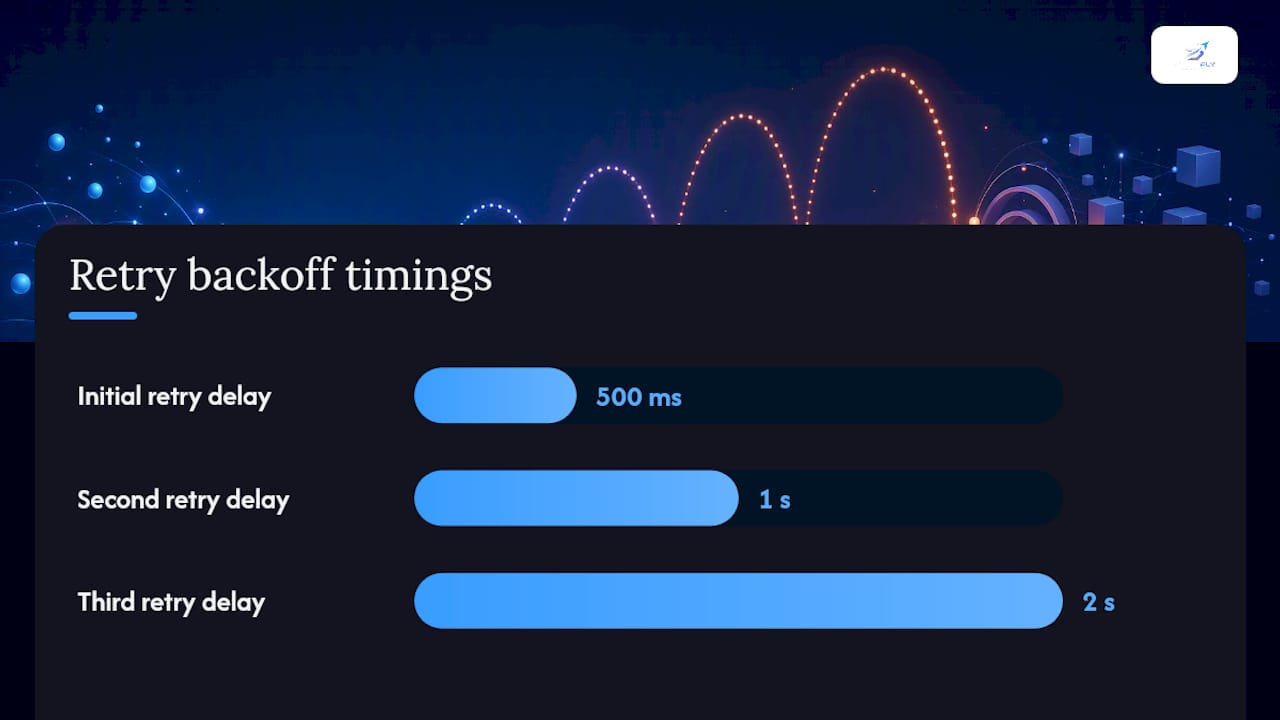
- Add retry logic with exponential backoff (500ms, 1s, 2s) for rejected modifications.
- Configure platform or broker alerts for every stop modification event.
- Place broker-side protective stops at a wider level as a fallback independent of platform automation.
- Increase the Plus/Offset buffer by 2–4 ticks around scheduled economic events.
For multi-account deployments, replication delays between a lead account and mirror accounts can cause the breakeven trigger to fire at slightly different price levels across accounts. Cross-account consistency checks, comparing stop prices across all mirrored positions after each modification, catch drift before it compounds.
Pro Tip: Combine platform-side breakeven automation with broker-side protective stops at all times. Platform automation handles normal conditions; broker-side stops handle disconnections, crashes, and latency events that the platform cannot respond to.
How should you test breakeven automation before going live?
Testing breakeven automation requires more than a standard strategy backtest. The stop-management logic itself must be validated independently of the entry/exit signals.
Testing sequence:
- Unit test the order-modify logic in isolation. Feed synthetic price sequences that cross the Profit Trigger and confirm the stop moves to the correct price. Test long and short positions separately.
- Backtest with stop management included. Use historical tick data to replay the full sequence: entry fill, price movement, trigger, stop modification, and eventual exit. The Edgeful breakeven stop algo demonstrates that including stop movement in the backtest produces materially different results than assuming a static stop.
- Paper trade for a minimum of two weeks across varying market conditions. Include at least one high-volatility session (e.g., a Fed announcement day) to observe behavior under stress.
- Run a small live pilot with one contract and reduced position size. Monitor modification success rate, slippage on modified stops, and frequency of manual overrides.
- Scale with monitoring. Add accounts or contract size only after the pilot shows consistent behavior across 50+ trades.
Key metrics to track during testing and rollout:
- Modification success rate: Percentage of breakeven trigger events that result in a confirmed stop modification. A rate below 95% indicates a systemic issue with freeze levels or latency.
- Slippage on modified stops: The difference between the intended stop price and the actual execution price when the stop is hit.
- Manual override frequency: How often a trader intervenes to adjust a stop the automation placed. High override rates signal a parameter mismatch with current market conditions.
- P&L impact per parameter set: Compare net P&L across different Profit Trigger and Plus/Offset combinations using backtested data before selecting live parameters.
How SafeFly handles automated protective stops across multiple accounts
Single-account breakeven automation is a solved problem on most platforms. The harder challenge is maintaining consistent stop placement across multiple accounts simultaneously, particularly when network conditions vary or a session disconnects mid-trade.
SafeFly addresses this directly for futures traders operating multiple Tradovate accounts. Key platform behaviors:
- Broker-side protective stops: Every mirrored trade is executed with a broker-side protective stop, independent of the platform session state. If the platform disconnects, the stop remains active at the broker level. This is the primary defense against the gap and disconnection failure modes described above.
- Multi-account mirroring: Trades from a lead account are replicated to mirror accounts automatically, with each receiving its own protective stop. The SafeFly multi-account mirroring architecture ensures stop placement is consistent across accounts rather than dependent on sequential replication.
- Daily P&L lockouts: SafeFly enforces daily profit and loss limits at the account level. When a limit is reached, the account stops accepting new trades, preventing automation from compounding losses during adverse sessions. Full details on these risk controls are documented on the platform's risk disclosure page.
- OAuth-secured integration: Account connections use OAuth, which limits the credential exposure that comes with API key-based integrations.
- Trade analytics and AI coaching: Post-session analytics allow traders to review stop placement accuracy, modification timing, and P&L impact by parameter set, which directly supports the parameter tuning process described in the testing section.
For traders running more than two Tradovate accounts, manual stop replication introduces execution risk at every trade. SafeFly removes that dependency by enforcing protective stops at the broker level regardless of platform state.
A note on automation discipline and its limits
Automation reduces emotional error in stop management. A trader who manually moves a stop to breakeven will sometimes hesitate, sometimes move it too early, and sometimes forget entirely during a fast market. An automated system does none of those things. That consistency is the primary value.
The risk is misplaced confidence. A well-configured automation running on the wrong parameters is more dangerous than a manual trader who at least notices when conditions change. Practitioners who build these systems consistently note that parameter selection requires as much discipline as the automation itself. A Profit Trigger set without reference to current ATR, or a Plus/Offset that ignores typical spread behavior, will produce results that look nothing like the backtest.
The practical discipline is this: treat the parameters as live variables, not fixed settings. Review them after every 50 trades or after any significant change in market volatility. Automation handles execution; the trader handles calibration.
SafeFly brings broker-side protection to multi-account breakeven workflows
Traders managing a single Tradovate account can configure breakeven automation directly through the platform's ATM settings. The gap appears at scale: replicating consistent stop placement across three, five, or ten accounts manually introduces the exact execution errors that automation is supposed to eliminate.
SafeFly closes that gap. Every trade mirrored across Tradovate accounts carries a broker-side protective stop enforced at the broker level, not dependent on the platform session remaining active. Daily P&L lockouts prevent runaway losses across all accounts simultaneously. Trade analytics give traders the data to tune Profit Trigger and offset parameters from real execution history rather than assumptions.

The platform operates on a subscription model with a 3-day trial. Traders who want to see the full architecture before committing can review how SafeFly works or go directly to pricing to evaluate plan options.
Sources
- Building a Smart Trade Manager in MQL5: Automate Break-Even, Trailing Stop, and Partial Close - MQL5 Articles
- Trailing Stop Orders - Tradovate
- Confused about auto-breakeven settings - Tips and tricks - Tradovate Forum
- How to Set a Breakeven Stop and Stop Profit (with code in ...)
- the IB breakeven stop algo: how to automate stop management with backtested data | edgeful blog
This article is general information, not a substitute for advice from a qualified financial advisor. Consult a qualified financial professional about your own circumstances before acting on anything here.