

For small, uniform fleets of two or three Tradovate accounts with identical contract sizes, native Group Trade is operationally sufficient. For anything larger, heterogeneous in sizing, or dependent on bracket/ATM preservation, production automation is the correct path. The decision point is not preference; it is a function of what Group Trade structurally cannot do.
Group Trade fans out a single order submission to every account in a defined group, but it does not preserve bracket or ATM strategies, cannot link accounts across different brokerage provider identities, and requires every order to be submitted in exact multiples of the group's total quantity. These are hard architectural constraints, not configuration gaps. Automation platforms address all three by adding per-account multipliers, symbol mapping, and server-side lifecycle mirroring.
If your fleet is two accounts trading the same instrument at the same size, configure Group Trade today and test with a single contract. If you need per-account sizing, symbol replacement such as ES to MES, or bracket preservation across a prop firm and a personal account, start a SafeFly trial instead.
Table of Contents
- What does Tradovate Group Trade actually do, and where does it stop?
- How do you configure and place a Group Trade in Tradovate?
- What are the subaccount rules and balance requirements at Tradovate?
- When is Group Trade enough, and when do you need automation?
- How does SafeFly-style automation solve advanced multi-account needs?
- Concrete workflows, go-live checklist, and position-sizing calculations
- Common gotchas traders report and how to fix them
- Key Takeaways
- The case for getting the architecture right before scaling
- SafeFly for production-grade multi-account automation
- Useful sources for further reading
What does Tradovate Group Trade actually do, and where does it stop?
Group Trade lets traders define an unlimited number of groups, assign accounts to each group, and set a per-account quantity for every member. One order submission fans out to all accounts simultaneously. The Orders module displays individual orders per account, and the Positions module shows aggregated positions for the selected group, which is useful for monitoring net exposure across a small fleet.
Three hard limits define the operational boundary of this feature:
- No ATM or bracket preservation. Group Trade does not support bracket or ATM strategies; stop and limit legs must be entered manually after the initial order fills, or managed through external automation.
- Same brokerage provider only. Group Trade cannot link a Tradovate brokerage account with a prop firm account from a different provider, even when that prop firm runs on Tradovate infrastructure on the back end.
The aggregated DOM and Chart view for a selected group is a genuine monitoring convenience. However, bracket prices are resolved once before fan-out, not dynamically per account, so bracket legs do not replicate with per-account precision. Cancel All and Reverse & Cancel functions operate across all accounts in the group when the group is selected, which is useful but requires deliberate attention to avoid unintended exits.
Pro Tip: Before going live, submit a single-contract test order with the group selected, then verify that individual orders appear in the Orders module for each account and that the Positions module reflects the correct aggregated quantity. Confirm Cancel All behavior on a demo account before using it in a live session.
How do you configure and place a Group Trade in Tradovate?
Setup follows a linear sequence in the Tradovate web application. The steps below reflect the current UI as documented in official support materials.
- Open the account dropdown in the top navigation bar.
- Select Manage Groups from the dropdown menu.
- Click Create New Group and assign a descriptive name.
- Add each target account to the group using the account selector.
- Set the per-account quantity for each member. Record the group total (the sum of all per-account quantities).
- Close the group manager and select the new group from the account dropdown.
- Submit a test order in a quantity that is an exact multiple of the group total.
- Open the Accounts Module via the New (+) menu to verify account status and add tabs for per-account filtering.
- Confirm individual orders appear per account in the Orders module and that the Positions module shows the correct aggregated position.
A practical example: a group with accounts set to 1, 1, and 2 contracts has a total of 4. Valid order sizes are 4, 8, 12, and so on. An order of 3 contracts will be rejected. This constraint becomes operationally limiting when accounts have different equity levels and require proportional sizing rather than fixed multiples.
Pro Tip: Run a full dry-run on Demo accounts before switching to live. Verify the Orders module shows separate fills per account, check that the Positions module aggregates correctly, and confirm that Cancel All only affects the group you intend.
What are the subaccount rules and balance requirements at Tradovate?
Tradovate supports multiple account types and subaccounts for traders managing different strategies or managed accounts. The key policies that affect multi-account operations are:
- Multiple accounts are permitted. Tradovate's FAQ confirms that traders may open more than one account and provides the subaccount request process.
- Subaccount application is required. Subaccounts must be requested through a formal application process; they are not opened through the standard account creation flow.
- Minimum combined balance — Traders with up to four accounts in an account group must maintain a minimum combined account balance meeting Tradovate's stipulated threshold.
- Compliance documentation — Subaccount applications may require additional paperwork depending on account type and strategy classification. Traders managing accounts on behalf of others should confirm the applicable regulatory requirements with their compliance counsel.
The $25,000 combined balance threshold is the most operationally significant constraint for traders scaling from two to four accounts. Exceeding four accounts in a group may trigger additional requirements not publicly listed in current support documentation.
When is Group Trade enough, and when do you need automation?
The decision follows three criteria: fleet size and uniformity, contract and symbol heterogeneity, and order-type fidelity requirements.
Three-item rule of thumb:
- Fleet size: Two or three accounts with identical sizing and the same instrument. Group Trade is sufficient.
- Heterogeneity: Different account sizes, different instruments (ES versus MES), or prop firm accounts alongside personal accounts. Automation is required.
- Order-type fidelity: Any strategy that uses brackets, ATMs, or trailing stops. Automation is required.
Decision checklist:
- All accounts are under the same Tradovate brokerage provider identity? (Yes/No)
- All accounts trade the same instrument at the same contract size? (Yes/No)
- No bracket or ATM strategies are used? (Yes/No)
- Order sizes are always exact multiples of the group total? (Yes/No)
If all four answers are Yes, native Group Trade covers the workflow. Any No answer indicates a structural gap that Group Trade cannot resolve.
Short decision matrix:
- Small uniform fleet (2–3 accounts, same instrument, same size): Configure Group Trade natively.
- Mixed-size fleet or different instruments: Use an automation platform with per-account multipliers and symbol mapping.
- Prop firm plus personal account combination: Automation only; Group Trade cannot cross provider boundaries.
- High-frequency or bracket-dependent strategies: Automation with server-side lifecycle management is the only viable path.
How does SafeFly-style automation solve advanced multi-account needs?
Third-party trade copiers address the structural gaps in native Group Trade by adding per-follower sizing, symbol replacement, and full trade-lifecycle mirroring. SafeFly implements this architecture with a specific focus on broker-side safety controls.
Core features that matter for production use:
- Per-account multipliers and percentage-of-equity sizing, so a $50,000 account and a $25,000 account can each receive proportionally correct contract quantities from the same leader signal.
- Symbol mapping, such as routing ES signals to MES on smaller follower accounts, without modifying the leader's configuration.
- Server-side bracket and stop/target management, so protective stops are placed at the broker level and remain active even if the client application disconnects.
- Daily P&L lockouts that halt new order placement when a defined loss threshold is reached, preventing runaway signals from compounding losses across a fleet.
- Secure OAuth-based connections to Tradovate, eliminating the need to store or transmit raw API credentials.
- Detailed trade analytics and AI-driven performance coaching to support post-session review across all accounts.
Feature-to-benefit mapping:
| Platform capability | Trader pain point addressed |
|---|---|
| Per-account multipliers | Proportional sizing across accounts with different equity |
| Symbol mapping (ES → MES) | Running micro and standard contracts from one leader |
| Broker-side protective stops | Position protection during disconnections or platform failures |
| Daily P&L lockouts | Preventing runaway losses across a multi-account fleet |
| OAuth authentication | Secure credential management without API key exposure |
| Trade analytics + AI coaching | Identifying execution patterns and improving strategy performance |
A representative workflow: the leader account executes a trade in the Tradovate platform. SafeFly detects the fill via its secure connection, applies per-follower sizing rules and any symbol mapping, and places the corresponding order on each follower account with a broker-side protective stop already attached. If the daily loss limit on any follower account is reached, that account's order flow is suspended automatically while others continue. Learn more about this architecture at SafeFly's how-it-works page.
Concrete workflows, go-live checklist, and position-sizing calculations
Sample position-sizing calculation:
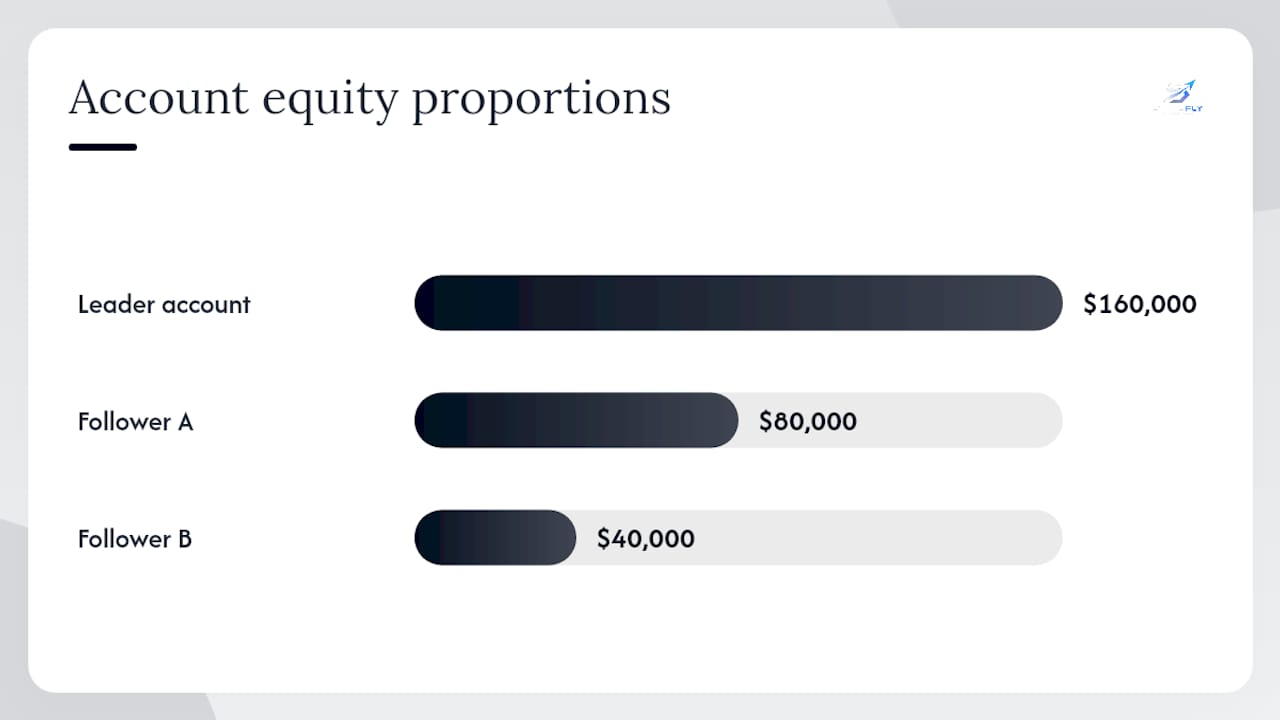
A leader account trades 2 ES contracts. Follower Account A has $80,000 in equity; Follower Account B has $40,000. The leader's equity is $160,000. The sizing rule is proportional to equity.
- Account A ratio: $80,000 / $160,000 = 0.5 → 0.5 × 2 = 1 ES contract
- Account B ratio: $40,000 / $160,000 = 0.25 → 0.25 × 2 = 0.5 → rounds to 1 MES contract (via symbol mapping)
This calculation is applied per signal, not per session, so position sizes adjust automatically as account equity changes.
Go-live checklist:
- Complete all configuration and testing in Tradovate's Demo environment.
- Verify that each follower account receives the correct quantity and instrument on every test signal.
- Confirm reconciliation logic handles partial fills and rejections without leaving orphaned positions.
- Set daily P&L lockout thresholds for each follower account before switching to live.
- Configure alerting for rejected orders, missed fills, and out-of-sync position states.
- Review the SafeFly risk disclosure and confirm that all risk parameters are documented.
- Schedule a weekly review of fill logs, rejection rates, and P&L across all accounts.
| Workflow mode | Signal source | Order-type fidelity | Best for |
|---|---|---|---|
| Webhook-driven signal | TradingView / custom alert | Full (configurable) | Systematic strategies with defined entry/exit rules |
| Execution copy | Leader account fills | Fill-level replay | Discretionary traders replicating manual entries |
| Hybrid | Signal + manual override | Configurable | Mixed systematic and discretionary approaches |
Pro Tip: Run a multi-day simulation in Demo with realistic signal frequency before increasing position size or adding accounts. Monitor the order and rejection logs daily during the first week of live operation. A single misconfigured multiplier can produce outsized exposure across a fleet before the next manual review cycle.
For additional context on copy-trading workflows specific to Tradovate, the SafeFly blog on Tradovate copy trading covers practical implementation patterns.
Common gotchas traders report and how to fix them
Multi-account configurations surface a consistent set of operational problems. The following are the most frequently reported issues and their immediate remediation steps.
- Bracket legs not preserved after fill — Group Trade does not support bracket preservation. Enter stop and limit legs manually after each fill, or migrate to an automation platform that manages the full order lifecycle server-side.
For account-level verification, open the Accounts Module via the New (+) menu in the Tradovate web application and add tabs to filter by individual account. This view confirms account status, permissions, and current positions without navigating away from the trading interface.
Community best practices include using descriptive account names that reflect the account's role (leader, follower-A, prop-eval), cycling through accounts in the Accounts Module after any configuration change, and reviewing fill logs at the end of each session to catch partial executions before they compound into position drift.
Key Takeaways
Native Group Trade covers small, uniform fleets; production automation is required the moment sizing, symbols, or order types diverge across accounts.
| Point | Details |
|---|---|
| Group Trade hard limits | No bracket/ATM support, same-provider only, orders must be exact multiples of the group total. |
| Subaccount balance rule | Traders with up to four accounts in a group must maintain a minimum combined balance of $25,000. |
| API multi-account method | Every order must include a specific account ID; loop through account IDs and apply per-account sizing logic. |
| Decision threshold | Use Group Trade for 2–3 uniform accounts; adopt automation for mixed sizing, symbol mapping, or bracket strategies. |
| SafeFly automation | Provides per-account multipliers, broker-side protective stops, daily P&L lockouts, and OAuth-secured connections for production-grade multi-account management. |
The case for getting the architecture right before scaling
The most common mistake in multi-account futures trading is treating Group Trade as a scaling tool rather than a convenience feature for small, identical fleets. Traders add a third or fourth account, discover the multiples constraint mid-session, and either submit oversized orders or abandon the group configuration entirely. Neither outcome is acceptable in a live market.
The more consequential gap is bracket preservation. A strategy that relies on ATM or bracket orders for risk management is structurally incompatible with native Group Trade. Placing stop and limit legs manually across four accounts after a fast fill is not a workflow; it is a liability. The operational case for server-side lifecycle management is not about convenience. It is about whether protective orders exist at the broker level before the next price move.
Traders who use SafeFly's broker-side protective stop feature are not adding a redundant safety layer. They are replacing a manual process that fails under pressure with one that executes regardless of client connectivity. That distinction matters most precisely when market conditions make manual intervention least reliable.
For traders evaluating AI-assisted execution tools alongside their multi-account setup, TradeAiFi offers automated execution capabilities for stocks, options, and futures that complement a multi-account workflow.
SafeFly for production-grade multi-account automation

Traders who have outgrown native Group Trade need a platform that handles per-account sizing, symbol mapping, and broker-side stop placement without requiring manual intervention after every fill. SafeFly delivers exactly that: automated trade mirroring from a leader account to an unlimited number of followers, with each follower governed by its own multiplier, daily P&L lockout, and protective stop placed directly at the broker level via secure OAuth.
The practical difference is operational: a fleet of five accounts with different equity levels and a mix of ES and MES contracts can be managed from a single leader position, with SafeFly computing and placing the correct quantity on each follower automatically. If any follower account hits its daily loss limit, that account's order flow stops while the rest of the fleet continues unaffected.
Review the SafeFly pricing page to compare subscription tiers, and consult the risk disclosure before connecting live accounts. A 3-day trial is available to test the full configuration against your existing Tradovate accounts before committing to a plan.
Useful sources for further reading
- Group Trade - Tradovate
- Can I trade once and have orders sent to multiple accounts? –Tradovate LLC
- Subaccounts at Tradovate
- Can I open more than one account? –Tradovate LLC
- Am I able to trade multiple accounts also controlling trade management from a main account - API Developers - Tradovate Forum
- Accounts Module - Tradovate Web
- Group Trade — vendor support
- How to use a trade copier for Tradovate accounts — quantVPS