

Emergency stop rules for mirrored Tradovate accounts come down to four enforced controls: broker-side protective stops on every order, hard daily profit and loss lockouts per account, contract sizing scaled to each account's equity, and a tested kill-switch that flattens positions on disconnect. Client-side stops alone are not enough. Traders running multiple accounts through a mirroring tool like SafeFly should treat server-side enforcement as the baseline, not an upgrade.
TL;DR:
- Always place broker-side protective stops on every order and account, as client-side stops are unreliable during disconnections or platform failures.
- Use wider stop-limit offsets and plan exits before volatile news to mitigate order cancellations caused by exchange protections like price banding.
- Size follower accounts proportionally to their equity and set individual daily loss lockouts to prevent one weak account from compromising the entire setup.
- Regularly test and verify your emergency stop system through simulated disconnects and activity-log audits to ensure proper activation during stress events.
- Implement a strict manual override process with documented triggers, confirmation steps, and automatic expiration to prevent frequent, untracked rule breaches.
Table of Contents
- What Are the Core Emergency Stop Rules for Mirrored Accounts?
- How Do Exchange Order Protections Affect Your Stops?
- How Should You Size Risk Across Follower Accounts?
- What Does a Full Implementation Checklist Look Like?
- How Do You Test and Verify Your Emergency Stop Rules Actually Work?
- When Should You Override an Emergency Stop Rule?
- Why Does Every Stop Trigger Need an Audit Trail?
- Can Emergency Stop Rules Work Alongside Other Risk Tools?
- Discipline Beats Willpower Under Pressure
- How SafeFly Enforces These Rules Automatically
- Sources
What Are the Core Emergency Stop Rules for Mirrored Accounts?
A minimal safe configuration rests on server-side enforcement, not intentions. Broker-side protective stops sit with the exchange or clearing firm, which means they execute even if your platform crashes, your internet drops, or your laptop dies mid-session. Client-side stops, the kind that live only inside your trading application, disappear the moment that application stops talking to the server. For a trader running five or six mirrored Tradovate accounts, that gap is not theoretical. One disconnect can leave four accounts unprotected while you're staring at a frozen screen on the fifth.
The rule set that actually holds up under stress looks like this:
- Place a broker-side protective stop on every order, on every account, at the moment of entry.
- Layer a soft P&L warning at a moderate fraction of your daily loss limit, followed by a hard lockout at 100% that disables new order entry.
- Scale contract size proportionally to each account's equity rather than mirroring identical size across accounts of different capital.
- Add a trailing max drawdown rule and break-even automation as secondary layers once the primary stop and lockout are in place.
Server-side controls matter because trailing stops or daily lockouts that only run while your client app is active offer no protection during disconnects. That single fact should shape every configuration decision that follows.
Pro Tip: Test your hard lockout on a demo or small-size account before trusting it on a fully mirrored setup. A lockout that fires 30 seconds late defeats the purpose entirely.
How Do Exchange Order Protections Affect Your Stops?
A stop order triggering is not the same as a stop order filling at your price. Exchanges commonly use stop-with-protection or market-with-protection logic, which converts a triggered stop into a limit order confined to a protection buffer rather than a guaranteed market fill. On CME markets, that buffer might run something like 12 ticks on ES, meaning your fill happens somewhere inside that band or the order simply parks if price runs through it too fast.
This isn't a flaw. It's how stop-with-protection orders are designed to behave, and it matters most during exactly the moments you're counting on your stop the most: fast gaps, news spikes, and thin overnight sessions.
Three failure modes show up repeatedly:
- Price banding and velocity logic can park orders at the edge of the protected range during violent moves.
- Stop-limit orders configured outside regular trading hours may trigger differently or get cancelled depending on exchange session rules.
- Market-with-protection orders are still bounded by a protection buffer, so "market" doesn't mean "guaranteed price" here either.
Exchange-level protections like these can park, convert, or cancel orders during stressed conditions, which is exactly why relying on a precise fill across a fast-moving gap is a design mistake, not just bad luck. The practical fix is conservative: use wider stop-limit offsets when converting from stop-market, plan exits ahead of scheduled news events rather than reacting to them, and size positions so a gap through the protection band doesn't wipe out an account.
How Should You Size Risk Across Follower Accounts?
Every follower account needs its own risk profile, not a copy of the lead account's settings. That profile should specify three numbers explicitly: the allowable daily dollar loss, the maximum position size in contracts, and the margin buffer held in reserve above the exchange minimum.
Proportional sizing is the mechanism that keeps a mirrored setup from having one weak account drag down the group. Per-account proportional sizing prevents a single follower from becoming the weak link in a multi-account mirror, and the math behind it is straightforward:
- Set a base contract size for your largest or most conservative account.
- Calculate each follower's equity as a percentage of that base account's equity.
- Scale contract size down proportionally rather than mirroring 1:1 across accounts with different capital levels.
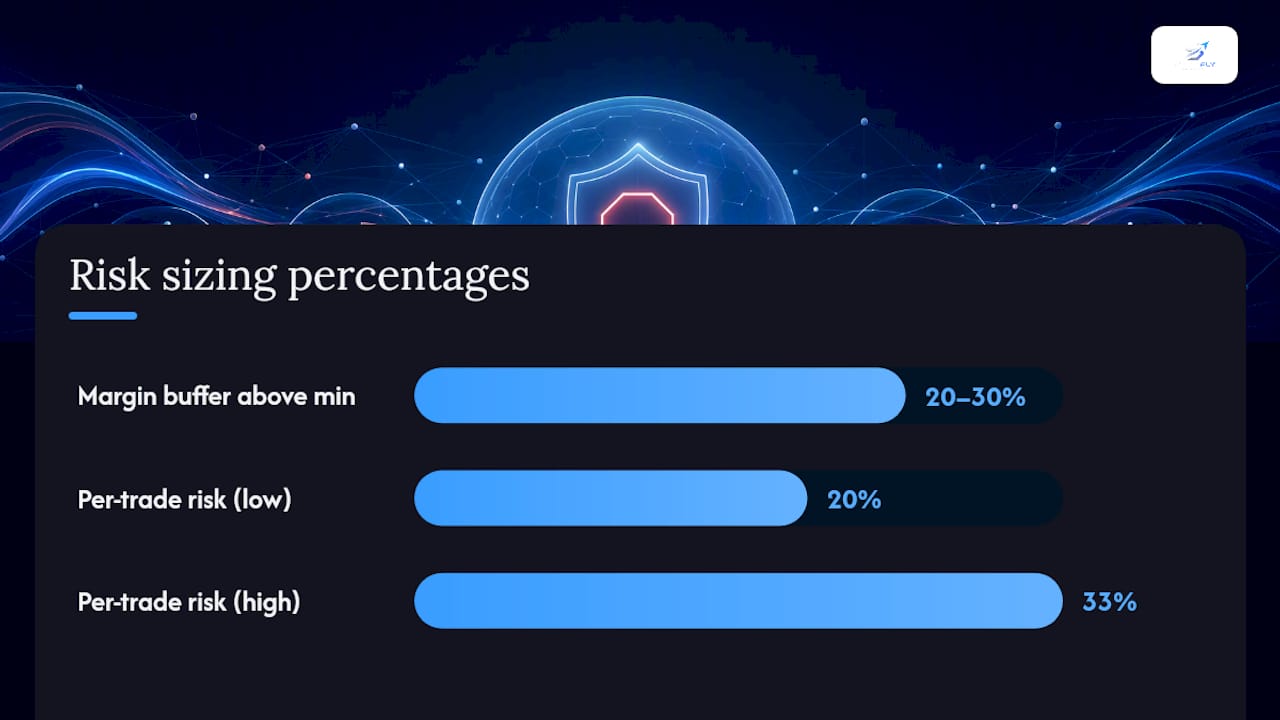
- Build in a margin buffer of at least 20 to 30% above the exchange's day-trading margin so a single bad fill doesn't trigger a margin call.
- Set each account's hard daily loss lockout independently, then trigger it in isolation to confirm it doesn't accidentally freeze the other accounts.
Per-trade risk should stay conservative relative to the daily limit. Community and prop-firm practice generally recommends risking 20 to 33% of the daily loss limit per trade, paired with a rule like stopping after two consecutive losses. Read more on scaling logic for copy trading risk management across Tradovate accounts.
Pro Tip: Run a manual test where you deliberately breach one follower's daily limit while the others keep trading. If the lockout bleeds into accounts it shouldn't touch, your configuration has a wiring problem, not a rule problem.
What Does a Full Implementation Checklist Look Like?
Getting from "we have a policy" to "the policy actually fires" takes a specific sequence of steps, most of which involve confirming behavior rather than assuming it.
- Ask your futures commission merchant directly whether they support server-side stop enforcement and daily P&L hard-limit services, and get the exact mechanics in writing.
- Configure flatten-on-disconnect versus cancel-on-disconnect settings on your platform, then test both by pulling your own connection mid-session on a demo account.
- Set the soft-warning threshold at 50 to 75% of your hard daily limit, with the hard auto-flatten firing at 100% and a cool-down period before re-entry is allowed.
- Apply your per-account contract-sizing rules inside your mirroring tool and set explicit follower position limits.
- Verify that OAuth-based integration is placing a broker-side protective stop on every mirrored order, not just the lead account's order.
Beyond the sequence itself, a few settings deserve a closer look before you consider the setup finished:
- Confirm bracket order behavior on Tradovate matches your expectations, since bracket order setup varies by configuration.
- Layer trailing max drawdown limits on top of your daily lockout for accounts trading during high-volatility windows.
- Check that break-even automation doesn't interfere with your protective stop placement, since break-even stop automation adjusts the stop level dynamically.
| Control | What it protects against | Where it's enforced |
|---|---|---|
| Broker-side protective stop | Local disconnect, app crash | Server / exchange |
| Daily hard P&L lockout | Overtrading, revenge trading | Account / platform |
| Proportional contract sizing | Uneven blowup risk across accounts | Mirroring tool |
| Cancel or flatten-on-disconnect | Orphaned working orders | Platform session logic |
How Do You Test and Verify Your Emergency Stop Rules Actually Work?
A rule that has never been tested is a guess wearing a policy's clothes. Verification needs to happen on a schedule, not just after something goes wrong.
- Run a pre-session checklist confirming that server-side stops are active, P&L monitors are live, and the kill-switch is armed on every mirrored account.
- Simulate a disconnect on a sandbox or small follower account to confirm flatten-on-disconnect actually flattens, rather than leaving a working order parked.
- Schedule activity-log reviews specifically looking for parked or partial fills created by stop-with-protection conversions.
- Log every incident, including status codes like park, cancel, or convert, and adjust your thresholds based on the slippage or gap data you observe.
A robust testing regimen includes simulated disconnects, controlled small-size gap tests, and activity-log audits that capture exactly which status code the exchange assigned to each affected order.
| Test type | Frequency | What it confirms |
|---|---|---|
| Disconnect simulation | Weekly | Flatten-on-disconnect fires correctly |
| Activity-log audit | Daily | No unnoticed parked or partial fills |
| Gap/slippage review | After volatile sessions | Protection buffer performed as expected |
| Full incident post-mortem | After any trigger event | Threshold or setting needs adjustment |
For a deeper look at breakeven testing methodology, the breakeven stop strategy guide walks through implementation steps worth cross-referencing against your own drill results.
When Should You Override an Emergency Stop Rule?
Exceptions exist, but they need a narrower gate than most traders give them. A manual override should require a specific, documented trigger, not a gut feeling mid-trade. Reasonable triggers include a confirmed exchange outage, a known data feed error producing an obviously false price, or a scheduled maintenance window that the platform mislabeled as a live session.
What doesn't qualify: wanting one more shot to recover a loss, believing "the market will bounce back," or disabling a lockout because it triggered "too early" relative to your expectations. Those are exactly the scenarios the rule was built to stop, and overriding it there defeats its purpose entirely.
A workable override process has three parts. First, require a second point of confirmation before any override goes live, whether that's a second person, a second data source, or a fixed waiting period of several minutes. Second, log the override separately from routine trading activity, with a timestamp and the specific reason recorded at the moment of the decision, not reconstructed afterward. Third, set an automatic expiration on any manual override so a change made for one volatile session doesn't quietly persist into the next day's trading.
Overrides tend to multiply under stress. A trader who overrides a lockout once during a legitimate outage is far more likely to override it again during an ordinary bad trading day, simply because the mental barrier is already broken. Treating every override as a rare, documented exception rather than a convenient toggle keeps that pattern from taking hold.
Why Does Every Stop Trigger Need an Audit Trail?
An emergency stop rule that fires without leaving a record might as well not exist for review purposes. You can't fix what you can't reconstruct, and disputes with a broker over a bad fill or a missed flatten depend entirely on having a timestamped record of what actually happened.
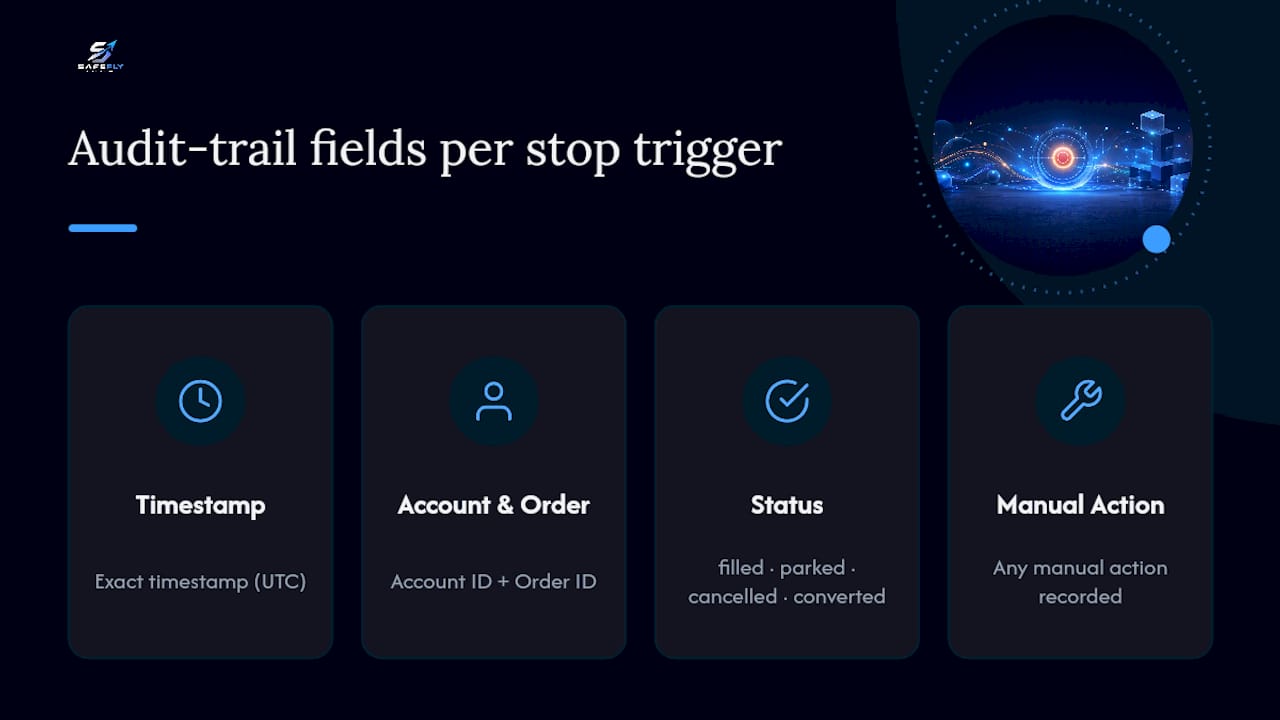
A usable audit trail captures four things for every trigger event: the exact timestamp of the trigger, the account and order ID affected, the resulting exchange status code (filled, parked, cancelled, or converted), and any manual action taken afterward. Exchange order protections routinely produce parked or partially filled orders during volatile conditions, and without a log entry tied to the specific order ID, you won't be able to tell whether that outcome came from your own configuration or from exchange-side banding.
Store these logs somewhere outside the trading platform itself. If your platform crashes during the exact event you're trying to review, a log stored only inside that platform is useless. A simple exported CSV, a shared spreadsheet, or a dedicated logging service all work, as long as the export happens automatically rather than depending on someone remembering to save it.
Review the logs on a schedule, not just after a bad day. Weekly reviews catch slow-forming problems, like a stop offset that's consistently too tight for current volatility, before they cause an actual loss. Monthly reviews across all mirrored accounts reveal whether one follower account is generating a disproportionate share of parked orders or lockout triggers, which usually points to a sizing or configuration issue rather than bad luck.
Can Emergency Stop Rules Work Alongside Other Risk Tools?
Most serious multi-account traders don't run a single tool in isolation. A mirroring platform handling broker-side stops and daily lockouts typically sits alongside a separate analytics dashboard, a journaling tool, or a prop-firm's own risk dashboard, and the integration points between them matter more than traders usually expect.
The main compatibility question is data direction. Does your risk tool pull P&L and position data from your broker directly, or does it depend on your mirroring platform to pass that data along? If it depends on the mirroring platform, a disconnect anywhere in that chain can leave your third-party dashboard showing stale numbers exactly when you need current ones. Confirm this before you trust a dashboard during a live session.
API and OAuth-based connections generally handle this better than screen-scraping or manual export tools, since they pull data directly from the source rather than relying on a fragile intermediate step. When evaluating a third-party tool, ask specifically whether it reads Tradovate account data through an authenticated connection or through a workaround, because the answer determines how reliable its numbers will be during exactly the volatile moments that matter most.
Layering tools also means layering thresholds, and those thresholds need to agree with each other. If your mirroring platform locks an account at a $500 daily loss but your separate risk dashboard is still configured to alert at $750, you'll get a confusing signal instead of a clear one. Reconcile every threshold across every connected tool at setup, then again whenever you adjust one of them.
Discipline Beats Willpower Under Pressure
Server-side enforcement isn't a nice-to-have feature buried in a settings menu. It's the difference between a rule that holds during a bad session and a rule that only holds when nothing goes wrong. Anyone who has watched a position run against them for even ninety seconds knows how fast the instinct to "just wait it out" takes over. Automation doesn't argue with you at that moment. That's the point.
The traders who get this wrong usually aren't lazy. They're confident, and confidence is exactly what erodes discipline under stress. Manual overrides have a place, but only inside a narrow, logged, time-boxed process, never as a daily habit dressed up as flexibility. Build the automated floor first. Decide, in advance and on a calm day, exactly when a human is allowed to override it.
— Arturo
How SafeFly Enforces These Rules Automatically
Configuring broker-side stops, per-account sizing, and lockouts by hand across five or six Tradovate accounts is exactly the kind of repetitive, error-prone task automation exists to eliminate. SafeFly mirrors trades from a single lead account to every follower account automatically, and it places a broker-side protective stop on each mirrored order at the moment of execution, which means the protection travels with the trade rather than depending on your local connection staying alive.

The platform connects to Tradovate through secure OAuth integration, so you're not handing over credentials to a third party or relying on a fragile screen-scraping workaround. Daily P&L lockouts run per account, catching overtrading before it compounds across a mirrored group, and detailed trade analytics paired with AI coaching give you a way to see where your setup is actually leaking risk rather than guessing. Full details on how the mirroring and stop placement work are laid out on the how-it-works page, and the risk disclosure spells out exactly what futures trading automation can and can't guarantee. If you're managing more than one Tradovate account right now, start a trial and configure your first mirrored follower account with broker-side stops enforced from the first trade.
Sources
- Stop loss orders: which order type to use — NinjaTrader futures blog
- Exchange order protections and price banding — NexusFi Academy
- Daily loss limit rules at prop firms (2026 guide) — FuturesHive