

Multi account mirroring is the automated replication of every trade from a lead Tradovate account into linked follower accounts, enforced by broker-side protective stops, daily profit and loss lockouts, and an independent watchdog process. The safest approach never relies on client-side software alone. Configure server-side stops and lockouts with your futures commission merchant first, then validate the entire chain on demo accounts before routing a single live contract.
TL;DR:
- Server-side stops and daily P&L lockouts are essential for safety, as they remain effective during disconnections or software failures.
- Proportional sizing and correct instrument mapping are crucial to ensure follower accounts correctly replicate partial fills and position sizes.
- Testing in demo mode is mandatory to identify execution errors, partial-fill issues, and watchdog failures before deploying live.
- Layered risk controls, including warnings, halts, and automatic flattening, help contain risks and prevent catastrophic losses across account groups.
- SafeFly implements architecture with broker-side stops, daily lockouts, and detailed analytics, reinforcing safety with disciplined setup and ongoing monitoring.
Table of Contents
- How Multi-Account Mirroring Works on Tradovate
- What Risk Controls Actually Keep Mirrored Accounts Safe?
- How Do You Set Up Multi-Account Mirroring on Tradovate?
- Monitoring, Analytics, and Emergency Stop Rules
- Why Testing Discipline Matters More Than the Software Itself
- How SafeFly Handles Mirroring, Stops, and Lockouts
- Sources
- FAQ
How Multi-Account Mirroring Works on Tradovate
A lead account, sometimes called the master, generates the trade signal. That signal gets detected, translated, and sent to each follower account almost simultaneously. The mechanics of that translation step determine whether mirroring is safe or reckless.
Tradovate accounts rarely share identical size or margin capacity, so the mirroring layer has to handle instrument mapping and proportional sizing before an order ever reaches a follower. A lead account trading E-mini S&P futures might need to route the equivalent position into Micro E-mini contracts on a smaller follower account. Partial fills complicate this further: if the lead account gets filled on six of ten contracts, followers need proportional partial fills, not a stalled order waiting on the remaining four.
Execution architecture matters as much as the mapping logic:
- Client-side replication watches the lead account through a local application and fires new orders to followers. It's flexible but fails the moment the local machine loses power, internet, or crashes.
- Broker-side order submission routes the mirrored order through the broker's own infrastructure, so execution continues even if a trader's laptop goes dark.
- Hybrid models use client-side detection for speed and broker-side stops for protection, which is the structure most experienced multi-account traders converge on.
That last point explains why server-side controls continue to protect accounts during outages when local systems fail. A protective stop sitting on a broker's server keeps working even if the trader's internet connection drops mid-session. A stop that only exists inside a desktop application disappears the instant that application does. For anyone running four or five follower accounts, that difference decides whether a disconnection costs a few ticks or an entire day's capital.
What Risk Controls Actually Keep Mirrored Accounts Safe?
Safe mirroring depends on layered controls, not a single safeguard. Each layer catches what the layer before it missed, and the goal is a managed decision window before anything gets forced closed.
The FIA's guidance on automated trading risk controls recommends exactly this kind of layering: platform checks, broker-side limits, and exchange-level protections working together rather than any single control carrying the full load. The escalation model generally follows three stages:
- Warn. A metric crosses a soft threshold and the platform alerts the trader without touching positions.
- Halt. A harder threshold blocks new orders across the account group while existing positions stay open.
- Flatten. The broker or watchdog closes positions outright, either because a hard risk limit was breached or because the trading engine stopped responding.
A heartbeat gap exceeding a short interval is commonly used as a trigger for automatic flattening, based on watchdog design patterns documented by NexusFi, based on the watchdog design patterns NexusFi documents for automated futures risk controls. An independent process pings the trading engine continuously; if it goes quiet, the watchdog assumes something broke and closes exposure rather than waiting for confirmation.
Per-trade risk limits, daily P&L lockouts, and margin utilization triggers round out the stack, and each needs to be set with the trader's FCM, not just inside a mirroring app. Under 17 CFR §1.73, futures commission merchants are required to maintain risk-based limits and risk management systems for allocated and block accounts. Multiple linked Tradovate accounts can be treated as one aggregated exposure for credit and margin purposes, so coordinating per-trade risk limits with the FCM avoids a mismatch between what the trader's software allows and what the broker will actually clear.
How Do You Set Up Multi-Account Mirroring on Tradovate?
Building this correctly means working through connection setup, risk controls, and testing in a fixed order. Skipping ahead to live rollout before the watchdog is verified is the single most common mistake among traders who try to build this in-house.
- Design the mapping rules first. Decide which instrument on the lead account maps to which instrument on each follower, and define the proportional sizing logic for accounts of different capital sizes.
- Connect accounts through OAuth. Tradovate's API access lives under Settings → API Access; verify the scopes granted are limited to what mirroring actually needs, nothing broader.
- Set broker-side stops and daily lockouts with your FCM. These need to exist on the broker's servers, not solely inside your application logic.
- Deploy an out-of-band watchdog. It should run as a separate process, poll the broker API directly, and flatten positions on a missed heartbeat.
- Test on demo before anything live. Run partial-fill scenarios, instrument substitutions, and simulated disconnections. Demo-first testing catches execution errors that only show up under real market conditions, and many prop firms expect proof of this testing before approving copy trading across accounts.
- Roll out live in stages. Start with one follower account and a small position size, then add accounts once the watchdog and stop logic have proven themselves for several sessions.
Pro Tip: Designate your lead account as the one with the lowest leverage in the group. If sizing math ever runs backward under stress, you want the error working in a conservative direction, not an aggressive one.
Monitoring, Analytics, and Emergency Stop Rules
Mirroring without daily monitoring is a liability, not a convenience. The accounts that stay safe over months of live trading are the ones where someone is actually watching a defined set of numbers every session.
Track these metrics across every linked account, not just the lead:
- Realized and unrealized P&L per account
- Mark-to-market exposure and margin utilization
- Order-to-fill latency across the mirroring chain
- Fill ratios, especially on partial fills
- Position mismatches between lead and followers
A common escalation structure warns traders at early thresholds of a daily loss limit, halts new orders at higher thresholds, and forces a flatten at the highest risk limit, following the warn-halt-flatten logic outlined in NexusFi's broker-side risk controls., following the same warn-halt-flatten logic NexusFi outlines for broker-side risk controls. Emergency rules should also flatten automatically on heartbeat loss and on any detected position mismatch between lead and follower accounts, since a mismatch usually means the mirroring logic already failed somewhere upstream.
Detailed trade analytics and AI coaching add a layer most manual setups skip entirely: pattern detection across sessions, enhanced by tools like StockPilot's AI stock portfolio builder. A trader might not notice that mismatches spike every time volatility crosses a certain threshold, but analytics built for copy trading risk can surface that pattern after a handful of occurrences instead of a handful of losses.
Why Testing Discipline Matters More Than the Software Itself
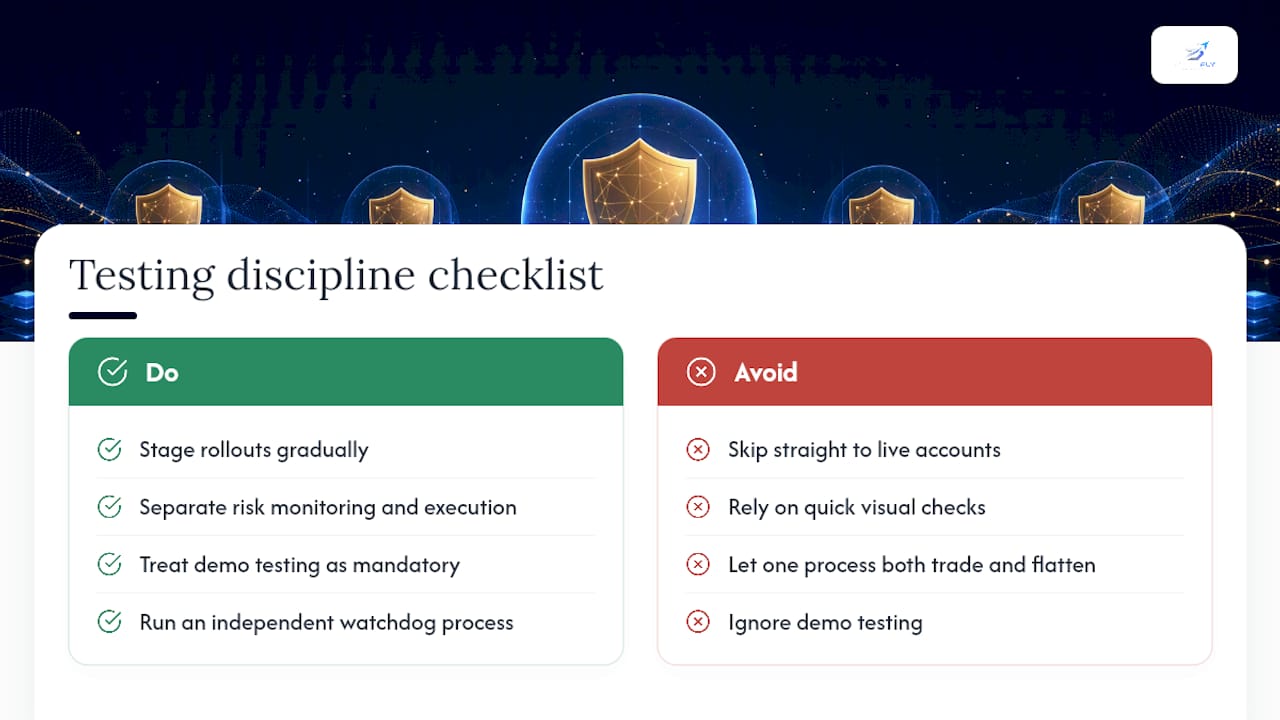
The software behind multi-account mirroring gets most of the attention, but the discipline around it is what actually prevents losses. Traders who stage their rollouts, who separate the process watching risk from the process executing trades, and who treat demo testing as mandatory rather than optional tend to avoid the worst outcomes. Those who skip straight to live accounts because the setup "looked fine" in a quick check are the ones who lose an entire day's capital to a disconnection nobody caught in time.
The separation between risk monitoring and trade execution deserves more attention than it gets. If the same process that places your trades is also the process deciding whether to flatten them, a single software bug can take down both functions at once. An independent watchdog isn't a redundant safeguard. It's the one component still standing when everything else fails.
— Arturo
How SafeFly Handles Mirroring, Stops, and Lockouts
SafeFly is built around the exact layered approach this article describes, not as an afterthought but as the core architecture. Trades from your lead Tradovate account mirror into every linked follower automatically, and each mirrored trade carries a protective stop placed on the broker's own servers, not inside a desktop application that can disappear the moment your connection does.

Daily profit and loss lockouts run continuously across every account in the group, and connections use OAuth-based authorization to protect API credentials from exposure in local scripts. Detailed trade analytics and automated coaching tools layer on top, helping to flag recurring risk patterns that a manual review might miss. If you're currently running mirrored accounts through a homemade script or a client-side copier with no broker-side backup, see how SafeFly's architecture handles the full stack, then start a trial and test it against your own demo setup before touching live capital.
Sources
- FIA — Automated trading risk controls (white paper)
- 17 CFR §1.73 — Risk management requirements for futures commission merchants
FAQ
Should I test multi-account mirroring on demo before going live?
Yes. Demo testing catches partial-fill errors, instrument mapping mistakes, and watchdog failures before they can cost real capital, and many prop firms require proof of this testing before approving copy trading.
What happens to my positions if my mirroring software disconnects?
Broker-side protective stops keep working even during a disconnection because they live on the broker's servers, not inside the software that just went offline. This is why server-side stops matter more than any client-side safeguard.
How does mirroring handle partial fills across accounts of different sizes?
The mirroring logic needs proportional sizing rules built in from the start, so a partial fill on the lead account translates into a matching proportional fill on every follower rather than a stalled or mismatched order.
Does multi-account mirroring violate prop firm rules?
It depends on the firm. Some prop firms restrict automated copying entirely, so verify the specific rules for each funded account before connecting it to a mirroring setup, and always confirm on demo first.
Can SafeFly manage broker-side stops and daily lockouts automatically?
Yes. Some platforms place protective stops on the broker's servers with every mirrored trade and can enforce daily profit and loss lockouts across linked accounts, often reducing the need for manual setup on each one.