

Risk netting across accounts means coordinating positions across multiple brokerage accounts so exposure, stops, and daily losses are controlled as a single system, not managed account by account. For Tradovate traders running several funded or personal accounts, the recommended architecture combines broker-side server stops, automated trade mirroring with per-order protective stops, daily P&L lockouts, and independent monitoring. Start by confirming your stops rest server-side, then run a controlled test before scaling.
TL;DR:
- Ensuring broker-side server stops are active and verified is essential, as client-side stops can vanish during disconnection or platform failure.
- Automated trade mirroring with secure OAuth permits synchronized orders across accounts, but requires careful configuration of replication rules and slippage tolerances.
- Daily profit and loss lockouts must include both soft warnings and hard flattening thresholds to prevent exposure during rapid account movements.
- Regular testing of the entire risk netting setup, especially disconnect simulations, is critical to confirm stops and lockouts function correctly under stress.
- Using a disciplined sizing approach, with 15-20% of daily limits per position, and monitoring correlated exposure, helps maintain safe risk levels in multi-account trading.
Table of Contents
- What Is Risk Netting Across Accounts, and Why Does It Matter?
- The Core Components of a Netted Multi-Account Setup
- How Do You Set Up Risk Netting on Tradovate Accounts?
- Operational Rules Worth Enforcing Every Day
- Troubleshooting Common Multi-Account Netting Problems
- Why Discipline Beats Strategy in Multi-Account Trading
- A Direct Way to Enforce Broker-Side Netting Without Manual Replication
- Sources
- FAQ
What Is Risk Netting Across Accounts, and Why Does It Matter?
Risk netting across accounts, in this context, means managing and reducing exposure when the same trade idea gets replicated across several accounts, by placing broker-side protective stops on every mirrored position and enforcing daily profit-and-loss lockouts that treat all accounts as one risk pool. It is not the treasury-style netting used to offset invoices or settlement balances. It is an execution and risk-control discipline.
The stakes are higher than single-account trading because losses multiply the moment a trade is mirrored across three or five accounts without a corresponding stop on each one. Prop-firm daily-loss limits typically count unrealized P&L toward the daily limit, using either an end-of-day balance or a trailing calculation, so a position that looks fine on paper can already be breaching a rule before it closes.
Common failure modes include:
- Client-side stops that vanish the moment the platform disconnects
- Overtrading after a loss, compounded across every mirrored account at once
- Correlated exposure that looks diversified but moves as one position during volatility
The Core Components of a Netted Multi-Account Setup
Four pieces have to work together, and each one fails silently if you skip verification.
Broker-side server stops rest at the exchange or broker level and survive a dropped connection or a crashed platform, unlike client-side stops that depend on your software staying online. Confirm this by checking your order status after closing your trading platform entirely. If the protective order disappears from your broker's order book, it was never server-side.
Trade mirroring replicates orders from a lead account to follower accounts, typically through a secure OAuth connection to Tradovate rather than shared credentials. OAuth integration matters because it grants scoped permissions without exposing your account password to a third-party service.
Daily P&L lockouts need both soft and hard thresholds. A soft lockout warns and reduces size; a hard lockout flattens positions and disables new orders.
Monitoring redundancy layers a platform kill switch on top of broker-side enforcement and, ideally, an independent script watching account status through the API, because broker-side controls keep working even when your local platform fails.
Pro Tip: Test your kill switch by simulating a disconnect mid-trade, not just at idle. Race conditions between mirrored orders show up under load, not at rest.
How Do You Set Up Risk Netting on Tradovate Accounts?
Deploying this correctly takes a sequence, not a single toggle.
- Audit account rules first. Pull the daily-loss limit, max contract size, and trailing drawdown rule for every account, including any prop-firm terms, before configuring anything.
- Pick your lead account. This account originates trades that get mirrored; it should be the one you watch most closely.
- Verify OAuth permissions. Confirm the mirroring tool has only the access it needs, order placement and account status, nothing broader.
- Enable server-side stops on every account. Check order type and time-in-force settings against exchange-specific TIF rules, since some contracts restrict stop behavior outside regular trading hours.
- Configure replication rules. Set per-account tick offsets and slippage tolerance so a mirrored stop lands at a sensible price even when accounts have slightly different fill conditions.
- Set soft and hard daily lockouts. Automate the hard lockout to flatten all positions and cancel resting orders, not just block new entries.
- Run a staged test. Start with micro-contracts, simulate a disconnect, and confirm the stop fires and the kill switch actually disables order entry.
- Build a daily and weekly checklist. Confirm stop placement each morning; audit lockout logs and mirroring latency once a week.
Skipping step 7 is the most common mistake. A stop that has never been tested against a disconnect is a theory, not a control.
Operational Rules Worth Enforcing Every Day
Position sizing relative to your daily limit is the single most controllable variable you have. A practical rule: size each position so that a full stop-out across all mirrored accounts consumes no more than 15 to 20 percent of your daily loss limit, leaving room for a second attempt without breaching the rule.
Correlation matters as much as sizing. Five accounts long the same futures contract are not five separate risk decisions; they are one leveraged position wearing five costumes. Check aggregated exposure across accounts before adding a new position, not after.
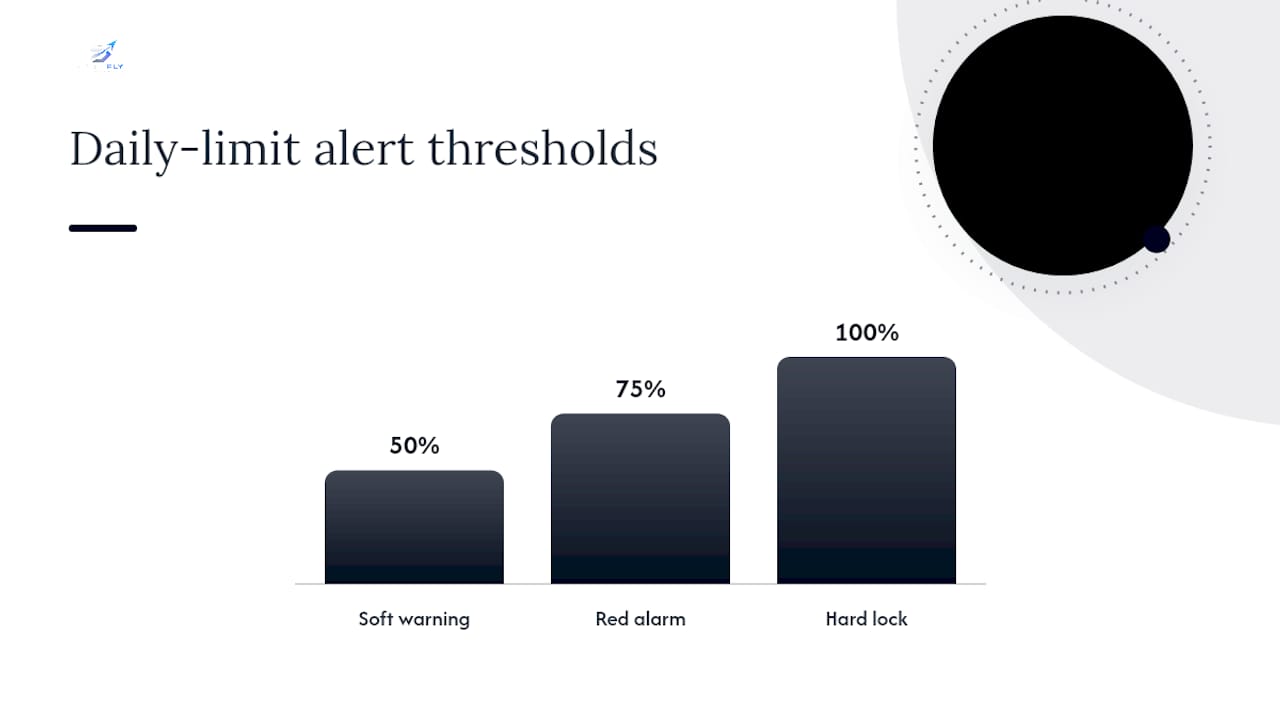
An alert hierarchy keeps you ahead of the lockout instead of reacting to it:
- 50% of daily limit: soft warning, reduce size on new entries
- 75% of daily limit: red alarm, no new positions
- 100% of daily limit: hard lock, flatten everything and disable orders
Pro Tip: Keep your personal daily-loss threshold 20 to 30 percent below your prop firm's stated limit. That buffer absorbs slippage and mirroring lag before the firm's own rule triggers.
After a hard lockout fires, resist the urge to reopen positions the same session. A short journal entry, what triggered it, what correlation existed across accounts, works better than an immediate re-entry.
Troubleshooting Common Multi-Account Netting Problems
Most problems trace back to one of four issues.
- Stops that aren't actually server-side: close your platform and check the broker's order book directly; if the stop vanished, it was client-side.
- Slippage on protective exits: stop-market orders guarantee an exit but can slip in thin conditions, while stop-limit orders guarantee price but risk not filling at all. For protective stops on funded accounts, stop-market is the safer default.
- Disconnect scenarios that never get tested: schedule a monthly simulated outage and confirm broker-side enforcement holds without your platform running.
- Replication race conditions: when several accounts get mirrored orders simultaneously, build idempotent flattening logic so a lockout event doesn't fire twice or leave one account unflattened.
Why Discipline Beats Strategy in Multi-Account Trading
The traders who blow up multi-account setups almost never lack a good strategy. They lack enforcement that survives the moment they stop paying attention, a dropped connection, a distracted afternoon, a mirrored order that fires without a matching stop. Automation earns its keep exactly there, not in generating better entries.
The uncomfortable truth is that most account failures are operational, not analytical. A trader with a mediocre strategy and airtight broker-side stops on every account will outlast a trader with a brilliant strategy and one unprotected mirrored position. Treat the control layer as the edge, because in multi-account trading, it usually is.
— Arturo
A Direct Way to Enforce Broker-Side Netting Without Manual Replication
There are platforms available to multi-account Tradovate traders to help run this entire architecture without rebuilding it by hand across every account. Trades from a lead account can mirror automatically to other accounts, and every mirrored position can have its own broker-side protective stop to help prevent exposure if a connection drops.

Such platforms often connect through secure OAuth instead of shared credentials, enforce daily P&L lockouts across accounts, and offer trade analytics and AI coaching to help identify how sizing or timing decisions impact performance. Before starting, review how SafeFly's replication and stop system works and check the risk disclosure so you know exactly what the tool does and does not cover. A 3-day trial is the fastest way to see whether automated mirroring and broker-side stops hold up against your own account rules.
Sources
- Daily Loss Limit Rules at Prop Firms (2026 Guide) — FuturesHive
- Daily Loss Limits and Account Preservation Protocols for Futures Trading - NexusFi Academy
- Stop order — Damn Prop Firms glossary
FAQ
What Does Risk Netting Across Accounts Actually Mean?
It means managing exposure across multiple trading accounts as one system, using mirrored trades, broker-side protective stops on every position, and daily P&L lockouts, rather than treating each account's risk in isolation.
Should Daily Loss Limits Include Unrealized P&L?
Yes. Most prop firms calculate daily limits using end-of-day or trailing balances that include unrealized losses, so an open losing position can breach a limit before you close it.
Are Broker-Side Stops Better Than Platform-Level Stops?
Broker-side stops rest at the exchange and keep working if your trading platform crashes or disconnects, while platform-level stops depend on your software staying connected and running.
Should I Use Stop-Market or Stop-Limit for Protective Stops?
Stop-market is the safer default for protective exits on funded accounts because it guarantees an exit, while stop-limit guarantees price but risks not filling at all during fast moves.
Can Trade Mirroring Across Accounts Be Automated Safely?
Yes, tools like SafeFly automate mirroring across Tradovate accounts through OAuth connections and attach a broker-side protective stop to each mirrored order, which keeps replication from becoming a new source of unprotected risk.