
Leader-follower accounts on Tradovate mirror every order from one lead account to one or more follower accounts automatically, removing manual re-entry across a multi-account portfolio. The setup only qualifies as safe when it enforces broker-side protective stops and daily profit-and-loss lockouts on every follower, not just the leader. This structure is built for serious futures traders running several Tradovate accounts who need consistent execution and hard risk limits, not casual traders testing a strategy on one account.
TL;DR:
- Setting broker-side stops is essential to ensure protection during connectivity issues, as software stops vanish when the copier disconnects.
- Proper risk controls include per-trade limits, leverage caps, asset concentration thresholds, drawdown halts, and daily P&L lockouts, all of which must be automatically enforced.
- Testing disconnect scenarios and verifying stop propagation, drift correction, and appropriate sizing ratios are crucial before scaling live accounts.
- Simulation in demo environments helps identify potential failure points, such as sizing mismatches and order-type risks, before deploying on live accounts.
- SafeFly integrates these safety measures by automatically attaching broker stops, applying configurable daily loss limits, and offering emergency shutdown protocols.
Table of Contents
- What Are Leader-Follower Accounts and How Does Tradovate Replication Work?
- Which Risk Controls Are Non-Negotiable for Multi-Account Replication?
- How Do You Set Up a Tradovate Leader-Follower Account?
- What Daily Routines Keep Multi-Account Replication Safe?
- What Compliance Considerations Apply to Leader-Follower Trading?
- What Pitfalls Trip Up Tradovate Copier Setups Most Often?
- How Do Other Futures Brokers' Copy Tools Compare to Tradovate?
- How Do You Troubleshoot a Broken Tradovate Copier Connection?
- When Does Automated Replication Make Sense, and When Doesn't It?
- How SafeFly Puts These Controls Into Practice
- Sources
- FAQ
What Are Leader-Follower Accounts and How Does Tradovate Replication Work?
A leader-follower setup, sometimes called master-follower replication or a trade copier arrangement, links one Tradovate account (the leader) to a group of other Tradovate accounts (the followers) so that every order the leader places gets copied automatically. The mechanics behind that copying determine how reliable the whole operation is, and Tradovate-focused copiers generally run in one of two modes.
Order-mode replays the actual order events, such as webhook or API-originated instructions, and preserves the order type when the copier itself generates the trade. Brackets, stop-limit orders, and other structured order types tend to survive the copy intact in this mode, according to CrossTrade's Tradovate copier documentation.
Execution-mode instead watches the leader's broker-side fills and replicates them to followers as market orders. This mode captures manual discretionary trades that order-mode would miss, but it often sacrifices order-type fidelity since a fill gets copied as a market execution rather than the original order structure.
Connectivity and identity management run underneath both modes. Tradovate's partner API handles account linking, organization-level account creation, and simulation account management, which is the foundation any copier needs before it can move a single contract between accounts, per Tradovate's partner API documentation. Authentication typically runs through OAuth, a secure token-based connection method that avoids sharing raw credentials between the trading platform and the copier service. Reliable systems also correct for drift automatically:
- Cloud-side copiers keep running even when your desktop is off, since replication happens server-side rather than on a local machine.
- Copy logs record every mirrored event, which lets you audit fills after a disconnect.
- Duplication suppression prevents the same broker event from firing a trade twice during a reconnect, a detail CrossTrade's documentation calls out specifically.
- Position-drift correction reconciles follower accounts back to the leader's actual position once connectivity resumes.
Choosing between the two modes comes down to what you're actually trading. If your leader account only takes automated, bracketed entries, order-mode preserves that structure. If the leader account includes manual adjustments or discretionary scalps, execution-mode covers more ground at the cost of some order-type precision.
Which Risk Controls Are Non-Negotiable for Multi-Account Replication?
Broker-side protective stops are the single most important safeguard in any leader-follower configuration, because they live on the broker's servers rather than inside the copier software. If your internet connection drops, your computer crashes, or the copier itself loses its session, a broker-side stop still executes because it was placed directly with Tradovate at the time of entry. A stop that exists only in the copier's memory disappears the moment that copier goes offline, which is exactly when a runaway position is most dangerous.
Beyond the stop itself, a properly risk-managed replication setup needs several layered controls working together:
- Per-trade exposure limits. Cap how much size any single trade can carry on a follower account, independent of what the leader is trading.
- Leverage ceilings. Risk-management frameworks commonly range from a conservative 2.0x up to a more aggressive 6.0x, with the appropriate ceiling depending on account size and strategy volatility, according to risk-management documentation covering portfolio risk limits.
- Single-asset concentration limits. The same documentation cites exposure caps in the 15% to 25% range for any one instrument, which prevents a single correlated move from wiping out several followers at once.
- Drawdown halt thresholds. Halting new entries once an account's drawdown reaches roughly 15% to 20% keeps a bad session from compounding into a catastrophic one.
- Daily P&L lockouts. Once a follower hits its daily loss limit, the system blocks new trades on that account for the rest of the session regardless of what the leader does next.
Every one of these controls needs an enforcement action attached to it, not just a warning. Pre-trade risk checks should be able to warn, reduce order size, reject the order outright, or halt the account entirely, depending on how far a trade violates the configured threshold, a structure described in the same risk-management examples. SafeFly's automated risk rules apply this layered logic across every linked Tradovate follower simultaneously.
Pro Tip: Set your drawdown halt threshold tighter on follower accounts than on the leader. A follower that trades a smaller size but hits the same percentage drawdown as the leader is often signaling a sizing mismatch worth investigating before you re-enable it.
How Do You Set Up a Tradovate Leader-Follower Account?
Setting up replication correctly means working through the connections, the sizing math, and the safety nets before a single live contract moves. Here's the order that avoids expensive mistakes:
- Link the leader identity first. Authenticate the lead Tradovate account through secure OAuth authentication in capital markets and confirm the connection is stable before adding any followers.
- Add follower identities one at a time. Tradovate's partner infrastructure separates live and simulation accounts distinctly, so confirm each follower is pointed at the environment you intend, live or demo, before mapping it in, per Tradovate's partner documentation.
- Choose order-mode or execution-mode based on whether the leader trades automated brackets or manual discretionary entries, as covered above.
- Set position-ratio mappings. Define contract translations such as one ES contract on the leader mapping to ten MES contracts on a smaller follower account, a common sizing pattern in trade copier configurations.
- Enable broker-side stops on every follower, not just the leader, and confirm each stop is visible in the account, not just queued in the copier.
- Configure P&L lockouts per follower, since a smaller account should usually lock out at a smaller dollar loss than a larger one even at the same percentage.
- Run a single-follower demo test. Confirm stop propagation, then simulate a disconnect to verify the broker-side stop still holds without the copier connection, a step SyncFutures recommends before scaling.
- Verify drift correction by manually closing a position on a follower and confirming the system reconciles it back to the leader's actual position.
- Scale to additional followers only after the single-follower test behaves deterministically across multiple sessions.
SafeFly's per-trade risk limit guide walks through the enforcement side of step six in more technical detail.
What Daily Routines Keep Multi-Account Replication Safe?
Replication that runs unattended is replication that eventually fails silently. A short daily routine catches problems before they become expensive ones.
- Pre-open connection check. Confirm every follower's OAuth session is active and the copier shows all accounts connected before the market opens.
- Open-orders audit. Compare resting orders on the leader against each follower to catch any that failed to propagate overnight.
- Post-close reconciliation. Use copy logs to match every leader fill against its corresponding follower fills, flagging any gaps or unusual slippage.
- Slippage and drift tracking. Log per-account variance between the leader's fill price and each follower's fill price; consistent gaps on one account often point to a liquidity or routing issue specific to that account.
- Emergency flattening protocol. Decide in advance who can trigger a full flatten across all accounts and under what conditions, separate from the automatic P&L lockout, since a lockout blocks new entries while a flatten closes existing ones.
- Per-trade attribution. Track which trades came from replication versus manual intervention, since mixing the two without labeling makes performance analysis unreliable.
What Compliance Considerations Apply to Leader-Follower Trading?
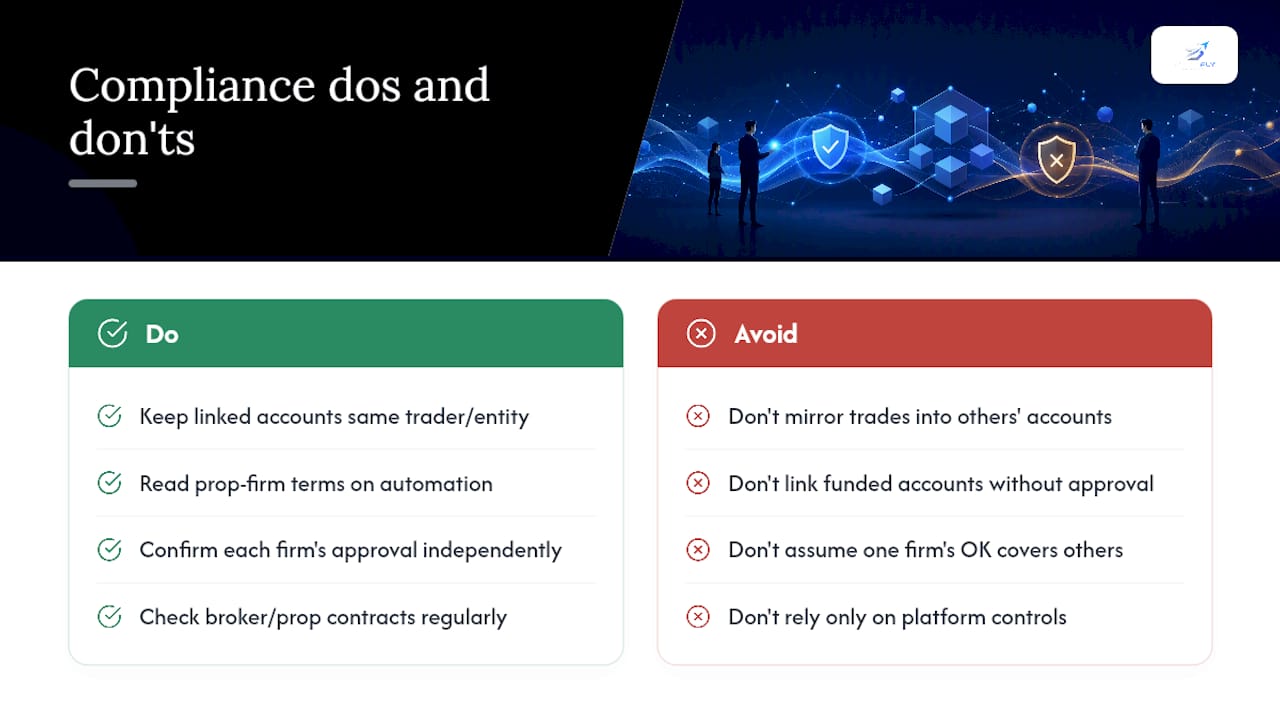
Leader-follower replication on Tradovate is a personal account-management tool, not a fund structure, provided every linked account belongs to the same trader or entity. The moment a leader account starts mirroring trades into accounts owned by other people, the setup can shift into territory that resembles managed-account or advisory activity, which carries separate regulatory obligations in most jurisdictions that this article does not cover.
Prop-firm accounts add a second layer of scrutiny. Many funded accounts explicitly prohibit copying trades from an outside source or forbid connecting a funded account to third-party automation without prior written approval, since the firm's own risk exposure is tied to how that account trades. Before linking any funded or evaluation account into a replication setup, read that firm's specific terms on automated trading and account linking, since violating them typically voids the funding regardless of how well the risk controls performed.
Tradovate's own partner infrastructure supports organizational risk settings and account-level trading halts, which suggests the platform anticipates multi-account structures needing centralized oversight, per its partner API documentation. That does not substitute for reading your specific broker agreement or prop-firm contract, since replication terms vary by provider and can change between contract renewals. Traders operating across multiple prop firms should confirm each firm's stance independently rather than assuming approval from one extends to another.
What Pitfalls Trip Up Tradovate Copier Setups Most Often?
The most common failure isn't a technical bug. It's testing the happy path and never simulating the failure path. A copier that works flawlessly when everything is connected tells you nothing about what happens when it isn't.
Skipping the disconnect test. Traders often verify that trades copy correctly, then go live without ever pulling the connection mid-trade to confirm broker-side stops hold independently. That's the exact scenario the stop exists for, and it's the one scenario most setups never test.
Mismatched sizing ratios. Mapping one ES contract to a fixed number of MES contracts works until account sizes change, and a stale ratio can push a smaller follower into leverage far beyond what its account can absorb.
Order-type assumptions in execution-mode. Traders choosing execution-mode for its broader coverage sometimes forget that bracket orders arrive as market orders on followers, which changes the effective risk profile of every trade compared to the leader.
Uniform lockouts across different account sizes. Setting the same dollar-based P&L lockout on every follower ignores that a $5,000 account and a $50,000 account should never share a stop-loss dollar figure.
Treating demo tests as optional. Since Tradovate separates live and simulation environments distinctly, a setup validated only in production carries risk that a demo test would have caught for free.
How Do Other Futures Brokers' Copy Tools Compare to Tradovate?
Trade replication exists across the futures brokerage industry in varying forms, and the differences matter when you're deciding whether to consolidate accounts on Tradovate or split them across providers.
Some brokers offer only order-mode replication with no execution-mode fallback, which means manual trades on the leader never propagate. Others support execution-mode exclusively, sacrificing order-type fidelity across the board even for automated strategies. Tradovate's partner API stands out for supporting both organizational-level risk settings and granular trading halts at the account or category level, a combination that gives copier providers more to build on than a simple order-forwarding connection.
Demo and live account separation is another point of divergence. Some platforms blend simulation and live account management under one interface, increasing the chance of accidentally routing a live order into what was meant to be a test. Tradovate keeps that separation structurally distinct, which reduces that specific class of error.
The practical takeaway: the broker's API depth determines how sophisticated a copier can be, not just how fast it copies. A broker with limited risk-setting hooks forces the copier software to handle everything client-side, which reintroduces the single point of failure that broker-side stops exist to eliminate.
How Do You Troubleshoot a Broken Tradovate Copier Connection?
Most replication failures trace back to one of a handful of causes, and working through them in order usually finds the problem faster than guessing.
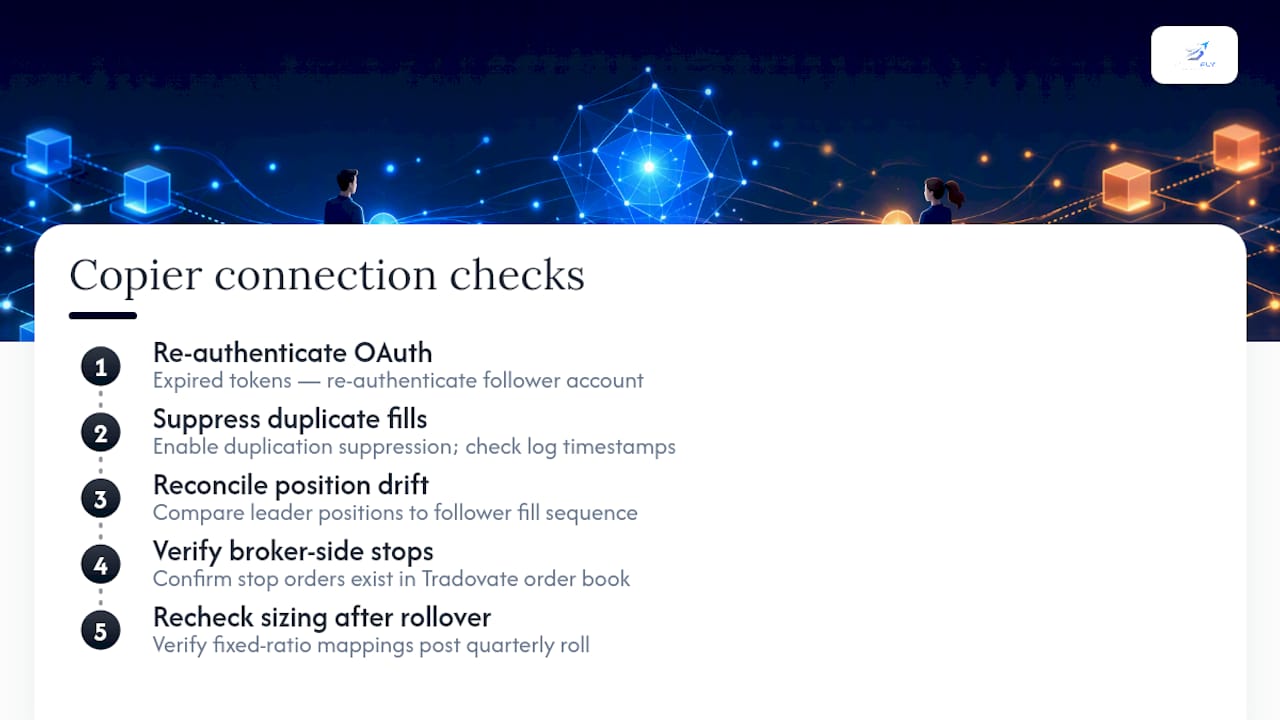
Followers stop receiving trades. Check the OAuth session first, since expired tokens are the most common cause of silent replication failure. Re-authenticate the follower account and confirm the copier dashboard shows it as connected before assuming the leader's orders aren't firing.
Duplicate fills appear on a follower. This typically happens during a reconnect when the same broker event gets processed twice. Confirm the copier's duplication suppression logic is active, a feature CrossTrade's documentation addresses directly, and check the copy log timestamp for the duplicate entry.
Position drift between leader and follower. Pull the copy log and compare the leader's position history against the follower's fill sequence. A single missed fill during a brief disconnect is the usual cause, and most systems reconcile automatically once connectivity returns.
Stop orders missing on a follower. Verify the stop was placed as a genuine broker-side order rather than a copier-side conditional. If it only shows in the copier's interface and not in Tradovate's own order book, it will not survive a disconnect.
Sizing mismatches after a contract roll. Contract rollovers can break fixed-ratio mappings between symbols like ES and MES. Recheck the mapping configuration after every quarterly roll rather than assuming it carries over automatically.
When Does Automated Replication Make Sense, and When Doesn't It?
Automated leader-follower replication earns its place when you're managing enough accounts that manual re-entry introduces more risk than the automation itself. Scale, consistent risk enforcement across every follower, and the elimination of fat-finger errors are real advantages. The trade-off is genuine too: execution-mode sacrifices some order-type fidelity, and you lose the split-second judgment a manual trader applies when a fill looks wrong.
Manual control still wins for traders running one or two accounts with highly discretionary entries, where the overhead of configuring sizing ratios and lockouts exceeds the benefit.
— Arturo
How SafeFly Puts These Controls Into Practice
SafeFly is built specifically around the risk controls this article covers, not as an add-on but as the core of how it mirrors trades across Tradovate accounts. Every replicated trade gets a broker-side protective stop attached automatically, so a dropped connection never leaves a follower position unprotected. Account connections run through secure OAuth, daily P&L lockouts are configurable per follower, and emergency stop rules let you halt or flatten accounts the moment a session goes wrong.

During a trial, the setup worth testing first is exactly what this article walked through: confirm stop propagation survives a simulated disconnect, verify the P&L lockout actually blocks new entries once a follower hits its daily limit, and trigger the emergency halt to see how fast every linked account responds. SafeFly also layers in detailed trade analytics and AI coaching on top of the replication engine, so you can see per-account slippage and attribution without building that tracking yourself. Review the risk disclosure alongside the how-it-works page before connecting your first follower, then start the trial once you've confirmed the controls behave the way your accounts need them to.
Sources
- CrossTrade Tradovate copier docs
- Tradovate partner API introduction
- Risk-management examples and API docs
FAQ
What Is a Leader-Follower Account on Tradovate?
It's a setup where one lead Tradovate account's orders are automatically mirrored to one or more follower accounts, ideally with broker-side protective stops and daily P&L lockouts enforced on every account.
What's the Difference Between Order-Mode and Execution-Mode Copying?
Order-mode replays the original order events and preserves order types like brackets and stops, while execution-mode copies the leader's fills as market orders, which covers manual trades but often loses order-type fidelity.
Why Do Broker-Side Stops Matter More Than Software-Side Stops?
A broker-side stop lives on Tradovate's servers and executes even if the copier software or your internet connection fails, while a software-side stop disappears the instant that connection drops.
How Do I Test a Tradovate Leader-Follower Setup Before Going Live?
Run a single follower in demo, confirm stop propagation, simulate a disconnect to verify the broker-side stop still holds, and check drift correction before scaling to additional live followers.
Can SafeFly Enforce P&L Lockouts Across Multiple Tradovate Accounts?
Yes, SafeFly applies configurable daily profit-and-loss lockouts per follower account, alongside broker-side stops and emergency halt rules across every linked account.